io.github.malkreide/wsl-envidat-mcp
WSL / EnviDat environmental research datasets via CKAN
🇨🇭 Part of the Swiss Public Data MCP Portfolio
wsl-envidat-mcp 🌲❄️⛰️






MCP server connecting AI models to Swiss environmental research data from WSL via EnviDat — forest, snow, avalanches, natural hazards and biodiversity, no API key required.
Phase
This server is in Phase 1: Read-only Wrapper.
| Property | Status |
|---|---|
| Read tools | ✅ 10 tools, all readOnlyHint: true |
| Write tools | ❌ none (EnviDat is read-only public data) |
| Semantic Layer | ⚠️ partial — three domain tools curate Solr queries |
| OAuth / Auth Gateway | ❌ not required (Public Open Data, no API key) |
| Container hardening | ✅ multi-stage Dockerfile, non-root |
| Test suite | ✅ 38 offline unit tests + 31 live integration tests |
| Audit run | ✅ 2026-05-27 (mcp-audit-skill v1.0.0) |
Phase-2 ideas (caching layer, semantic aggregation tool combining forest +
snow + hazard data into a "Lage-Übersicht"): tracked under docs/.
Overview
The WSL (Eidgenössische Forschungsanstalt für Wald, Schnee und Landschaft / Swiss Federal Research Institute for Forest, Snow and Landscape) is one of Europe's leading environmental research institutes. Its open data platform EnviDat provides access to 1,000+ research datasets, time series of up to 130 years, and data from 6,000+ monitoring stations.
This MCP server exposes the EnviDat CKAN API as 10 tools and 2 resources, enabling AI assistants to search, filter and retrieve WSL research data by keyword, domain, or geographic bounding box — all without an API key.
Anchor demo query: "How was air quality and forest health around Schulhaus Leutschenbach in Zurich — and what does the WSL say about the current forest condition in the canton?"
Demo
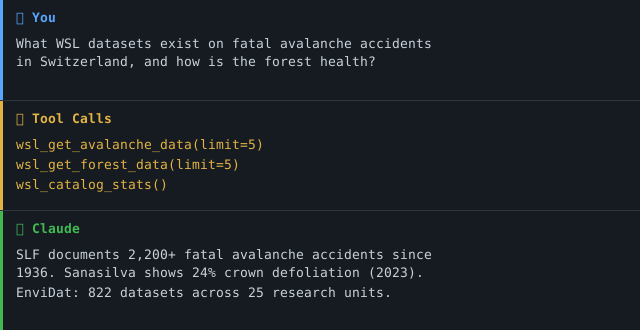
Features
- 10 tools covering full-text search, domain-specific queries, spatial search, and curated thematic tools (avalanche, forest, natural hazards)
- 2 MCP resources for organizations and research domains
- 5 research domains: Forest · Biodiversity · Natural Hazards · Snow & Ice · Landscape
- 815+ datasets, time series since 1890, data from the SLF avalanche research institute
- No API key required — all data publicly accessible via open licenses
- Dual transport: stdio (Claude Desktop / local) + Streamable HTTP (cloud deployment)
- Model-agnostic: works with Claude, GPT-4, and any MCP-compatible client
Prerequisites
- Python 3.11+
piporuv/uvx- Internet connection (live API calls to envidat.ch)
Installation
# Recommended: uvx (no installation needed)
uvx wsl-envidat-mcp

# Or with pip
pip install wsl-envidat-mcp

# Development
git clone https://github.com/malkreide/wsl-envidat-mcp.git
cd wsl-envidat-mcp
pip install -e ".[dev]"
Quickstart
Claude Desktop
Edit ~/Library/Application Support/Claude/claude_desktop_config.json (macOS) or %APPDATA%\Claude\claude_desktop_config.json (Windows):
{
  "mcpServers": {
    "wsl-envidat": {
      "command": "uvx",
      "args": ["wsl-envidat-mcp"]
    }
  }
}
Restart Claude Desktop, then ask:
- "What WSL datasets exist on fatal avalanche accidents in Switzerland?"
- "Show me forest inventory data from the LFI for the canton of Zurich."
- "Which natural hazard research data does the SLF publish on EnviDat?"
- "Are there WSL datasets on drought conditions in summer 2022?"
- "What biodiversity data is available for alpine ecosystems?"
Configuration
No API key required. Optional environment variables:
| Variable | Default | Description |
|---|---|---|
MCP_TRANSPORT | stdio | Transport mode: stdio or streamable-http (legacy streamable_http is accepted) |
MCP_HOST | 127.0.0.1 | Bind address for streamable-http. Use 0.0.0.0 only inside a container. |
PORT | 8000 | Port for Streamable HTTP mode |
Cloud Deployment (Streamable HTTP)
For use via claude.ai in the browser (e.g. on managed workstations without local software):
# Local: keep MCP_HOST at its default 127.0.0.1
MCP_TRANSPORT=streamable-http PORT=8000 python -m wsl_envidat_mcp.server

# Container: bind to all interfaces inside the container only
MCP_TRANSPORT=streamable-http MCP_HOST=0.0.0.0 PORT=8000 python -m wsl_envidat_mcp.server
💡 "stdio for the developer laptop, streamable-http for the browser."
⚠️ Multi-Replica Cloud Deployments: Session state lives in the server. Run a single replica or enable sticky sessions (Railway/Render setting, or
sessionAffinity: ClientIPon Kubernetes Services).
⚠️ Multi-Tenant / Unauthenticated Streamable HTTP: This server has no auth layer (
auth_model: none). Streamable HTTP without a reverse-proxy + OAuth/API-Gateway is intended only for single-user deployments (e.g. one user's claude.ai browser session). For multi-tenant use, front the server with an authenticating gateway.
Container image (recommended for cloud)
A hardened multi-stage image is published to GitHub Container Registry on
every main push and semver tag. Runs as non-root (uid=1000), no build
tools in the runtime layer, multi-arch (linux/amd64 + linux/arm64).
The publishing workflow is .github/workflows/container.yml —
not publish.yml, which only uploads the Python package to PyPI on a
release. container.yml is delivery, not a gate: it does not gate a pull
request, and a red run there means the image is missing, not that the code
is broken.
docker run --rm -p 8000:8000 \
  --read-only --tmpfs /tmp \
  --cap-drop=ALL --security-opt=no-new-privileges \
  ghcr.io/malkreide/wsl-envidat-mcp:latest
Kubernetes hardening (excerpt):
securityContext:
  runAsNonRoot: true
  runAsUser: 1000
  readOnlyRootFilesystem: true
  allowPrivilegeEscalation: false
  capabilities: { drop: ["ALL"] }
Available Tools
| Tool | Description |
|---|---|
wsl_search | Unified search — combine query, domain, organization, and bbox filters |
wsl_get_dataset | Full metadata, DOI, download URLs for a specific dataset |
wsl_list_organizations | List all WSL research units on EnviDat |
wsl_get_organization | Details of a specific research unit incl. datasets |
wsl_list_tags | Browse available tags/keywords |
wsl_get_recent_datasets | Most recently updated datasets |
wsl_get_avalanche_data | SLF avalanche & snow data (incl. fatal accidents since 1936) |
wsl_get_forest_data | Forest data incl. National Forest Inventory (LFI) & Sanasilva |
wsl_get_naturgefahren_data | Natural hazard datasets (landslides, rockfall, floods) |
wsl_catalog_stats | Catalog overview and statistics |
Example Use Cases
| Query | Tool |
|---|---|
| "Fatal avalanche accidents in Valais since 2000?" | wsl_get_avalanche_data |
| "Forest health data for canton Zurich?" | wsl_get_forest_data |
| "Landslide risk datasets near Brienz?" | wsl_get_naturgefahren_data |
| "Most recent WSL publications on biodiversity?" | wsl_search(domain="biodiversitaet") |
| "Which datasets cover the area around Lake Constance?" | wsl_search(bbox=[9.0, 47.5, 9.7, 47.8]) |
| "How many datasets does SLF publish?" | wsl_get_organization |
Resources
| URI | Description |
|---|---|
envidat://organization/{name} | Research unit (e.g. slf, wsl) |
envidat://domain/{domain} | Domain overview with top datasets |
Valid domain values: wald, biodiversitaet, naturgefahren, schnee_eis, landschaft
Architecture
┌─────────────────┐     ┌───────────────────────────┐     ┌──────────────────────────┐
│   Claude / AI   │────▶│    WSL EnviDat MCP        │────▶│       envidat.ch          │
│   (MCP Host)    │◀────│    (MCP Server)           │◀────│                          │
└─────────────────┘     │                           │     │  CKAN API  (REST/JSON)   │
                        │  10 Tools · 2 Resources   │     │  Solr full-text search   │
                        │  Stdio | Streamable HTTP  │     │  1,000+ research datasets│
                        │                           │     │  815+ open datasets      │
                        │  server.py                │     │  Time series since 1890  │
                        │  api_client.py            │     └──────────────────────────┘
                        └───────────────────────────┘
Infrastructure Components
| Component | Metaphor | Function |
|---|---|---|
api_client.py | Librarian | Handles all HTTP requests to EnviDat CKAN API |
server.py | Reception desk | Registers all 10 tools and 2 resources with FastMCP |
| Domain filters | Filing cabinet | Pre-configured keyword sets per research domain |
| Bounding box search | Map overlay | Spatial filtering via lat/lon coordinates |
Project Structure
wsl-envidat-mcp/
├── src/wsl_envidat_mcp/
│   ├── __init__.py         # Package
│   ├── server.py           # MCP server — 10 tools, 2 resources
│   └── api_client.py       # HTTP client for EnviDat CKAN API
├── tests/
│   └── test_integration.py # 11 live API integration tests
├── .github/workflows/
│   ├── ci.yml              # Gates: lint, format, syntax, import, tests, version sync
│   ├── live.yml            # Scheduled live tests against envidat.ch (cron 05:47 UTC)
│   ├── container.yml       # Builds & pushes the ghcr.io image (delivery, not a gate)
│   └── publish.yml         # Uploads the Python package to PyPI on a release
├── pyproject.toml          # Project config (hatchling build backend)
├── CHANGELOG.md
├── CONTRIBUTING.md         # Contribution guide (English)
├── CONTRIBUTING.de.md      # Contribution guide (German)
├── SECURITY.md             # Security policy & posture (English)
├── SECURITY.de.md          # Security policy & posture (German)
├── LICENSE                 # MIT
├── README.md               # This file (English)
└── README.de.md            # German version
Combination with Other MCP Servers
This server is part of the Swiss Open Data MCP Portfolio and integrates well with:
| Combination | Use Case |
|---|---|
+ zurich-opendata-mcp | Urban climate + forest condition around Zurich |
+ swiss-statistics-mcp | Population data + environmental quality |
+ swiss-transport-mcp | Avalanche risk + public transport connections |
+ fedlex-mcp | Forest protection law + actual LFI forest condition |
+ global-education-mcp | Compare environmental education data internationally |
Known Limitations
- Solr search:
ORis treated as a stopword — use single, specific search terms per query - Domain search: Results depend on WSL's internal keyword tagging — not all datasets are tagged consistently
- Spatial search: Bounding box filtering is approximate; verify coordinates with individual dataset metadata
- Live API: All tools make live calls to envidat.ch — results depend on availability of the public API
- Languages: Dataset metadata is primarily in English and German; some older entries may be in German only
Safety & Limits
- Read-only: All tools perform HTTP GET requests only — no data is written, modified, or deleted on EnviDat.
- No personal data: The API returns research metadata, dataset descriptions, and download URLs. No personally identifiable information (PII) is processed or stored by this server.
- Rate limits: The EnviDat CKAN API is public without documented rate limits. Use
limitandrowsparameters conservatively. The server enforces a 30-second timeout per request. - Data freshness: All tools make live API calls — results reflect the current state of the EnviDat catalog at query time. No caching is performed by this server.
- Terms of service: Data is subject to the EnviDat Terms of Use. Individual datasets are published under various open licenses (Creative Commons, CC0) — see dataset metadata.
- No guarantees: This is a community project, not affiliated with WSL or EnviDat. Availability depends on the upstream EnviDat API.
For the full security posture (egress allow-list, redirect handling, accepted risks) see SECURITY.md.
MCP Protocol Version
This server speaks two protocol eras over the same endpoint. The client's first request on a connection decides which one applies; a later claim from the other era is refused.
| Era | Revision | Who reaches it |
|---|---|---|
initialize handshake | 2024-11-05 … 2025-11-25 | What today's clients speak. The server answers with the revision asked for, or with the 2025-11-25 ceiling when the request asks for something newer. |
| Per-request envelope | 2026-07-28 | A request carrying the 2026-07-28 _meta envelope opens a modern connection. |
Both revisions are pinned in
tests/test_protocol_version.py and asserted
against the installed SDK, so a Dependabot bump of mcp cannot move either one
silently. This server builds no ASGI app to send an initialize through, so
the gate asserts the SDK constants rather than a measured response — the
weaker form, named rather than left unsaid.
SUPPORTED_MCP_PROTOCOL_VERSION in
server.py names the modern era; a
mismatch against the SDK logs a warning at startup. A warning is not a gate —
that is what the test file is for.
Note that the SDK's LATEST_PROTOCOL_VERSION is an alias for the modern
era, not for the handshake era — pinning against it alone would leave the era
that current clients actually negotiate free to drift.
Update policy. When the gate fails, do not edit the constant blindly: read
the spec changelog between the two revisions, verify the server still behaves,
then move the constant, this section, README.de.md and
CHANGELOG.md together.
What the server uses from 2026-07-28
Pinning a revision is not the same as speaking it. Until now this server
pinned 2026-07-28 and used the shape of the era before it; the table above
was true and the wire was older than it sounded.
Two channels per tool result. The revision gives a tool result content
for the reader and structuredContent for the application, with
outputSchema as the contract between them. Every tool now fills both: the
same human-readable Markdown as before in content, and the data behind it —
typed, schema-backed — in structuredContent.
This is not a new interface. The fields are exactly the payload that
response_format="json" has always produced. That option is the predecessor
of structuredContent: it exists only because, before 2026-07-28, there was
one channel, so the machine-readable version had to travel as a JSON string
inside the reader's channel. response_format still works and still controls
only the text block.
What it replaces is worse than nothing. A signature of -> str makes the SDK
publish an outputSchema of {"result": string} and repeat the Markdown block
underneath it. Measured on wsl_search against the recorded fixture: 2058
characters of text, 2058 characters of structuredContent.result,
character-identical. An outputSchema is a promise; that one promised
structure and delivered prose under a key called result.
serverInfo carries its six fields. It carried two, one of them empty.
version was the expensive one: the number is kept in step across
pyproject.toml, server.json and both README badges by
scripts/check_version_sync.py — and reached every place except the one a
client reads. It now comes from the package metadata, so no literal enters
src/.
Tool titles moved to title. They sat in annotations.title, the slot
from before this revision. A client that follows the schema and reads
tool.title got None and displayed the slug.
Deliberately not used: icons on server, tools and resources, and the
task-augmented call flow (execution). Both are optional, and neither has
anything real to point at here — this repository ships no icon asset, and every
call is a short CKAN query that finishes well inside a request. Declaring
either would be a claim without a thing behind it.
tests/test_structured_output.py holds all
of the above against a live ClientSession, with a negative control that shows
what the SDK does when a server does not do this — so the day the default
changes, the assertions say so instead of quietly passing.
Testing
# Unit tests — offline, no network access, all CKAN responses mocked via respx
PYTHONPATH=src pytest -m "not live"

# Live integration tests — actual HTTP calls to envidat.ch
PYTHONPATH=src pytest -m live

# Linting
ruff check src/
ruff format --check src/
CI runs the offline suite on every PR. The live suite runs only on main
pushes and manual workflow_dispatch triggers, so build status is not
coupled to upstream availability.
Changelog
See CHANGELOG.md
Contributing
See CONTRIBUTING.md
Security
See SECURITY.md (Deutsch) for the security posture and how to report a vulnerability.
License
MIT License — see LICENSE
Data on EnviDat is published under various open licenses (Creative Commons, CC0) — see individual dataset metadata.
Author
Hayal Oezkan · malkreide
Credits & Related Projects
- Data: EnviDat – WSL Swiss Federal Research Institute for Forest, Snow and Landscape
- Protocol: Model Context Protocol – Anthropic / Linux Foundation
- Portfolio: Swiss Public Data MCP Portfolio
Installation
Run via uv's uvx — no clone or manual install needed. Add to your MCP client config (mcpServers for Claude Desktop, Cursor and Windsurf; use a top-level servers key for VS Code in .vscode/mcp.json):
{
  "mcpServers": {
    "wsl-envidat-mcp": {
      "command": "uvx",
      "args": [
        "wsl-envidat-mcp"
      ]
    }
  }
}
Installation
Source-derived launch command. Check the maintainer’s required arguments and credentials before running:
uvx wsl-envidat-mcpSet up in your AI client
Merge this template into ~/Library/Application Support/Claude/claude_desktop_config.json. Keep existing servers. Add any arguments, credentials, and permissions required by the maintainer; this template has not been install-tested.
{
  "mcpServers": {
    "io-github-malkreide-wsl-envidat-mcp": {
      "command": "uvx",
      "args": [
        "wsl-envidat-mcp"
      ]
    }
  }
}
Restart Claude Desktop completely for changes to take effect. Confirm the server appears connected in the client’s tool list, then try a read-only example from its documentation.
Claude Desktop setup referencePackage
wsl-envidat-mcppypiCompatible MCP Clients
io.github.malkreide/wsl-envidat-mcp works with any MCP-compatible client. Copy the config snippet from the Configuration section above and add it to the file shown for your client, then restart the application.
- Claude Desktop
~/Library/Application Support/Claude/claude_desktop_config.jsonRestart Claude Desktop completely for changes to take effect. - Cursor
~/.cursor/mcp.jsonRestart Cursor for changes to take effect. - VS Code
.vscode/mcp.jsonReload VS Code window for changes to take effect. - Windsurf
~/.codeium/windsurf/mcp_config.jsonRestart Windsurf for changes to take effect. - Claude Code
.mcp.jsonSave at the project root, then start Claude Code in that project and review the MCP server approval prompt. Keep real credentials out of shared files.