Obsidian Vault MCP
Local Zotero, MinerU, Obsidian literature workflow with transactional Analysis notes.
Obsidian Vault MCP
面向科研文献工作流的本地 MCP 服务:以 Zotero 管理来源,以 MinerU 提取全文,以 Obsidian 沉淀文献、Wiki 与结构化 Analysis,并通过 Skills 让 AI Agent 按可追溯流程工作。
English · 完整安装教程 · 开发文档 · 更新日志 · 贡献者
架构
用户自然语言任务
        ↓
7 个科研 Skills:识别意图、规划步骤、约束证据与输出
        ↓
31 个 MCP Tools:版本契约、查询、导入、解析、检索、校验与事务写入
        ↓
Zotero Desktop ── PDF ── MinerU ── Obsidian Vault
                                      ├─ Literature 主笔记
                                      ├─ PDF 与全文 Markdown
                                      ├─ Index / Literature.base
                                      ├─ Wiki
                                      └─ 五类 Analysis / Analysis.base
项目不绑定大模型供应商。MCP Tools 负责确定性的本地数据操作,Skills 负责把工具编排成可复用的科研工作流。
核心功能
- 稳定文献身份:以 Zotero 父条目
zoteroKey作为主键。 - Zotero 导入与同步:支持单篇、Collection、notes、annotations、BibTeX、存储附件和链接附件。
- MinerU 全文解析:将 PDF 规范化为 Markdown,每篇文献使用独立图片目录和相对链接。
- Obsidian 文献库:自动维护
Literature/index.md、Literature/Literature.base、主笔记、PDF、全文和 Wiki。 - 结构化研究层:支持
full_read、literature_review、passage_qa、figure_qa、concept五类 Analysis。 - 统一数据库视图:
Literature/Analysis/Analysis.base提供 9 个视图。 - 科研 Skills:内置
paper-qa、full-read、passage-qa、figure-qa、compare-papers、literature-review、concept-learning。 - 安全写入:支持 dry-run、staging、锁、备份、原子替换、事务预览和回滚。
- 版本可验证:
literature_version返回当前版本、31 个工具、7 个 Skills 和五类 Analysis。 - 多客户端接入:支持 Codex、Claude Code、OpenCode、Pi、Hermes 和 WorkBuddy。
效果展示
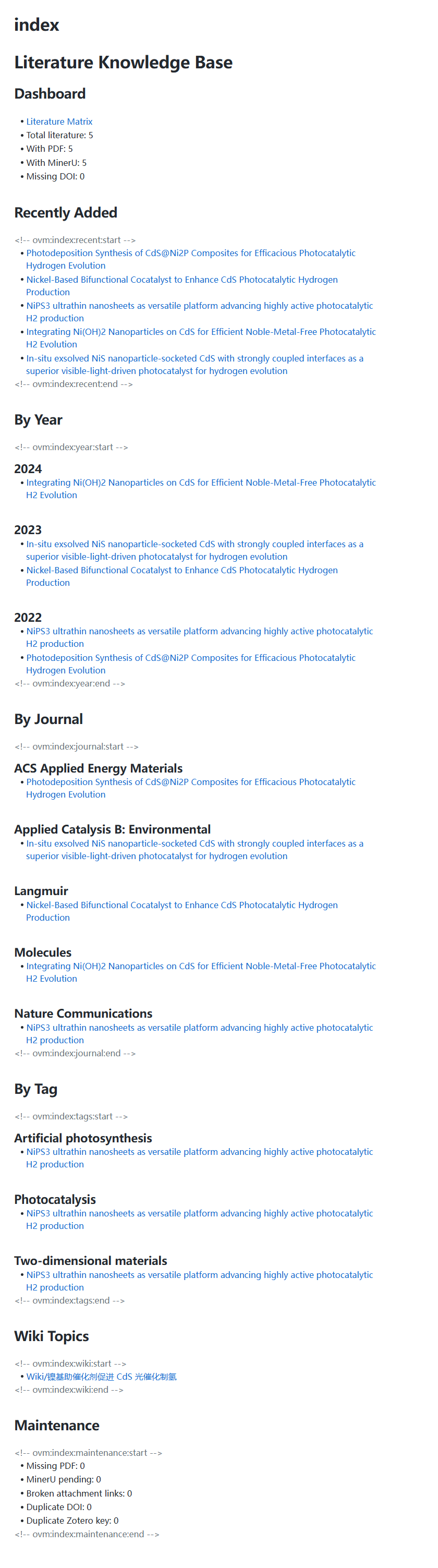
文献目录
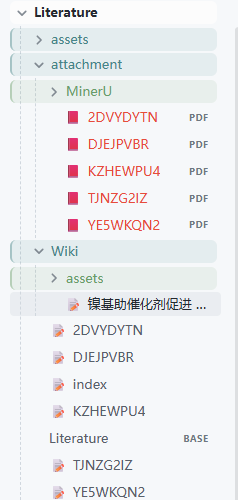
Literature Index
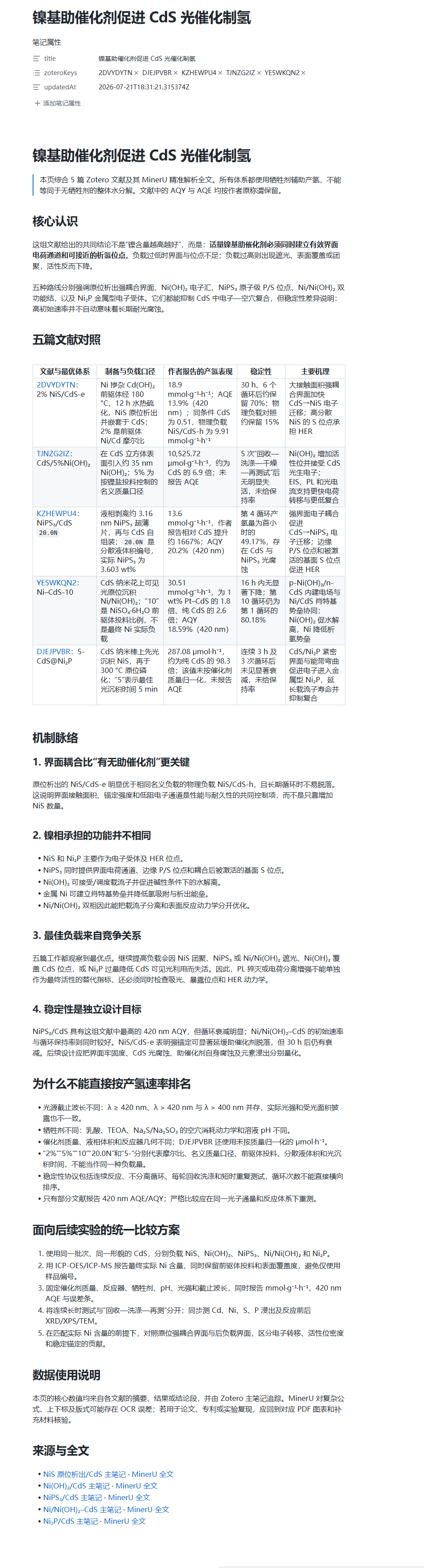
多篇文献形成的可追溯 Wiki
展开效果图
安装
3.0.2 已正式发布,要求 Python 3.10+。以下公开安装命令现已可用。
uv(推荐)
uv tool install "zotero-obsidian-mcp==3.0.2"
obsidian-vault-mcp --help
无需持久安装:
uvx --from "zotero-obsidian-mcp==3.0.2" obsidian-vault-mcp doctor --vault-path "<VAULT_PATH>"
pipx / pip
pipx install "zotero-obsidian-mcp==3.0.2"
# 或
python -m pip install "zotero-obsidian-mcp==3.0.2"
MCP Registry
io.github.luffysolution-svg/obsidian-vault-mcp
等价的 stdio 配置:
{
  "mcpServers": {
    "obsidian-literature": {
      "command": "uvx",
      "args": [
        "--from",
        "zotero-obsidian-mcp==3.0.2",
        "obsidian-vault-mcp",
        "serve",
        "--transport",
        "stdio"
      ],
      "env": {
        "OBSIDIAN_VAULT_PATH": "<VAULT_PATH>"
      }
    }
  }
}
首次配置
目标目录必须是已由 Obsidian 打开过的 Vault,并包含 .obsidian/。
obsidian-vault-mcp config init --vault-path "<VAULT_PATH>" --dry-run
obsidian-vault-mcp config init --vault-path "<VAULT_PATH>"
obsidian-vault-mcp config validate --vault-path "<VAULT_PATH>"
obsidian-vault-mcp doctor --vault-path "<VAULT_PATH>"
obsidian-vault-mcp call literature_version --json '{}'
启动 Zotero Desktop 并启用本地 API:
obsidian-vault-mcp call zotero_search_items --json '{"query":"photocatalysis"}'
obsidian-vault-mcp import item ABCD1234 --vault-path "<VAULT_PATH>" --dry-run
obsidian-vault-mcp import item ABCD1234 --vault-path "<VAULT_PATH>"
链接附件配置:
{
  "zotero": {
    "linkedAttachmentBaseDir": "<ZOTERO_LINKED_ATTACHMENT_BASE_DIR>"
  }
}
MinerU 解析:
obsidian-vault-mcp mineru parse ABCD1234 --vault-path "<VAULT_PATH>" --dry-run
obsidian-vault-mcp mineru parse ABCD1234 --vault-path "<VAULT_PATH>"
规范产物:
Literature/attachment/MinerU/ABCD1234.md
Literature/attachment/MinerU/image/ABCD1234/ABCD1234-fig01.png
Agent 与插件安装
obsidian-vault-mcp agent install codex --dry-run
obsidian-vault-mcp agent install codex
客户端名称可替换为 claude、opencode、pi、hermes 或 workbuddy。
| 客户端 | 安装内容 |
|---|---|
| Codex | 原生 marketplace 插件、MCP 和 7 Skills |
| Claude Code | 原生 marketplace 插件、MCP 和 7 Skills |
| OpenCode | 项目本地 MCP 和 7 Skills |
| Pi | 薄 TypeScript Extension |
| Hermes | MCP 配置 |
| WorkBuddy | MCP 配置 |
GitHub Release 中的离线插件包:
obsidian-vault-mcp-3.0.2-plugins.zip
Skills
| Skill | 工作流 |
|---|---|
paper-qa | 单篇快速问答,默认不写入 Vault |
full-read | 单篇完整精读并保存 full_read |
passage-qa | 定位具体段落、方法、数据或结论 |
figure-qa | 解读图、表、Scheme 和方程 |
compare-papers | 对用户选定论文建立可比性矩阵 |
literature-review | 对文献池进行主题化综述 |
concept-learning | 跨文献建立概念模型 |
正式工具面
| 分组 | 数量 |
|---|---|
| 版本、系统与配置 | 5 |
| Zotero | 6 |
| 导入与同步 | 4 |
| MinerU | 3 |
| 导航与校验 | 3 |
| Analysis | 5 |
| Wiki | 3 |
| 事务 | 2 |
| 合计 | 31 |
发布一致性
3.0.2 必须同时出现在 Python 包、运行时 __version__、MCP Registry server.json、Codex/Claude 插件清单、Pi 包、Git Tag v3.0.2、GitHub Release 和 PyPI 中。Release workflow 会校验版本、Tag 和产物身份,构建 wheel、sdist、插件 ZIP,执行测试与 handshake,并生成 SHA256SUMS。
安全边界
- 所有写操作先 dry-run,再提交并保存
transactionId。 - 不要提交 Vault 绝对路径、Zotero 数据目录、MinerU token 或其他凭据。
- MinerU 可能把 PDF 发送到外部服务,使用前确认授权和组织政策。
- 推荐本地
stdio;SSE/HTTP 必须放在可信认证边界之后。 - 事务备份不替代独立的 Vault 备份。
贡献者
感谢 方珸 / Lym Fang (@LimFang) 提出 Zotero 链接附件兼容方案。完整记录见 CONTRIBUTORS.md。
Installation
Source-derived launch command. Check the maintainer’s required arguments and credentials before running:
uvx zotero-obsidian-mcpSet up in your AI client
Merge this template into ~/Library/Application Support/Claude/claude_desktop_config.json. Keep existing servers. Add any arguments, credentials, and permissions required by the maintainer; this template has not been install-tested.
{
  "mcpServers": {
    "io-github-luffysolution-svg-obsidian-vault-mcp": {
      "command": "uvx",
      "args": [
        "zotero-obsidian-mcp"
      ]
    }
  }
}
Restart Claude Desktop completely for changes to take effect. Confirm the server appears connected in the client’s tool list, then try a read-only example from its documentation.
Claude Desktop setup referencePackage
Compatible MCP Clients
Obsidian Vault MCP works with any MCP-compatible client. Copy the config snippet from the Configuration section above and add it to the file shown for your client, then restart the application.
- Claude Desktop
~/Library/Application Support/Claude/claude_desktop_config.jsonRestart Claude Desktop completely for changes to take effect. - Cursor
~/.cursor/mcp.jsonRestart Cursor for changes to take effect. - VS Code
.vscode/mcp.jsonReload VS Code window for changes to take effect. - Windsurf
~/.codeium/windsurf/mcp_config.jsonRestart Windsurf for changes to take effect. - Claude Code
.mcp.jsonSave at the project root, then start Claude Code in that project and review the MCP server approval prompt. Keep real credentials out of shared files.