pyscn
Python code analysis for AI agents: complexity, dead code, clones, coupling, and a health score.
English | 日本語 | 简体中文 | Français
Code quality analysis for Python in the age of AI coding.
Building with Cursor, Claude, or ChatGPT? pyscn keeps AI-generated code maintainable with structural analysis.





Quick Start
# Run analysis without installation
uvx pyscn@latest analyze .
# or
pipx run pyscn analyze .
Demo
Features
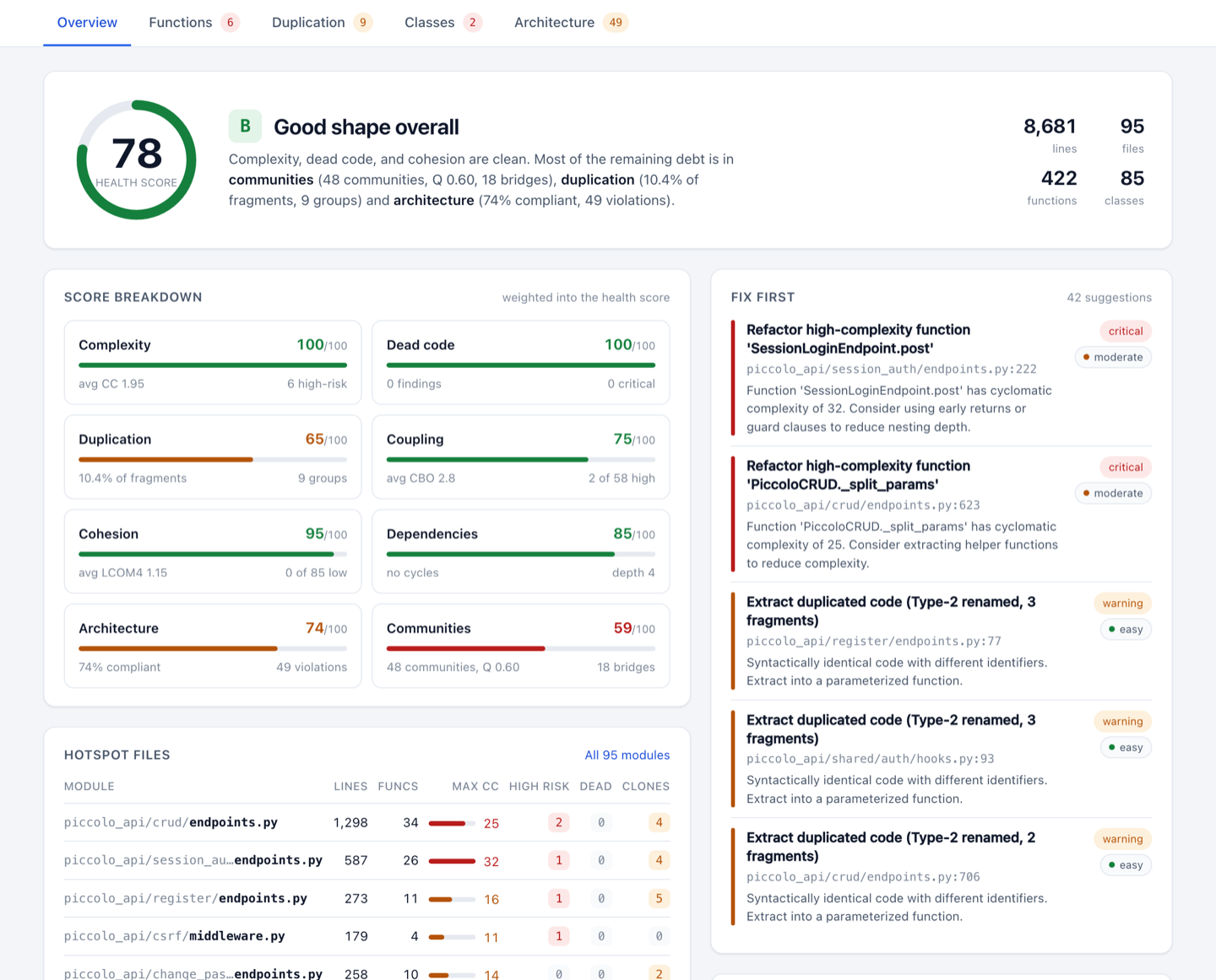
One command scores your whole codebase (0-100 with an A-F grade) and generates an HTML report that shows what to fix first.
pyscn looks at your code from five angles:
- 🧹 Dead code - unreachable code you can safely delete
- 📋 Duplicate code - copy-pasted and structurally similar code worth merging (Type 1-4 clone detection)
- 🌀 Complexity - functions and executable class suites that are hard to read and test (cyclomatic and cognitive complexity)
- 🔥 Module and directory hotspots - per-file quality and per-directory complexity rollups for prioritizing refactors
- 🏗️ Architecture - circular imports, layer rule violations (clean / layered / hexagonal / MVC presets), and auto-detected module communities that reveal how your code is actually structured
- 🧩 Class design - classes that do too much or depend on too much (CBO coupling, LCOM4 cohesion)
100,000+ lines/sec • Built with Go + tree-sitter
Other Languages
pyscn is the Python analyzer of polyscan. For JavaScript, TypeScript, Go, Rust and C++, run:
npx polyscan analyze .
Same five angles, same 0-100 score, one HTML report.
Polyscan for GitHub
Polyscan App files a weekly audit report as a GitHub Issue. Free for public repositories.
AI Agent Integration
pyscn ships Agent Skills that teach AI coding agents when and how to run each analysis: health checks, refactoring, architecture review, and CI-friendly reports.
Agent Skills (Recommended)
uvx add-skills ludo-technologies/pyscn
This installs the Skills into your project. They work with Claude Code, Cursor, Codex, Gemini CLI, and many other agents (add --agent cursor etc. to target one, --global for all projects).
Then just ask your agent:
-
"Analyze the code quality of the app/ directory"
-
"Find duplicate code and help me refactor it"
-
"Show me complex code and help me simplify it"
MCP Server (Optional)
For tighter integration, the bundled pyscn-mcp server exposes the same analyses as MCP tools to Claude Code, Cursor, ChatGPT, and other MCP clients.
Claude Code plugin (sets up the MCP server and the Skills together):
claude plugin marketplace add ludo-technologies/pyscn
claude plugin install pyscn-mcp@pyscn-marketplace
Manual setup for Claude Code:
claude mcp add pyscn-mcp uvx -- pyscn-mcp
Cursor / Claude Desktop: add to your MCP settings (~/.config/claude-desktop/config.json or Cursor settings):
{
  "mcpServers": {
    "pyscn-mcp": {
      "command": "uvx",
      "args": ["pyscn-mcp"],
      "env": {
        "PYSCN_CONFIG": "/path/to/.pyscn.toml"
      }
    }
  }
}
Dive deeper in mcp/README.md for setup walkthroughs and docs/MCP_INTEGRATION.md for architecture details.
Installation
# Install with pipx (recommended)
pipx install pyscn

# Or with uv
uv tool install pyscn
macOS Intel (x86_64): PyPI wheels are built for Apple Silicon only (the Intel wheel was dropped in v1.5.1), so
uvx,pipx,uv, andpipcannot install pyscn on Intel Macs. Usebrew install pyscnorgo install github.com/ludo-technologies/pyscn/cmd/pyscn@latestinstead.
Alternative installation methods
Build from source
git clone https://github.com/ludo-technologies/pyscn.git
cd pyscn
make build
Go install
go install github.com/ludo-technologies/pyscn/cmd/pyscn@latest
Common Commands
pyscn analyze
Run comprehensive analysis with HTML report
pyscn analyze .                              # All analyses with HTML report
pyscn analyze --json .                       # Generate JSON report
pyscn analyze --json --output - . | jq       # JSON report on stdout
pyscn analyze --json --html --no-open .      # JSON and HTML reports from one run
pyscn analyze --select complexity .          # Only complexity analysis
pyscn analyze --select deps .                # Only dependency analysis
pyscn analyze --select complexity,deps,deadcode . # Multiple analyses
pyscn analyze --skip-communities .           # Skip module community detection
pyscn check
Fast CI-friendly quality gate
pyscn check .                         # Quick pass/fail check
pyscn check --max-complexity 15 .     # Custom thresholds
pyscn check --max-cycles 0 .          # Only allow 0 cycle dependency
pyscn check --select deps .           # Check only for circular dependencies
pyscn check --select di .             # Detect DI anti-patterns (opt-in)
pyscn check --allow-circular-deps .   # Allow circular dependencies (warning only)
pyscn init
Create configuration file
pyscn init # Generate .pyscn.toml
💡 Run
pyscn --helporpyscn <command> --helpfor complete options
Configuration
Create a .pyscn.toml file or add [tool.pyscn] to your pyproject.toml:
# .pyscn.toml
[complexity]
max_complexity = 15

[dead_code]
min_severity = "warning"

[output]
directory = "reports"
⚙️ Run
pyscn initto generate a full configuration file with all available options
Documentation
📖 pyscn documentation site — installation, rule catalog, CLI reference, configuration, output specification
For contributors: Development Guide • Architecture • Testing
Enterprise Support
For commercial support, custom integrations, or consulting services, contact us at contact@ludo-tech.org
License
MIT License — see LICENSE
Built with ❤️ using Go and tree-sitter
Installation
Source-derived launch command. Check the maintainer’s required arguments and credentials before running:
uvx pyscn-mcpSet up in your AI client
Merge this template into ~/Library/Application Support/Claude/claude_desktop_config.json. Keep existing servers. Add any arguments, credentials, and permissions required by the maintainer; this template has not been install-tested.
{
  "mcpServers": {
    "io-github-ludo-technologies-pyscn": {
      "command": "uvx",
      "args": [
        "pyscn-mcp"
      ]
    }
  }
}
Restart Claude Desktop completely for changes to take effect. Confirm the server appears connected in the client’s tool list, then try a read-only example from its documentation.
Claude Desktop setup referencePackage
pyscn-mcppypiCompatible MCP Clients
pyscn works with any MCP-compatible client. Copy the config snippet from the Configuration section above and add it to the file shown for your client, then restart the application.
- Claude Desktop
~/Library/Application Support/Claude/claude_desktop_config.jsonRestart Claude Desktop completely for changes to take effect. - Cursor
~/.cursor/mcp.jsonRestart Cursor for changes to take effect. - VS Code
.vscode/mcp.jsonReload VS Code window for changes to take effect. - Windsurf
~/.codeium/windsurf/mcp_config.jsonRestart Windsurf for changes to take effect. - Claude Code
.mcp.jsonSave at the project root, then start Claude Code in that project and review the MCP server approval prompt. Keep real credentials out of shared files.