lcc — Local Context Compiler
Compact agent context verbatim, offline: cut spent tool outputs, recall them by hash.
lcc — Local Context Compiler
Compact coding-agent context without summarizing it away.
lcc cuts what the model does not need, keeps everything else byte for byte, and writes a receipt.




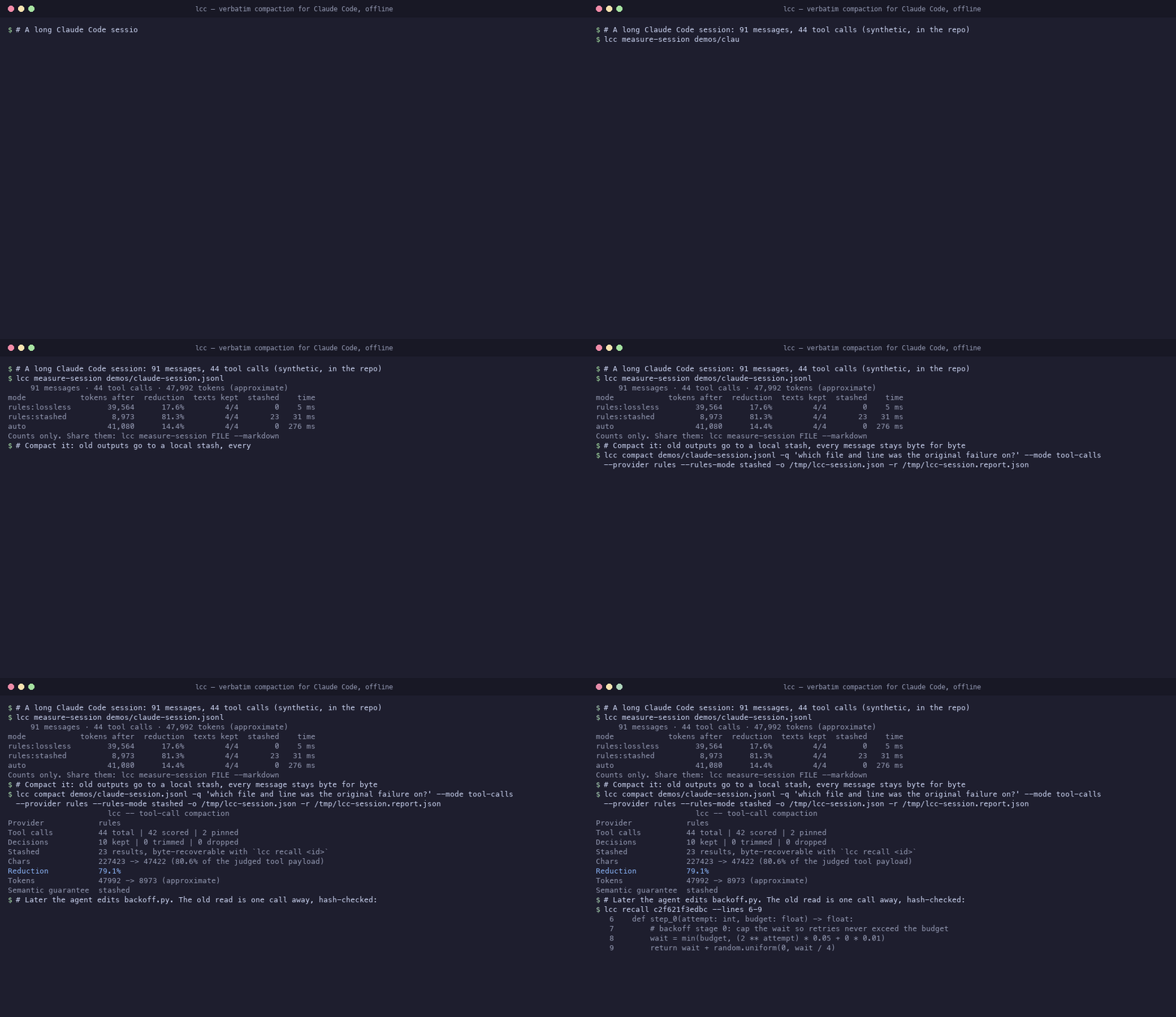
/compact vs lcc
Claude Code's /compact replaces your session with a summary written by a model. Summaries
drop the exact error, path or line the agent needs two turns later. lcc does the opposite: old
tool outputs leave the context but stay one recall away, and every user and assistant message
is kept as it was.
| One real Claude Code session (193 messages, 75 tool calls) | tokens | user and assistant messages | removed tool outputs |
|---|---|---|---|
| before | 57,083 | 43, as written | — |
/compact | one summary | rewritten into the summary | gone |
lcc (rules, stashed) | 28,807 (−49.5%) | 43 / 43 byte for byte | 33, each one recall away |
Measured with lcc measure-session (1.2.0, offline, exact o200k_base token count). That
session is one of the best cases. Across all 266 of my long sessions (100+ messages each,
31.6 M tokens) the median cut was 22.7% (middle half 15% to 32%, best 65%), with 0 messages
lost. These are all my sessions: run it on yours and post the result.
In a pre-registered test on 172 real requests (evidence), an agent answering
from the stashed context plus recall did as well as with the full context on file recall
(+0.006, 95% CI −0.023 to +0.034) with 36.6% fewer tokens. It called recall for 90% of the
questions about removed content. A /compact-style summary of the same sessions got 73% of exact values
right (our reimplementation of /compact, written by Opus); full and verbatim context got 98%.
Install
pip install "local-context-compiler[tiktoken]" # the CLI is `lcc`
Claude Code plugin (replaces the /compact summary). Function hooks are early access, so
this needs Claude Code 2.1.274+ and the flag below:
export CLAUDE_CODE_ENABLE_FUNCTION_HOOKS=1
claude plugin marketplace add lucasmartins-ai/lcc
claude plugin install lcc@lcc --config provider=rules --config rulesMode=stashed
Allow mcp__plugin_lcc_lcc__recall so the agent can get removed outputs back. When a pass
fails or removes too little, the plugin hands over to the built-in summary and says so in a
toast. Details: Claude Code guide.
MCP (Claude Code, Cursor, Claude Desktop, any stdio client):
{"mcpServers": {"lcc": {"command": "lcc", "args": ["mcp"]}}}
Tools: compact, compact_transcript, recall, inspect, prepare, explain, intake
(MCP guide).
CLI, on a session file or any document:
lcc compact ~/.claude/projects/<project>/<session>.jsonl -q "finish the parser fix" \
  --mode tool-calls --provider rules --rules-mode stashed -o compacted.json -r report.json
lcc recall <id>                                   # a removed output, hash-checked

lcc compact notes.md -q "what is wrong with the booking flow?" \
  --provider mechanical -o compacted.md -r report.json
lcc explain report.json --source notes.md         # why each block was kept or dropped
Send us your numbers
lcc measure-session ~/.claude/projects/<project>/<session>.jsonl --markdown
# Codex CLI rollouts are auto-detected from their session_meta record:
lcc measure-session /path/to/rollout.jsonl --markdown
It runs every mode on one of your sessions, offline, and prints counts only: messages, tool
calls, tokens before and after, messages kept, time. No text, path or tool output. For exact
counts, install the tiktoken extra and cache its tokenizer once (lcc itself never downloads):
python -c "import tiktoken; tiktoken.get_encoding('o200k_base')". Otherwise the report says
approximate and why. Paste it in
Discussions → Results.
Already compacting with lcc? lcc share-stats turns your local reports into the same kind of
counts-only summary (SHARE_STATS.md), or use the
results issue form.
Every number from someone other than me makes the claims above less mine and more true.
Why lcc
- Verbatim. Kept spans are byte-identical to the source. Nothing is summarized or rewritten.
- Recoverable.
stashedmoves removed outputs to a local content-addressed store (~/.cache/lcc/stash);recallre-hashes on read. - Auditable. Every pass writes a JSON report;
lcc explaingives the reason for every drop. - Local. The default judges run on your CPU in plain Python. No API key, no network.
Providers
| Provider | Runs | When it is used | Report says |
|---|---|---|---|
specialist-v3 | local, CPU | default (auto) whenever transcript blocks are present: the Claude Code hook, compact_transcript, --mode tool-calls | semantic_guarantee: none (a rank, not a judgment) |
mechanical | local, CPU | --provider mechanical; plain text under auto (a configured TypeSafe key does not change that unless LCC_AUTO_REMOTE=1) | semantic_guarantee: none |
rules (lossless, recoverable, stashed) | local, no model | provider: rules for transcripts | lossless: only provable duplicates removed; recoverable: also outputs that can be re-read; stashed (recommended): removed outputs stay byte-recoverable through recall |
jev | remote (TypeSafe API) | opt-in: --provider jev / provider: jev, needs TYPESAFE_API_KEY | semantic judgment or explicit degradation |
laya | local model | deprecated; runs only when named | named model and fallback state |
specialist-v3 details and limits: SPECIALIST.md. Rules modes:
TOOL_CALLS.md. Jev is an optional path you name explicitly
(--provider jev); it sends the objective and context blocks to the TypeSafe API, and
LCC_DISABLE_NETWORK=1 disables it. auto never picks it on its own: having a key is not
consent to send context off-machine, so plain text under auto stays on mechanical unless
you set LCC_AUTO_REMOTE=1. compact writes a relevance-compaction-1.2 report;
check provider_used and degraded before trusting the output.
Benchmarks
Real sessions (held-out, INFERIDO). In plain words: when a ranker has to drop part of a session, how often does it keep what the agent actually used next? 1.0 would be always. A one-shot final test on 193 items from 36 of the maintainer's sessions that started after the training cutoff. Retention AUC over drop budgets of 0–60% of candidate tokens:
| ranker | recall AUC | all-kept AUC |
|---|---|---|
| specialist-v3 | 0.899 | 0.434 |
| mechanical | 0.829 | 0.238 |
| recency | 0.818 | 0.306 |
| bm25 | 0.803 | 0.270 |
| random | 0.689 | 0.138 |
The labels are next-action evidence from one maintainer's Claude Code sessions, which favours v3's training target. The sessions are private; only aggregates are published (SPECIALIST.md).
Synthetic, reproducible (python benchmarks/run_judge_bench.py, about 20 s, no network).
Nine hand-written edge cases: supersession, contradiction, config change, exception rule,
pt/en mixed, prompt injection in a tool output, large git diff, old root cause, re-read.
| raw ranking | specialist-v3 | mechanical | bm25 | recency |
|---|---|---|---|---|
| cases with every must-keep block kept at a 30 / 50 / 70% cut (of 9) | 8 / 7 / 7 | 9 / 9 / 9 | 9 / 9 / 7 | 8 / 6 / 3 |
| full pass, default settings | must-keep kept | 302 blocks | 1,138 blocks | peak RSS |
|---|---|---|---|---|
specialist-v3, tool-call mode | 9/9 | 181 ms | 3.4 s | 71 MB |
rules lossless | 9/9 | 2 ms | 16 ms | 55 MB |
These cases are lexically easy, so the lexical baselines do well; v3 misses the Portuguese case. Timings are from macOS arm64 under heavy machine load. Method, every arm and the limits: BENCHMARKS.md. Rules modes on real sessions: REAL_SESSION_BENCHMARKS.md.
Reduction depends on how much of a context is noise. Below a 25% gain, the report marks the pass as not worth it, and the Claude Code plugin keeps the built-in summary.
What it does not do
- It does not check that a model will answer correctly. A structural
PASSis not an answer quality result. - No RAG, embeddings or vector store.
- Protection rules and bounded restoration reduce, but do not rule out, lost evidence; see the safety model.
specialist-v3was trained on Claude Code transcripts. Other agents and plain documents are out of distribution; plain text usesmechanicalunless you opt in to Jev.
Docs
| Topic | Link |
|---|---|
| Five-minute tour of the CLI | QUICKSTART.md |
| Claude Code plugin | CLAUDE_CODE.md |
| MCP server | MCP.md |
| Tool-call compaction and rules modes | TOOL_CALLS.md |
| The local ranker | SPECIALIST.md |
| Benchmarks | BENCHMARKS.md, REAL_SESSION_BENCHMARKS.md, benchmarks/ |
Python API (lcc.msi.compile) | msi-api.md |
| Architecture and decisions | architecture.md, ADR 0010, ADR index |
| Opt-in and deprecated providers | JEV.md, LAYA.md |
| Research archive | paper.md, results-master.md, TRANSCRIPT_AB.md |
| Privacy | PRIVACY_POLICY.md |
Development
Python 3.11+.
python -m pip install -e '.[dev,tiktoken]'
pytest -q && ruff check . && mypy
npm test                                   # Node API and hook tests
python benchmarks/run_judge_bench.py --check --out /tmp/judge-bench
The PyPI package named lcc is unrelated; this one is local-context-compiler.
Contributing: CONTRIBUTING.md. Security: SECURITY.md.
Changes: CHANGELOG.md.
License
MIT. The optional Laya integration carries Apache-2.0 attribution in NOTICE. Maintained by LookADev.
Installation
Source-derived launch command. Check the maintainer’s required arguments and credentials before running:
uvx local-context-compilerSet up in your AI client
Merge this template into ~/Library/Application Support/Claude/claude_desktop_config.json. Keep existing servers. Add any arguments, credentials, and permissions required by the maintainer; this template has not been install-tested.
{
  "mcpServers": {
    "io-github-lucasmartins-ai-lcc": {
      "command": "uvx",
      "args": [
        "local-context-compiler"
      ]
    }
  }
}
Restart Claude Desktop completely for changes to take effect. Confirm the server appears connected in the client’s tool list, then try a read-only example from its documentation.
Claude Desktop setup referencePackage
local-context-compilerpypiCompatible MCP Clients
lcc — Local Context Compiler works with any MCP-compatible client. Copy the config snippet from the Configuration section above and add it to the file shown for your client, then restart the application.
- Claude Desktop
~/Library/Application Support/Claude/claude_desktop_config.jsonRestart Claude Desktop completely for changes to take effect. - Cursor
~/.cursor/mcp.jsonRestart Cursor for changes to take effect. - VS Code
.vscode/mcp.jsonReload VS Code window for changes to take effect. - Windsurf
~/.codeium/windsurf/mcp_config.jsonRestart Windsurf for changes to take effect. - Claude Code
.mcp.jsonSave at the project root, then start Claude Code in that project and review the MCP server approval prompt. Keep real credentials out of shared files.