rawmem
Read-only MCP access to a local append-only evidence ledger for AI agent sessions.
rawmem
rawmem is a tiny local-first evidence ledger for AI and human workflows.
The idea is deliberately small:
Store now, understand later.
AI memory systems often start by summarizing. rawmem starts one layer lower:
append-only raw evidence. A chat turn, a 2px UI tweak, a bug fix, a command run,
a git snapshot, a browser clip, or a coding-agent completion can all become the
same kind of local event.
The hard boundary is simple: capture is not recall. The ledger is a source layer. Review, filtering, MemoryDSL conversion, preference mining, and project rules can be derived later.
Why This Exists
Small facts look noisy alone. Repeated across time and projects, they become patterns:
- "This icon is too small; make it 2px bigger."
- "The AI forgot to update the desktop package again."
- "This project prefers append-only bug records."
- "The same class of boundary bug appeared in three repos."
Disk is cheap. Missing history is expensive.
Install
New to programming? Choose the Windows app (EXE). An EXE is a Windows program you open by double-clicking. Running it requires no Python installation or terminal commands.
| Who it is for | Choose | Requirements |
|---|---|---|
| Windows users who want a graphical app | Windows EXE preview | A built rawmem.exe; no Python required |
| Developers who want commands or integrations | Python CLI | Python 3.10+ and Git for the source installation below |
Choose one approach; you do not need both. There is currently no downloadable release of the new EXE preview. A developer must build it from source first. Users unfamiliar with programming can wait for an EXE release instead of following the Python commands below.
Windows app (EXE preview)
Once you have a built rawmem.exe, double-click it, choose a storage folder,
decide whether to start at logon, and click to begin recording. Browser saving
requires the optional extension. See Windows recorder
for setup and build instructions. This preview is unsigned and the extension
still requires manual developer-mode installation.
Python CLI (for developers)
EXE users can skip this section. With Python 3.10+ and Git installed, run these commands in PowerShell:
git clone https://github.com/Liyuan1992/rawmem.git
cd rawmem
python -m pip install --user -e .
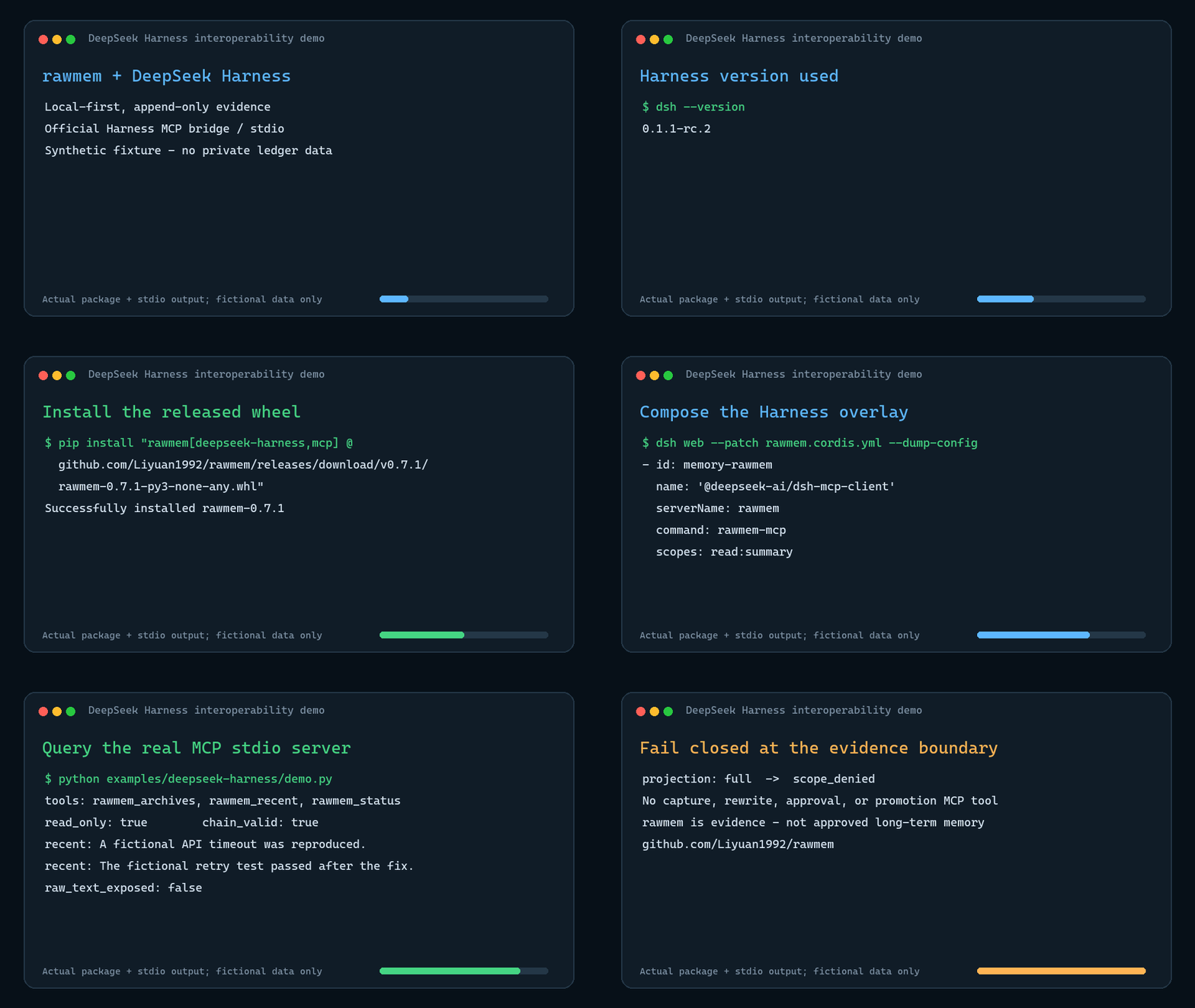
The core runtime has no third-party dependencies. DeepSeek Harness compressed session capture and the MCP server are optional extras:
python -m pip install --user -e ".[deepseek-harness,mcp]"
To install the published v0.7.1 wheel without cloning the repository:
python -m pip install "rawmem[deepseek-harness,mcp] @ https://github.com/Liyuan1992/rawmem/releases/download/v0.7.1/rawmem-0.7.1-py3-none-any.whl"
Make sure the user Scripts
directory (e.g. %APPDATA%\Python\Python312\Scripts) is on PATH so rawmem
works from any directory.
One-Time Setup
rawmem setup --global --install-startup --dry-run  # inspect first; writes nothing
rawmem setup --global --yes           # global config + git hooks for all repos
rawmem setup --install-startup --yes  # run the daemon headless at every logon
rawmem setup --start-daemon           # start it right now
rawmem config --show-browser-token    # paste into the browser extension options
rawmem doctor                         # verify the complete installation
After this the daemon passively tails Claude Code, Codex, and Cursor sessions,
tails PowerShell history, watches configured directories, and serves the
browser-capture endpoint — with zero per-event action from you. Clipboard
polling is available but disabled by default; enable it explicitly in config
or with rawmem config --include-clipboard.
The guiding principle is passive over self-report: evidence is pulled
from logs other tools already write, not pushed by agents remembering to
report back.
See docs/SETUP.md for the full setup matrix and the browser extension.
For DeepSeek Harness capture plus bounded read-only MCP access, see docs/DEEPSEEK_HARNESS.md.
Commands
Background capture (the primary path):
rawmem daemon              # run all background surfaces in one process
rawmem daemon --status     # task counters, errors, last run times
rawmem doctor              # config, storage, daemon, token, startup, hooks, events
rawmem doctor --strict     # warnings also produce a nonzero exit code
rawmem sync                # one manual tailer pass
rawmem sync --backfill     # first run: also ingest existing history
rawmem config --disable-clipboard
rawmem config --rotate-browser-token
Preview or remove integrations:
rawmem setup --global --install-startup --dry-run
rawmem uninstall --dry-run
rawmem uninstall                    # disables integrations; keeps ~/.rawmem
rawmem uninstall --remove-home --yes  # also deletes the ledger and local state
Inspect the ledger:
rawmem tail --limit 10
rawmem tail --source claude-code --limit 5
rawmem tail --project rawmem --type agent_user_turn --json
rawmem verify --json
rawmem export --cursor-file .rawmem\consumer-cursor.json --limit 100
rawmem seal --yes --json            # unchanged read-only archive + linked active ledger
rawmem archives --json              # metadata-only derived archive registry
rawmem export --archive .rawmem\archives\old.jsonl  # explicit; metadata-only default
rawmem export uses the stable rawmem.cursor.v1 contract and never needs to
load the whole ledger. Cursors bind to a ledger identity plus a byte offset and
boundary hash, so truncation, replacement, or rotation is reported explicitly
instead of silently skipping or duplicating evidence. See
docs/LEDGER_PROTOCOL.md.
rawmem verify is strictly read-only: it never creates or refreshes lock/state
sidecars. rawmem seal keeps historical bytes unchanged, records the full
verification report and every accepted previous_hash_mismatch, marks the old
ledger ReadOnly on Windows, and creates a chain-complete active ledger at the
same configured path. Archive reads require --archive; they hash the complete
archive before returning results, default to a body-free metadata projection,
and surface recorded integrity warnings.
Manual and scripted capture:
rawmem capture --source manual --type note --text "First rawmem event"
"The button should be 2px larger." | rawmem capture --source clipboard --type ui_feedback --stdin
rawmem ingest --file event.json
"Selected page text" | rawmem clip --stdin --url "https://example.com"
rawmem run --source terminal -- python --version
rawmem git-snapshot
Current Coverage
Capture preserves complete supported text without a character cap, including
when old configurations still contain max_chars. Source batch sizes are
processing budgets and never split complete records. Browser capture saves
only the loaded document on an explicit click; it does not fetch hidden history.
| Surface | How | What lands in the ledger |
|---|---|---|
| Claude Code sessions | daemon tailer (zero friction) | user/assistant turns, project, session, branch |
| Codex sessions | daemon tailer (zero friction) | user/assistant turns, project, session |
| Cursor agent transcripts | daemon tailer (zero friction) | user/assistant turns, workspace, session |
| DeepSeek Harness sessions | opt-in daemon tailer (zero friction after setup) | direct user/model turns; tool name/id/status metadata only |
| WorkBuddy local history | opt-in daemon tailer (desktop setup enables it) | 5.1-style JSONL message text and source identity |
| OpenClaw local history | opt-in daemon tailer (desktop setup enables it) | legacy JSONL and new SQLite transcript messages; shared identity dedupe |
| Shell commands | daemon tailer of PSReadLine history | every completed command line |
| Clipboard | daemon poller (deduped, opt-in) | clipboard text changes |
| Git lifecycle, all repos | setup --global --yes core.hooksPath hooks | commit/checkout/merge/rewrite/push snapshots |
| File changes | daemon watcher | batched created/modified/deleted paths |
| Browser pages | MV3 extension (extension/) + token-protected localhost endpoint | selection or page text, title, URL |
| Any adapter/tool | ingest / POST /capture | JSON event payloads |
| Manual notes | capture / clip / run | raw text, tags, artifacts, command results |
Storage
By default, events are written to:
~/.rawmem/events.jsonl
Use --local to write to the current project's private ledger:
.rawmem/events.jsonl
Use --ledger <path> or RAWMEM_LEDGER for an explicit ledger path.
Capture policy is configured under privacy in ~/.rawmem/config.json.
Optional project/path allowlists fail closed, common secret shapes are redacted
before append, and artifacts default to metadata references rather than
embedded content. Daemon status and rawmem doctor expose source coverage,
skipped events, redactions, and cursor health without printing captured text.
.rawmem/ is ignored by Git because raw evidence can contain private text,
paths, command output, and local work context.
Event Shape
Each line is JSON:
{
  "schema": "rawmem.event.v1",
  "event_id": "evt_...",
  "ts": "2026-07-09T00:00:00Z",
  "source": "codex",
  "event_type": "task_note",
  "project": "rawmem",
  "cwd": "/workspace/fictional-rawmem",
  "summary": "User asked for a local-first raw evidence ledger.",
  "raw_text": "User asked for a local-first raw evidence ledger.",
  "tags": [],
  "artifacts": [],
  "payload": {},
  "privacy": {
    "scope": "local_only",
    "review_required": true
  },
  "previous_hash": null,
  "content_hash": "..."
}
The previous_hash / content_hash chain is a lightweight tamper-evidence
mechanism. It is not a security boundary, but it makes accidental rewrites more
visible.
Adapter Strategy
rawmem should not chase every AI tool with one giant integration. The stable
piece is the ledger. Capture adapters can be small and optional:
- CLI wrappers for Codex, Claude Code, shell commands, and build scripts.
- Generic JSON ingest for tools like WorkBuddy, QWork, or custom scripts.
- Git/file watchers for tools that ultimately change a repo.
- Localhost browser capture, bookmarklets, and later browser extensions for web AI chats, issue pages, docs, and web clips.
- App-specific adapters when a tool exposes logs, exports, plugins, or APIs.
- Manual hotkey/clipboard capture as a low-friction fallback.
All adapters should emit the same event schema.
MCP is a query adapter, not a promotion path. rawmem-mcp exposes only
path-free status, bounded recent events, and archive metadata. Summary access
is the default; raw bodies require an explicit read:full scope.
Privacy Principles
- Local first.
- No upload by default.
- No automatic memory promotion.
- Background capture must be opt-in.
- Clipboard polling is off by default.
- Browser capture requires the local token created in
~/.rawmem/config.json. - The extension options page can test daemon connectivity and token acceptance.
- Machine-wide Git hook setup requires
--yes. rawmem uninstallpreserves captured data unless--remove-home --yesis explicit.- Store raw events separately from reviewed or derived memory.
- Prefer allowlists for browser/app capture.
See PRIVACY.md and SECURITY.md before enabling background capture on a daily driver machine.
Development
$env:PYTHONPATH = "src"
python -m unittest discover -s tests
python scripts/open_source_audit.py
Setup from the maintainer
This listing does not have a supported local package template. Use the maintainer’s documentation for its hosted endpoint, authentication, and client-specific setup. No install command has been inferred.
Package
https://github.com/Liyuan1992/rawmem/releases/download/v0.7.1/rawmem-0.7.1.mcpbotherCompatible MCP Clients
rawmem works with any MCP-compatible client. Copy the config snippet from the Configuration section above and add it to the file shown for your client, then restart the application.
- Claude Desktop
~/Library/Application Support/Claude/claude_desktop_config.jsonRestart Claude Desktop completely for changes to take effect. - Cursor
~/.cursor/mcp.jsonRestart Cursor for changes to take effect. - VS Code
.vscode/mcp.jsonReload VS Code window for changes to take effect. - Windsurf
~/.codeium/windsurf/mcp_config.jsonRestart Windsurf for changes to take effect. - Claude Code
.mcp.jsonSave at the project root, then start Claude Code in that project and review the MCP server approval prompt. Keep real credentials out of shared files.