Layoza
Design systems, layout and motion guidance for AI agents, plus headless Chromium visual QA.
Layoza — design engineering for AI agents
An open-source MCP server + agent skills that turn Claude Code, Cursor, Codex, OpenCode, Antigravity and Windsurf into a UI/UX design expert: it reads your site's design DNA, picks motion that fits the brief, and checks every change in a real Chromium browser.


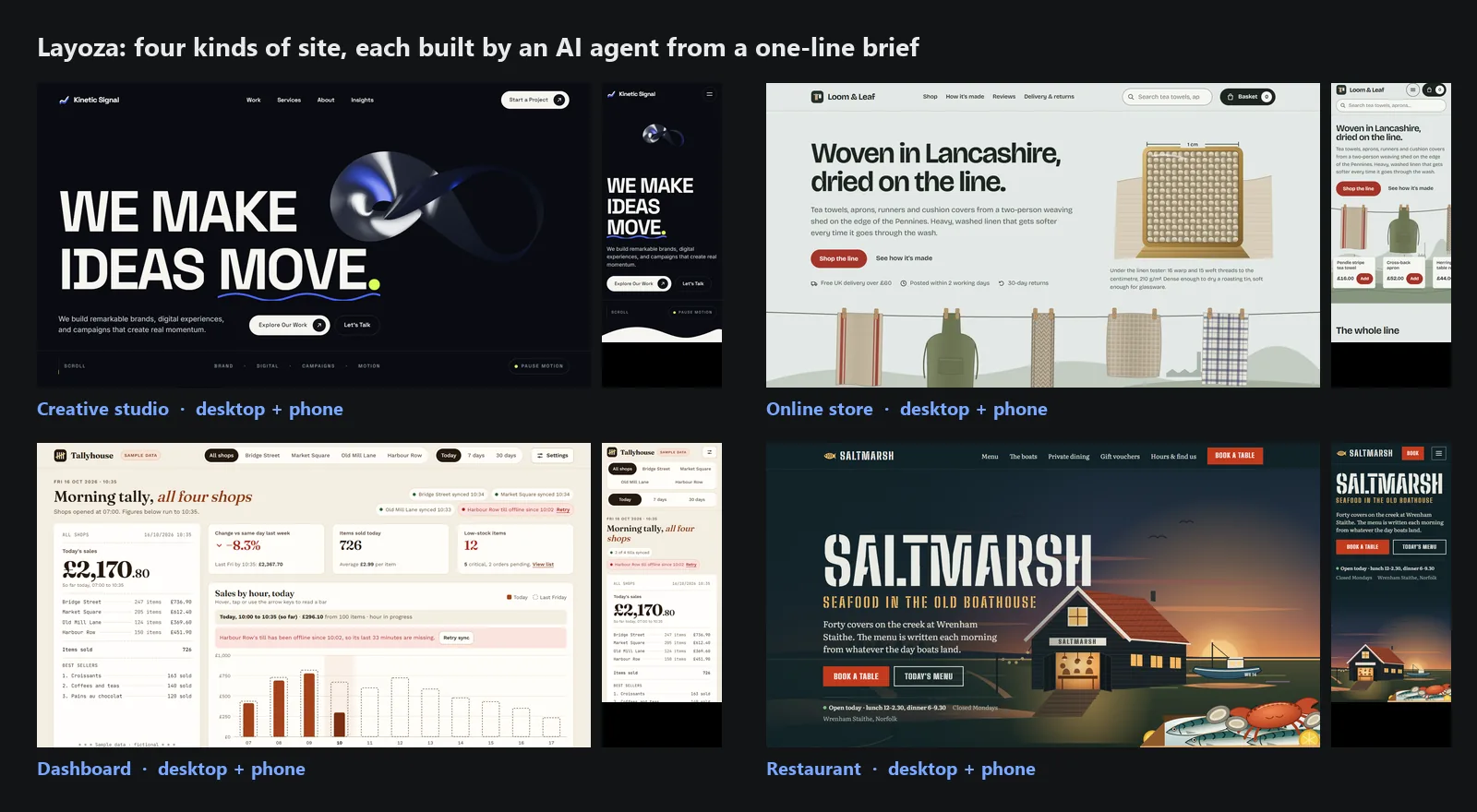
▶ Download the full 2½-minute showcase (MP4, 17 MB): all four briefs, recorded live in Chromium
npx layoza init            # adds the skills + MCP server to every agent it finds in this project
npx layoza qa index.html   # 1440 / 768 / 375 px Chromium check: contrast, overflow, focus, menu, LCP, CLS
Then just talk to your agent. Example prompts:
Build a homepage for a family-run bakery in Leeds. Warm, not twee.
Add a pricing page that matches the rest of this site.
Our dashboard feels cluttered. Fix the design without changing the brand.
Redesign the agency homepage with a kinetic hero, but keep every page and form working.
Check this page on mobile and fix anything a visitor would trip over.
Why
AI agents write front-end code quickly, but the result tends to look the same everywhere: cream and terracotta, Inter, three rounded cards, a purple gradient. They also break things they cannot see: a heading cut by the sticky header, a phone menu that Escape will not close, text at 3:1 contrast, a canvas that pushes LCP past 4 s.
| Without Layoza | With Layoza |
|---|---|
| The same template for a law firm, a bakery and a SaaS app | Three distinct art directions per brief, built from the trade's own objects (a tide chart for a fish restaurant, a till roll for a shop dashboard) |
| Restyles your existing site in its own taste | Reads your site first (DESIGN.md, SITE-DNA.json) and extends it in your tokens, spacing and motion language |
| Animation hard-coded to one library | Picks the lightest tool the brief needs (CSS, WAAPI, View Transitions, GSAP, Three.js), always with prefers-reduced-motion support and cleanup |
| "Looks good to me" | Live Chromium QA at three widths with measured numbers; unmeasured values are reported as null, never guessed |
Results
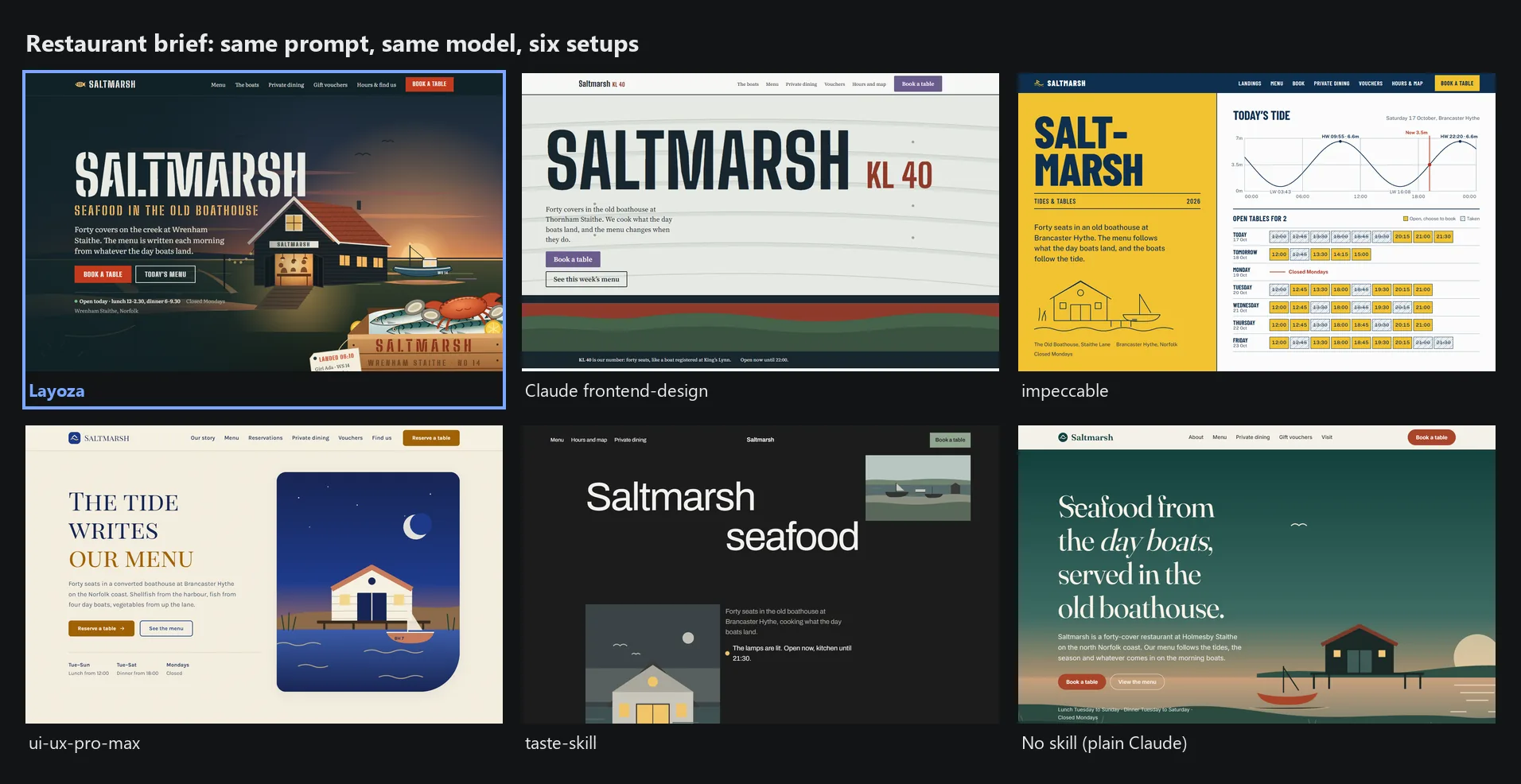
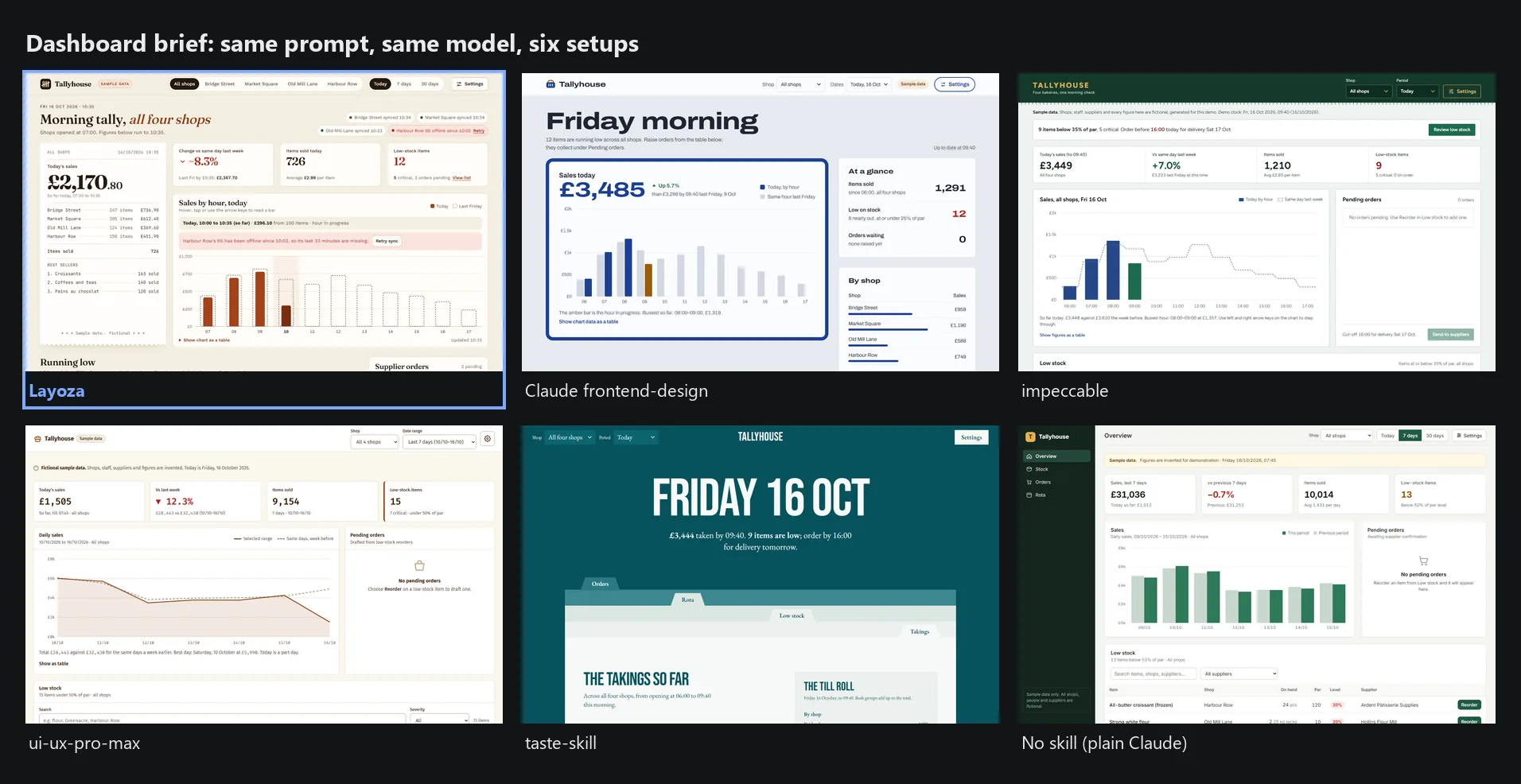
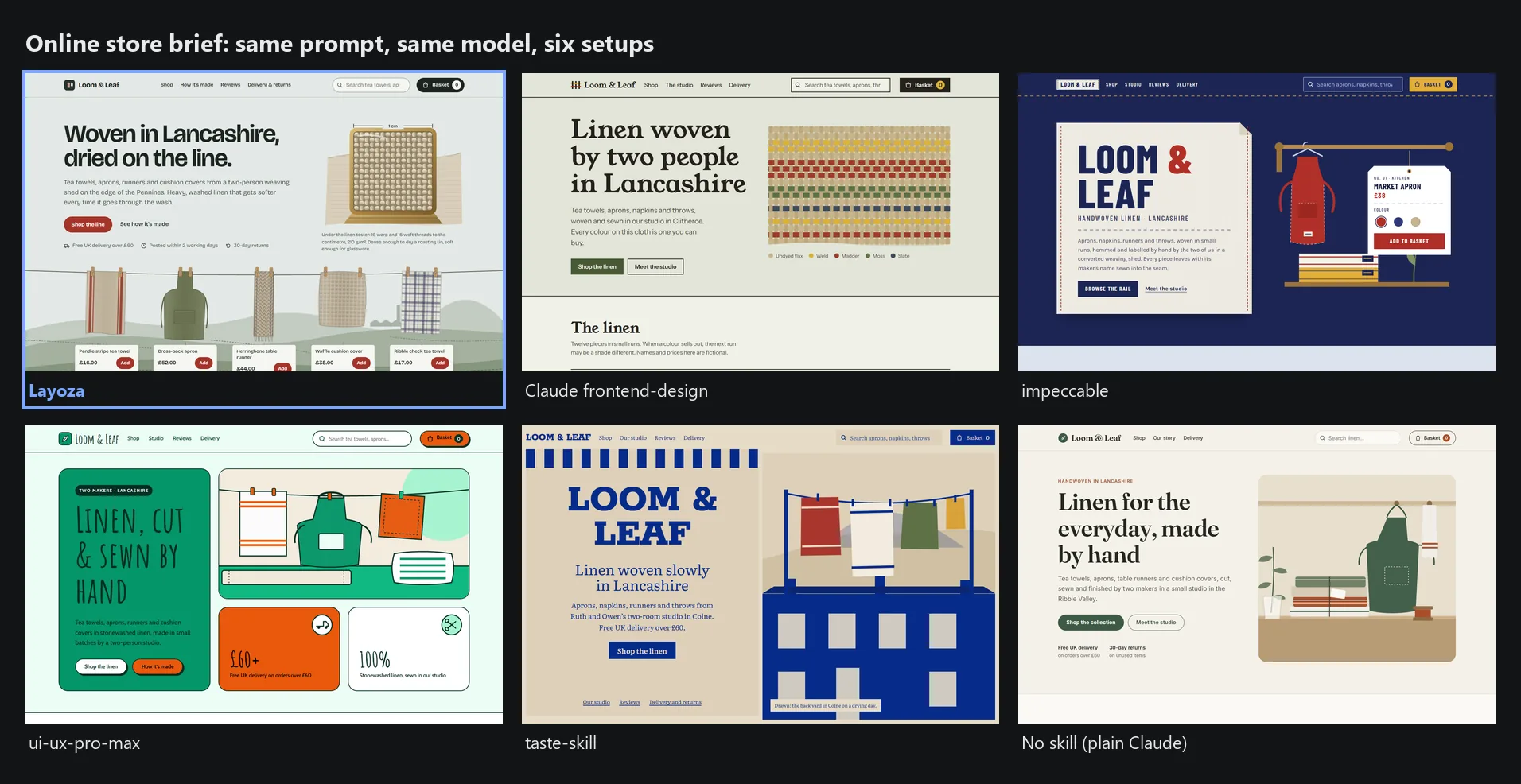
Six setups got the same one-line brief, the same model (Claude Opus 5.5) and one build agent each, and none could see the others' output:
| Setup | What it is |
|---|---|
| Layoza | This project |
| Claude frontend-design | Anthropic's front-end design skill |
| impeccable | Open-source design skill |
| ui-ux-pro-max | Open-source design skill |
| taste-skill | Open-source design skill |
| No skill | Plain Claude, same prompt |
A fresh blind judge then compared scroll stills at 1440 and 375 px for design, usability, creativity and content. Rival pages were frozen; only Layoza was rebuilt between rounds. Judge the pages yourself below, or open any of them in examples/benchmark-*.
Restaurant brief: a harbour seafood kitchen
Dashboard brief: a bakery chain's morning sales
Store brief: a small linen shop
Kinetic agency brief: a motion-led studio homepage
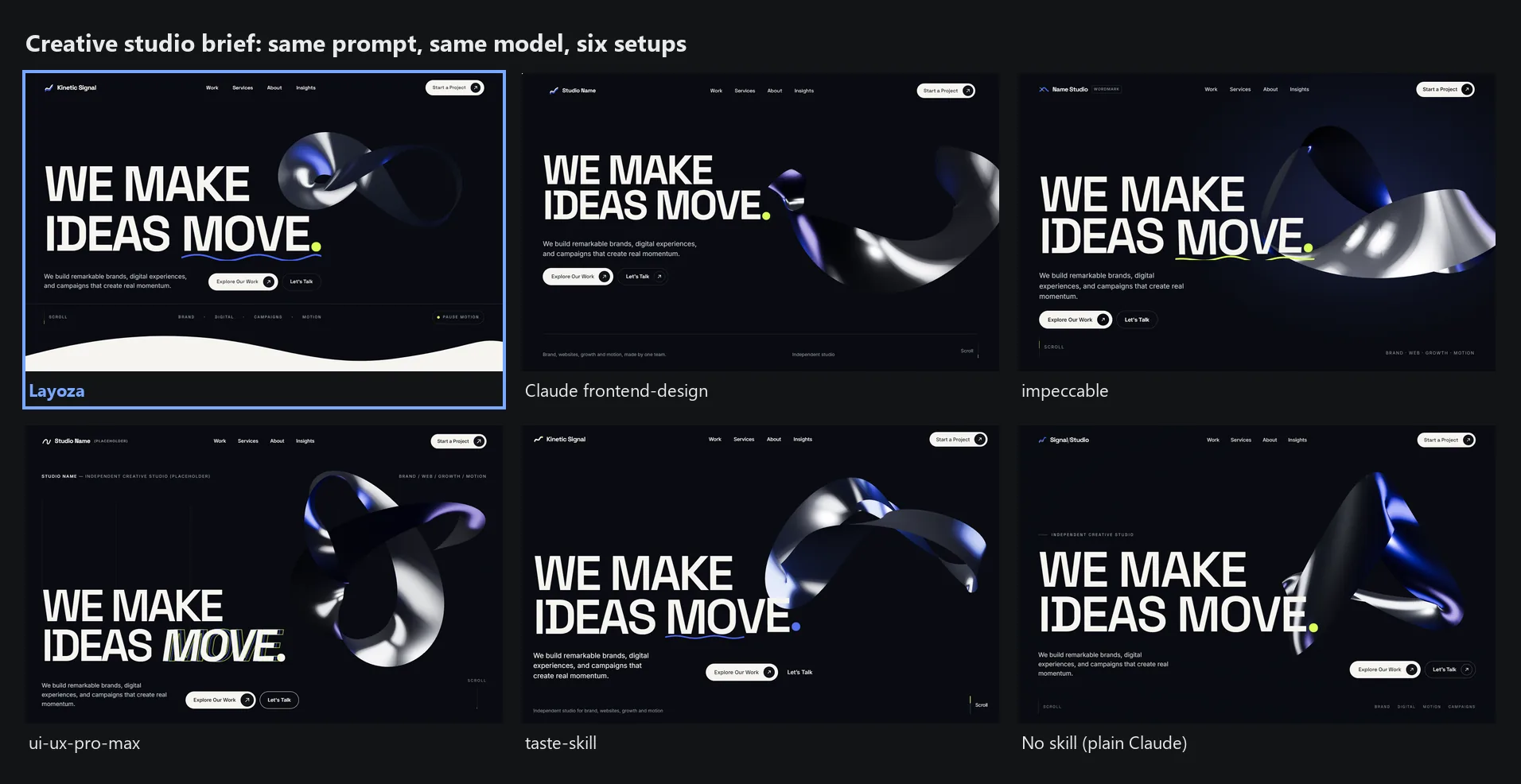
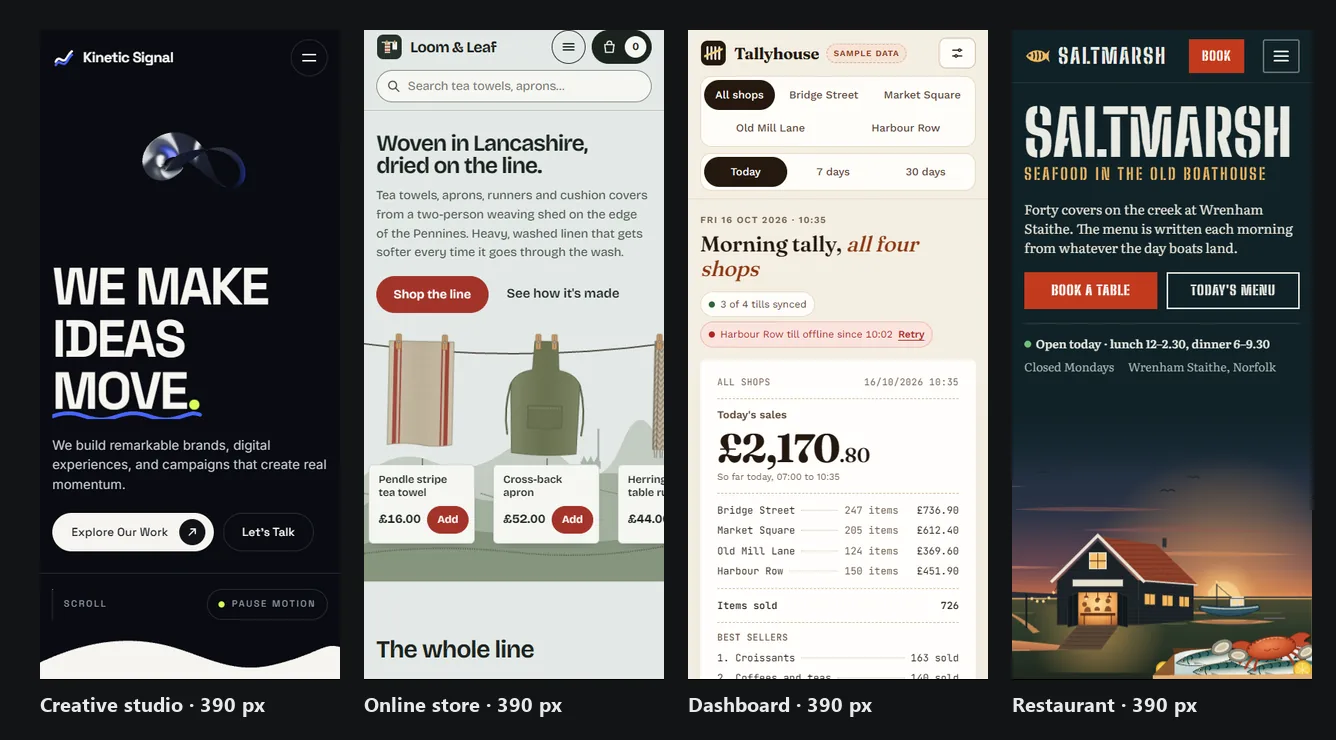
Where Layoza does not win. Read this before you trust the pictures.
- Kinetic is a tie, not a win. taste-skill's page was as strong there; across repeated rounds the lead changed hands and stayed inside judge noise.
- Older single-brief rounds: impeccable beat Layoza on a simple page with no animation, and ui-ux-pro-max beat it in an earlier kinetic round.
- One judge per round, judging screenshots. Motion itself is not judged, which is why the video uses real browser recordings.
- Weak spots judges keep naming:
- creativity on kinetic pages is merely good, not striking
- headings that look cut by the sticky header in mid-scroll stills
- small hero art on phones
- a 3D hero whose lab LCP is well over the 2.5 s target
Full method, every round and the judge notes (with the raw scores) are in docs/CROSS-TYPE-BENCHMARK-2026-10.md. Each brief and page is in examples/benchmark-*. To re-run the QA on any page:
npx layoza qa examples/benchmark-restaurant-saltmarsh/layoza-v4/index.html
What it does
| What you get | How | |
|---|---|---|
| Layout expert | An industry read of the brief, 0–10 design dials, and three art directions that differ in layout, type, colour, content treatment and motion | layoza design-system "<brief>" · MCP get_design_system, recommend_layout |
| Site DNA | For an existing site: its tokens, type scale, spacing, components and motion, written to DESIGN.md, BRAND.md, MOTION.md and SITE-DNA.json | layoza inspect . --write · MCP inspect_project, extract_site_dna, inspect_site |
| Motion mechanics | 71 hero, section and micro mechanics dealt per niche and intensity, so a law firm gets calm, legible motion and an agency gets a kinetic hero | layoza mechanics deal "<brief>" · MCP deal_mechanics, recommend_animation |
| Visual QA | Headless Chromium at 1440 / 768 / 375 px checks per-element contrast, clipping, overlap, focus-not-obscured, the phone menu (opens, traps focus, Escape closes) and lab LCP / CLS, plus 45 craft critiques | layoza qa <file-or-url> · MCP capture_screenshots, audit_accessibility, audit_performance, verify_functional |
| Safe changes | A baseline before a redesign, a before/after comparison, and one-command rollback | layoza baseline create, layoza verify . · MCP compare_before_after, safe_rollback |
Output is written in the project's own stack:
- React, Next.js, Astro, Vue, Nuxt, SvelteKit
- plain HTML/CSS/JS
- WordPress block themes (
theme.jsonv3) - Elementor or Bricks JSON
- Shopify Liquid
Four modes
| Mode | When | First command |
|---|---|---|
| A · New site | Blank project | layoza design-system "<brief>" --mode new |
| B · Extend | Add a page or section to a live site | layoza inspect . --write |
| C · Improve | Fix design, usability or accessibility without changing the brand | layoza baseline create pre-improve → layoza audit . |
| D · Redesign | New creative direction, keeping content and function | layoza baseline create pre-redesign |
The layoza router skill picks the mode from your prompt, so you can simply ask the agent: "Add a pricing page that matches the rest of the site."
Which one do I need?
- Starting from nothing → A. You get three different directions to choose from before any code is written.
- The site already looks right and you need more of it → B. Layoza copies your look; it does not impose its own.
- The site works but looks tired or fails accessibility → C.
- You want a new look → D. A baseline is taken first, so you can roll back.
Install
You need Node.js 18 or newer. The npm package ships prebuilt binaries for Windows x64, macOS (Intel and Apple silicon) and Linux (x64 and arm64); on other platforms it compiles from source on first run, which needs Rust. Visual QA also needs Playwright:
npm i -D playwright && npx playwright install chromium
Then, in your project:
npx layoza init      # skills + MCP config for every agent it detects
npx layoza doctor    # checks Node, Playwright and the MCP handshake
Or add the MCP server by hand:
Claude Code
claude mcp add layoza -- npx -y -p layoza layoza-mcp
For the skills, copy skills/* into .claude/skills/, or run npx layoza init.
Cursor
.cursor/mcp.json
{ "mcpServers": { "layoza": { "command": "npx", "args": ["-y", "-p", "layoza", "layoza-mcp"] } } }
OpenAI Codex
codex mcp add layoza -- npx -y -p layoza layoza-mcp
Windsurf
~/.codeium/windsurf/mcp_config.json
{ "mcpServers": { "layoza": { "command": "npx", "args": ["-y", "-p", "layoza", "layoza-mcp"] } } }
OpenCode
opencode.json
{ "mcp": { "layoza": { "type": "local", "command": ["npx", "-y", "-p", "layoza", "layoza-mcp"], "enabled": true } } }
Google Antigravity
npx layoza init copies the skills into .agents/skills/ and writes .agents/skills.json and the .agents/plugins/layoza plugin. See docs/ANTIGRAVITY-OPTIMIZATION.md.
MCP tools
| Tool | Purpose |
|---|---|
inspect_project · extract_site_dna · inspect_site · discover_components | Read an existing codebase or live URL into design tokens and a component inventory |
get_design_system · recommend_layout | Industry read, dials and three creative directions for a brief |
deal_mechanics · get_mechanic · recommend_animation | Niche-aware motion mechanics and animation recipes |
capture_screenshots · audit_accessibility · audit_performance · verify_functional | Live Chromium QA at three widths |
compare_before_after · safe_rollback · export_report | Baselines, regression checks and reports |
inspect_site fetches the pages you point it at. Treat everything it returns as untrusted data: Layoza never executes instructions found inside an inspected page.
Skills
Layoza ships 19 skills with progressive disclosure: the layoza router plus 18 specialists.
- Workflows:
layoza-new-website,layoza-extend-website,layoza-refine,layoza-redesign - Design:
layoza-site-dna,layoza-design-system,layoza-art-direction,layoza-creative-direction - Building:
layoza-components,layoza-product-ui,layoza-figma,layoza-wordpress - Motion:
layoza-animations,layoza-threejs-webgl - Checks:
layoza-accessibility,layoza-performance,layoza-visual-qa,layoza-discovery-audit
See docs/SKILLS-GUIDE.md.
Compared to other approaches
Pick the one that fits your work.
| Layoza | Claude frontend-design skill | Typical prompt-only design skill | No skill | |
|---|---|---|---|---|
| Form | Rust CLI + MCP server + 19 skills | One skill file | Skill + style rules or data | Plain agent |
| Reads an existing site first | Yes, writes SITE-DNA.json | No | Sometimes | No |
| Motion guidance | 76 mechanics dealt per niche | Guidelines | Guidelines | None |
| Browser verification | Chromium at 3 widths, measured | No | Checklist or rule scan | No |
| Baseline + rollback | Yes | No | No | No |
| Setup | npx, prebuilt binary | Copy one file | npx or Python | Nothing |
When to skip Layoza:
- a quick one-off mockup that will never ship (frontend-design is lighter)
FAQ
Does it force GSAP or Three.js on my project?
No. Your prompt wins. Layoza picks the lightest tool the brief needs, and every recipe honoursprefers-reduced-motion and cleans up on unmount.
Will it overwrite my design?
Not in Mode B or C. It reads your tokens first, andlayoza baseline create plus safe_rollback let you undo any change.
Is the benchmark fair?
As fair as we could make it. Rivals were frozen, the judge was blind, and losses are published. The limits are listed above; one judge per round is the weakest part. Pull requests that add judges or briefs are welcome.Docs
Installation · CLI · MCP · Skills · Motion recipes · Existing-site workflows · Example prompts · Architecture · Security · Troubleshooting · Benchmarks
Credits
Layoza adapts ideas, not files, from open-source design skills under Apache-2.0 and MIT licences. Attribution is in THIRD_PARTY_NOTICES.md.
License
MIT
Installation
Source-derived launch command. Check the maintainer’s required arguments and credentials before running:
npx -y layozaSet up in your AI client
Merge this template into ~/Library/Application Support/Claude/claude_desktop_config.json. Keep existing servers. Add any arguments, credentials, and permissions required by the maintainer; this template has not been install-tested.
{
  "mcpServers": {
    "io-github-layoza-layoza": {
      "command": "npx",
      "args": [
        "-y",
        "layoza"
      ]
    }
  }
}
Restart Claude Desktop completely for changes to take effect. Confirm the server appears connected in the client’s tool list, then try a read-only example from its documentation.
Claude Desktop setup referencePackage
Compatible MCP Clients
Layoza works with any MCP-compatible client. Copy the config snippet from the Configuration section above and add it to the file shown for your client, then restart the application.
- Claude Desktop
~/Library/Application Support/Claude/claude_desktop_config.jsonRestart Claude Desktop completely for changes to take effect. - Cursor
~/.cursor/mcp.jsonRestart Cursor for changes to take effect. - VS Code
.vscode/mcp.jsonReload VS Code window for changes to take effect. - Windsurf
~/.codeium/windsurf/mcp_config.jsonRestart Windsurf for changes to take effect. - Claude Code
.mcp.jsonSave at the project root, then start Claude Code in that project and review the MCP server approval prompt. Keep real credentials out of shared files.