Lagaam
Stops an agent's Trino or Pinot query before it runs if it costs too much or reads outside its grant
One agent query shouldn't stall everyone's Trino. On a shared cluster, a missing partition filter or an accidental cross join doesn't cost you a bill — it costs everyone else their queries. Lagaam is an MCP server that sits between your AI agents and your lakehouse (Trino and Apache Pinot): every query is schema-grounded, priced from the engine's own plan before it runs, checked against a budget, and audited — and the bad one is refused before it runs, with a fix the agent can act on.
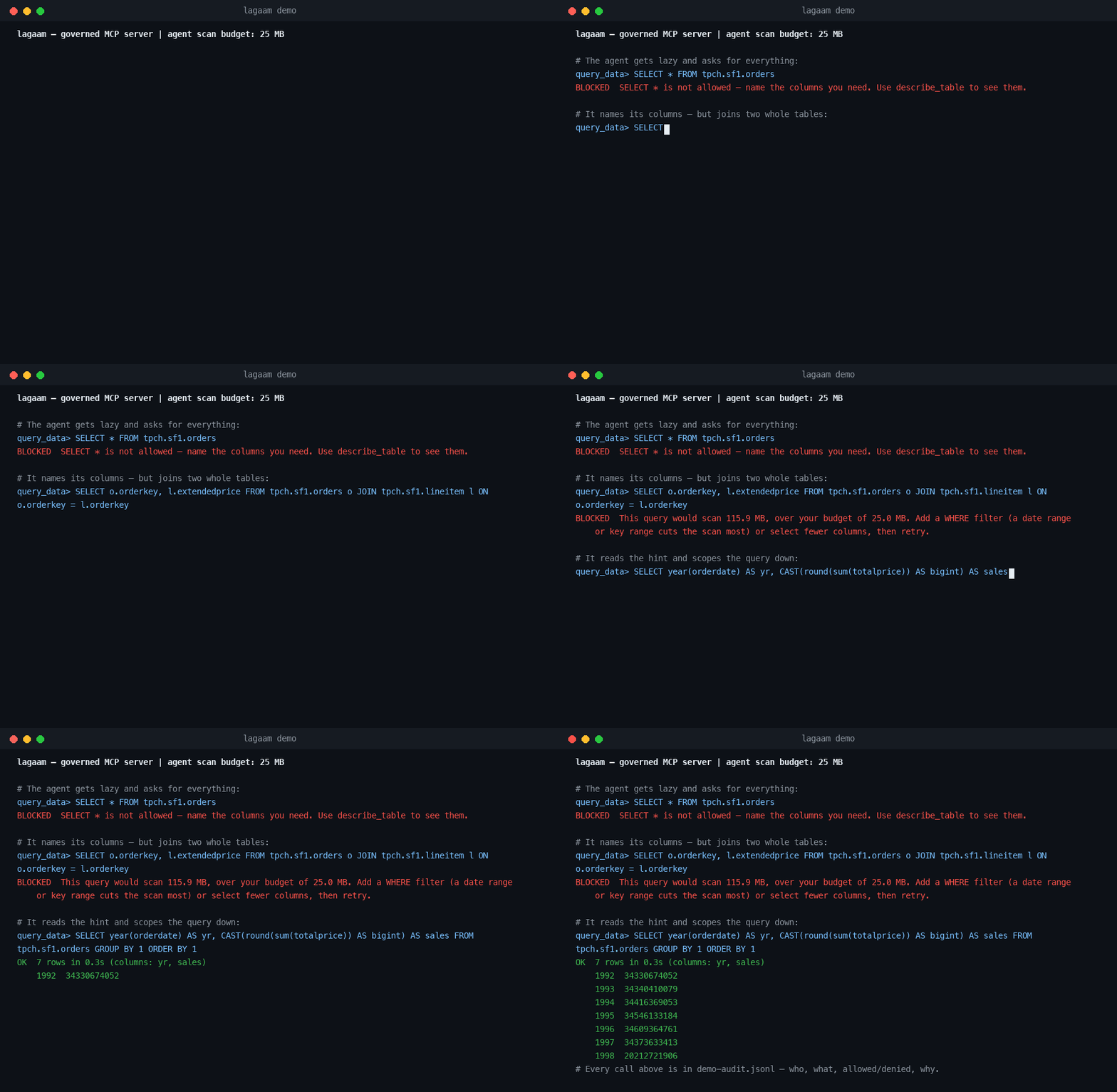
Real session, real Trino, nothing mocked — reproduce it with
uv run --project server python examples/demo.py.
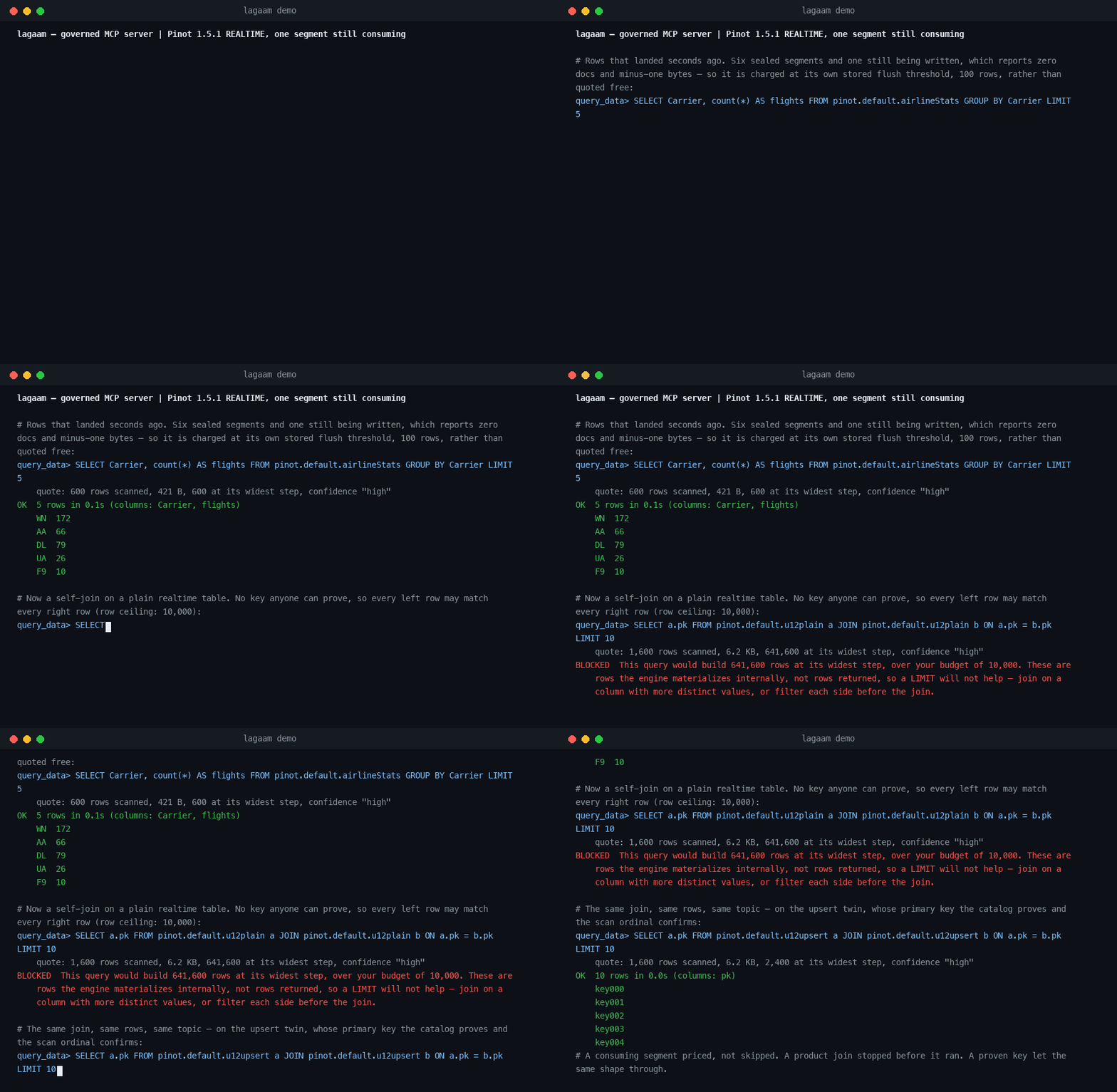
Real session, real Pinot 1.5.1 realtime table, nothing mocked — reproduce it
with uv run --project server python examples/demo_pinot.py.
The problem
Agents write syntactically-valid, catastrophic SQL, and on a shared cluster
the damage isn't theirs alone. A missing partition filter turns into a full
scan that ties up every worker; an accidental cross join fills worker memory
while everyone else's queries wait behind it; a retry loop runs it again. A
SELECT * drags 40 columns into a context window that needed 2. The usual
fix is to not give agents database access at all.
Lagaam gives them access with reins on:
- Cost is a quotation, not a bill. Every query is priced from the
engine's own plan before execution —
EXPLAIN (TYPE IO)for the bytes it would scan,EXPLAIN (TYPE LOGICAL)for the widest row count any operator would build (the number a cross join blows and aLIMITcannot hide). Over budget → blocked, with the number and the fix. - Un-estimable means no. No table statistics, a self-join that breaks the estimate, a passthrough the planner can't see — the gate fails safe instead of hoping.
- Read-only, enforced in the AST. Single
SELECTonly. No DDL/DML, no multi-statement injection, noSELECT *, no table-function passthrough, and aLIMITis injected when missing. Validated SQL is re-rendered, so what runs is exactly what was checked. - Agents ground themselves.
list_catalogsanddescribe_tablereturn exact names, types, and row estimates — scoped to the agent's table grant, so the agent never learns names it isn't allowed to touch. - Results are verified before they're trusted. Zero rows, truncated pages, all-NULL columns — the agent gets a warning with a next action, not a silently misleading answer.
- Every call is audited. One JSONL line per tool call: who, what, allowed or denied, and why.
Doesn't Trino already limit this?
It limits a query once it is running. Lagaam refuses it before it starts. Keep both.
| Acts | What the agent sees | Catches a cross join that reads little | |
|---|---|---|---|
query.max-scan-physical-bytes | during execution: terminated once the bytes are scanned | a query failure | no — it counts bytes read, not rows built |
query.max-execution-time | during execution: terminated after the time is spent | a query failure | only after it has held the cluster that long |
Resource groups (hardPhysicalDataScanLimit, softMemoryLimit, …) | on the next query: new queries queue once the group is over its share | its later queries wait | no — the running query continues |
| Lagaam | before execution, from EXPLAIN | a refusal with the number and the fix | yes — it prices the rows the widest step would build |
Measured on Trino 476: SELECT o.orderkey, l.partkey FROM tpch.tiny.orders o CROSS JOIN tpch.tiny.lineitem l LIMIT 10 reads 676,575 bytes by Trino's own
plan — any scan cap above 0.7 MB lets it run — and would build 902,625,000
rows. Lagaam refuses it before it runs: "This query would build 902,625,000
rows at its widest step, over your budget of 50,000,000 … a LIMIT will not
help — join on a column with more distinct values, or filter each side
before the join."
Resource groups stay your backstop for everything that does reach the cluster; Lagaam is the gate in front of it for agent traffic.
What about other database MCP servers?
They're good servers that do a different job: keep the agent read-only and bound what comes back. Lagaam does that too, and also prices the query first.
| Read-only | Row cap | Timeout | Checks the plan before running | |
|---|---|---|---|---|
| tuannvm/mcp-trino | on by default | results truncated while fetching (TRINO_MAX_ROWS) | during execution (TRINO_QUERY_TIMEOUT) | no — explain_query shows the agent a plan; it doesn't gate execute_query |
| startreedata/mcp-pinot | always on, parsed before execution | LIMIT rewritten before execution, paged results | during execution (PINOT_QUERY_TIMEOUT, 60 s) | no |
| bytebase/dbhub | opt-in (readonly): keyword check plus the database's own read-only transaction | opt-in (max_rows), injected as LIMIT/TOP | opt-in (query_timeout), during execution | no — opt-in explain_sql shows a plan; it doesn't gate execute_sql |
| Lagaam | always on, parsed before execution | 1,000 by default; a bigger LIMIT is lowered before it runs | during execution (LAGAAM_QUERY_TIMEOUT, 300 s) | yes — scan bytes and widest-step rows from EXPLAIN; over budget is refused |
Catch rate
11 queries an LLM agent plausibly writes — full scans, SELECT *, DDL,
injection attempts, oversized joins, out-of-grant reads. A raw MCP
wrapper submits all of them to the engine. Lagaam stops 11/11 before
execution while the well-scoped control query runs untouched.
Reproduce: benchmarks/catch_rate.py →
results.
Quickstart
Against the Trino you already have (TRINO_PORT / TRINO_USER if yours
aren't 8080 / lagaam):
TRINO_HOST=trino.internal LAGAAM_ALLOWED_TABLES=hive.sales.orders uvx lagaam # MCP server on stdio
Or try it on a demo warehouse:
git clone https://github.com/lagaam-ai/lagaam && cd lagaam
docker compose -f examples/docker-compose.yml --profile trino up -d   # demo warehouse
cd server && uv sync
LAGAAM_ALLOWED_TABLES=tpch.tiny.orders,tpch.tiny.lineitem \
  uv run python -m lagaam                                             # MCP server on stdio
For Pinot, --profile pinot brings up the batch quickstart and
--profile pinot-realtime up -d brings up a Kafka-fed streaming one —
run examples/pinot-realtime/bootstrap.sh after it to create the topics,
tables and feed. Then start the server with LAGAAM_ENGINE=pinot.
Wire it into any MCP client (Claude Code, Claude Desktop, or your own agent):
{
  "mcpServers": {
    "lagaam": {
      "command": "uvx",
      "args": ["lagaam"],
      "env": {
        "TRINO_HOST": "localhost",
        "LAGAAM_MAX_SCAN_BYTES": "5368709120",
        "LAGAAM_ALLOWED_TABLES": "hive.sales.orders,hive.sales.customers"
      }
    }
  }
}
In Claude Code, install it as a plugin instead:
/plugin marketplace add lagaam-ai/lagaam
/plugin install lagaam@lagaam
It asks for the tables to allow (LAGAAM_ALLOWED_TABLES) and your Trino
host, port and user (localhost / 8080 / lagaam if you leave them).
From a shell, pass them as flags:
claude plugin marketplace add lagaam-ai/lagaam
claude plugin install lagaam@lagaam \
  --config allowed_tables=hive.sales.orders --config trino_host=trino.internal
On Pinot, pick engine=pinot and set the controller and broker URLs
(http://localhost:9000 / http://localhost:8000 if you leave them):
claude plugin install lagaam@lagaam --config engine=pinot \
  --config allowed_tables=pinot.default.baseballStats \
  --config pinot_controller_url=http://pinot.internal:9000 \
  --config pinot_broker_url=http://pinot.internal:8099
Other LAGAAM_* settings, and PINOT_USER / PINOT_PASSWORD for a Pinot
with auth, are read from the environment you start claude in.
The agent gets three tools — list_catalogs, describe_table,
query_data — and cannot reach the engine any other way.
Configuration
| Env var | Meaning | Default |
|---|---|---|
LAGAAM_ALLOWED_TABLES | Comma list of catalog.schema.table grants | required |
LAGAAM_ALLOW_ALL_TABLES | true to run with no grant at all | off |
LAGAAM_AGENT_NAME | Identity stamped on the audit trail | anonymous |
LAGAAM_MAX_SCAN_BYTES | Scan-bytes budget per query, pre-execution | 50 GiB |
LAGAAM_MAX_ROWS | Scanned-row estimate budget per query | ungated |
LAGAAM_MAX_INTERMEDIATE_ROWS | Rows the engine would build at its widest step — not rows returned, so a LIMIT doesn't lower it | 50,000,000 |
LAGAAM_MAX_RETURNED_ROWS | Rows returned to the agent per query — unset, the server applies its own 1000-row cap, and a bigger LIMIT in the query is lowered to it before it runs | 1000 (max 100000) |
LAGAAM_QUERY_TIMEOUT | Wall-clock seconds per query | 300 |
LAGAAM_METADATA_TTL | Metadata cache TTL, seconds | 300 |
LAGAAM_AUDIT_LOG | Audit JSONL file path | stderr |
TRINO_HOST / TRINO_PORT / TRINO_USER | Trino coordinator | localhost / 8080 / lagaam |
The server will not start without LAGAAM_ALLOWED_TABLES. An agent that
can reach every table in every catalog is the thing this exists to prevent, so
that has to be asked for — set LAGAAM_ALLOW_ALL_TABLES=true if you mean it.
The budget dimensions above apply whether or not you set them. Leaving
LAGAAM_MAX_SCAN_BYTES and LAGAAM_MAX_INTERMEDIATE_ROWS unset gives you
their defaults, not an open gate — an unconfigured server refuses what it
cannot afford rather than waving it through. If queries are being denied and
you expected no limits, that is why; raise the dimension you mean to raise.
Cost quotes come from the engine's own plan estimates, and those need table
statistics: a table without stats cannot be priced, so its queries are refused
rather than guessed at. Run ANALYZE on your tables before pointing an agent
at them — a connector that has no statistics at all is effectively unusable
through the gate. That is deliberate: a query nobody can size is exactly the
kind that stalls a shared cluster.
How it works
A QueryEngine port with a Trino adapter and a native Pinot adapter —
grounding, execution, and a synthesised cost quotation for both OFFLINE and
REALTIME tables. Every query_data call walks one pipeline: validate
(sqlglot AST) → table allowlist → cost quotation → budget gate → execute
(row cap + timeout) → verify → audit.
On Trino, the quote is the engine's own plan, not a guess from the SQL text:
EXPLAIN (TYPE IO) prices the bytes a query would scan, and
EXPLAIN (TYPE LOGICAL) prices the widest row count any operator would
build — the number a cross join blows and a LIMIT cannot hide.
Pinot gives no such plan — every table scan reports the same placeholder row count whatever the table holds, and no endpoint reports bytes at all — so its quote is synthesised instead: from static segment metadata, the broker's own pruning oracle (how many segments survive the predicate), and the plan's join/union shape. A consuming (REALTIME) segment, which the controller reports as empty mid-flight, is priced at the stream's own flush threshold instead of zero. A join is charged its bound rather than the product wherever the catalog can prove the join key. See ADR 0008 and ADR 0009.
Details in docs/architecture.md; the longer story in docs/vision.md.
Status
v0.2.5 — on PyPI as lagaam, listed in the MCP Registry as io.github.lagaam-ai/lagaam, installable as a Claude Code plugin (lagaam@lagaam). Trino adapter, schema tools, plan-based cost guard, query
budgets, read-only enforcement, per-agent allowlists, result verification,
audit log. 1,189 unit + 212 integration tests (live Trino 476 and Pinot
1.5.1, batch and realtime), mypy strict. LAGAAM_ENGINE=pinot starts the
native Pinot adapter: grounding, execution and a quotation synthesised from
segment metadata and the broker's own pruning oracle, for OFFLINE and
REALTIME tables alike — a consuming segment is charged at the stream's
flush threshold, and a join is charged its bound rather than the product
wherever the catalog proves the key. On deck
(roadmap): post-execution actuals on the audit line,
then a Kubernetes control plane — agents as CRDs with token/dollar budgets
and kill switches.
Apache 2.0.
Installation
Source-derived launch command. Check the maintainer’s required arguments and credentials before running:
uvx lagaamSet up in your AI client
Merge this template into ~/Library/Application Support/Claude/claude_desktop_config.json. Keep existing servers. Add any arguments, credentials, and permissions required by the maintainer; this template has not been install-tested.
{
  "mcpServers": {
    "io-github-lagaam-ai-lagaam": {
      "command": "uvx",
      "args": [
        "lagaam"
      ]
    }
  }
}
Restart Claude Desktop completely for changes to take effect. Confirm the server appears connected in the client’s tool list, then try a read-only example from its documentation.
Claude Desktop setup referencePackage
lagaampypiCompatible MCP Clients
Lagaam works with any MCP-compatible client. Copy the config snippet from the Configuration section above and add it to the file shown for your client, then restart the application.
- Claude Desktop
~/Library/Application Support/Claude/claude_desktop_config.jsonRestart Claude Desktop completely for changes to take effect. - Cursor
~/.cursor/mcp.jsonRestart Cursor for changes to take effect. - VS Code
.vscode/mcp.jsonReload VS Code window for changes to take effect. - Windsurf
~/.codeium/windsurf/mcp_config.jsonRestart Windsurf for changes to take effect. - Claude Code
.mcp.jsonSave at the project root, then start Claude Code in that project and review the MCP server approval prompt. Keep real credentials out of shared files.