io.github.kokogo100/ragalgo
Dynamic RAG Engine preventing AI hallucinations in Korean Finance and Crypto markets.
RagAlgo: Dynamic RAG Engine for AI Reliability





"Your AI is an Analyst, NOT a Day Trader."
RagAlgo is an MCP Server that provides mathematically scored financial context (Korean Stocks/Crypto) to AI agents. We focus on "State-of-Truth" (Daily Closed Data) to prevent AI hallucinations caused by real-time market noise.
- Analyst, Not Broker: We provide "Daily Analysis Reports" (Post-Market), not real-time tick data.
- Scored Context: Instead of raw prices, we give you "Scores" (0~100) and "Zones" (Forest vs Tree).
- Global Market Specialist: Optimized for US, UK, JP, KR, and Crypto.
👉 Official Website (ragalgo.com)
📖 Architecture & Whitepaper
Discover why RagAlgo is the "Hippocampus" for Agentic AI, not just another RAG.
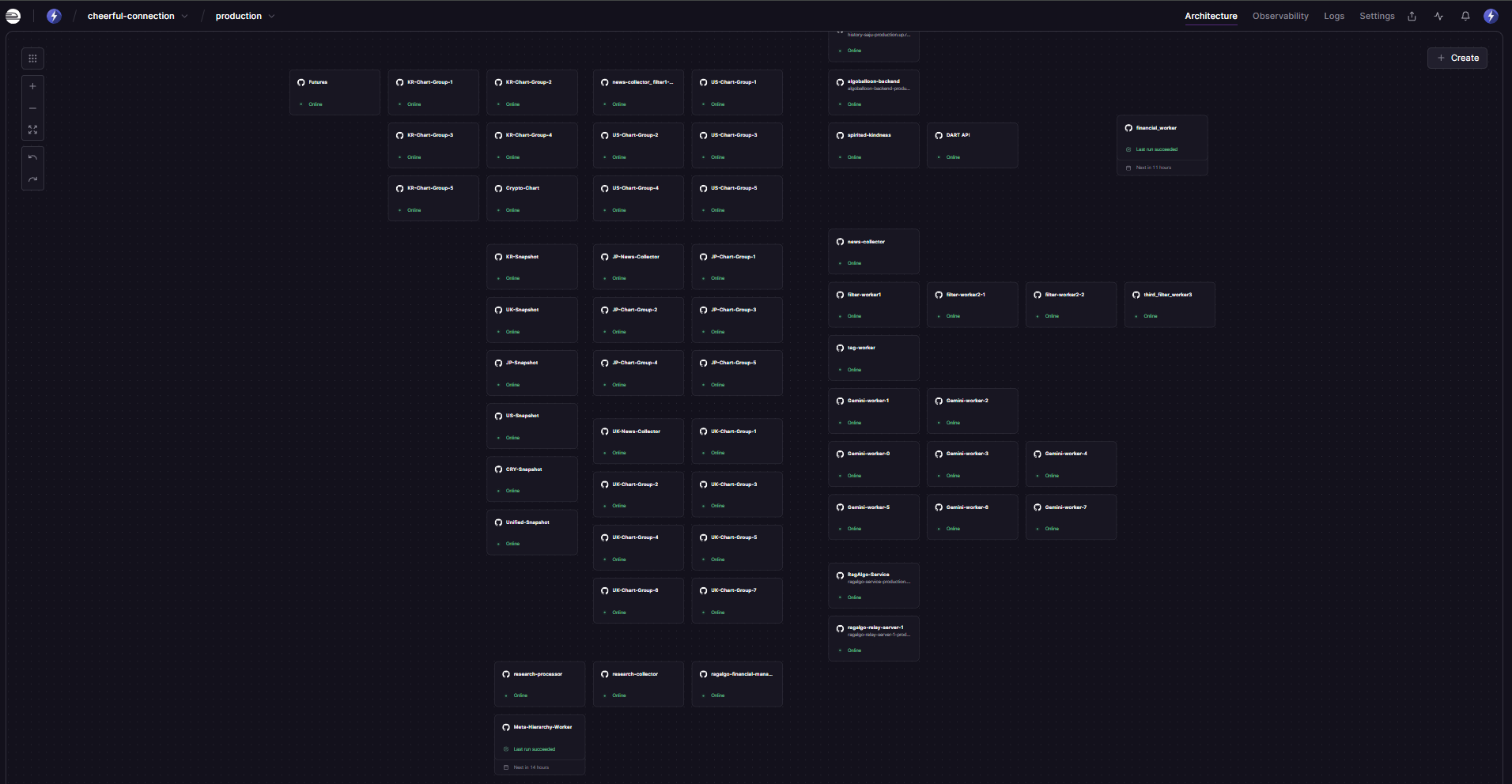
🏗️ Data Pipeline Architecture
Our production system on Railway processes global financial data 24/7:
┌─────────────────────────────────────────────────────────────────────────────┐
│                        RagAlgo Data Pipeline (Railway)                      │
├─────────────────────────────────────────────────────────────────────────────┤
│                                                                             │
│  📥 COLLECT              🔍 FILTER              🏷️ TAG           📊 SCORE  │
│  ─────────────          ──────────────         ─────────        ──────────  │
│  • KR-News-Collector    • filter-worker-1      • tag-worker     • Gemini-1  │
│  • US-News-Collector    • filter-worker-2      • Meta-Hierarchy • Gemini-2  │
│  • UK-News-Collector    • filter-worker-3      •   Worker       • ...       │
│  • JP-News-Collector    • ibkr_filter_worker3  │                • Gemini-7  │
│  • research-collector   │                      │                │           │
│                         │                      │                │           │
│  ════════════════════════════════════════════════════════════════════════  │
│                                    ↓                                        │
│                      📦 SNAPSHOT (Daily 18:00 KST)                          │
│                      ──────────────────────────────                         │
│                      • KR-Snapshot  • US-Snapshot                           │
│                      • UK-Snapshot  • JP-Snapshot                           │
│                      • CRY-Snapshot • Unified-Snapshot                      │
│                                    ↓                                        │
│                          🚀 SERVE (MCP Server)                              │
│                          ─────────────────────                              │
│                          • RagAlgo-Service (SSE/stdio)                      │
│                          • ragalgo-relay-server (WebSocket)                 │
│                                                                             │
└─────────────────────────────────────────────────────────────────────────────┘
- Vision Whitepaper (The Hook)
- Concept: Why RagAlgo is a "Semantic Digital Twin" (SDT) using the Hippocampus analogy.
- Value: Explains the "Self-Growing Taxonomy" and "Data Flywheel" effect.
- Technical Report (The Proof)
- Deep Dive: Detailed anatomy of the Contextual Knowledge Network (CKN).
- 2025 Trend: How RagAlgo serves as the memory layer for Agentic AI (e.g., PepsiCo/Salesforce Agentforce).
💡 Why "Daily Close"?
Users often ask: "Why isn't the chart data real-time?"
Because AI performs better with clarity. Real-time tick data is full of noise and volatility. If you feed an LLM raw live prices, it often hallucinates patterns that don't exist.
RagAlgo acts like a Professional Technical Analyst who works after the market closes:
- Wait for the dust to settle (Market Close).
- Analyze the day's battle (Daily Candle & Aux Indicators).
- Deliver a "Confirmed Strategy" to your AI.
Use RagAlgo to build "Investment Advisors", not "High-Frequency Trading Bots".
🚀 Quick Start
Claude Desktop Configuration
Add this to your config file:
- Windows:
%APPDATA%\Claude\claude_desktop_config.json - Mac:
~/Library/Application Support/Claude/claude_desktop_config.json
☁️ Cloud Mode (Recommended - No installation required)
{
  "mcpServers": {
    "ragalgo": {
      "url": "https://ragalgo-service-production.up.railway.app/sse",
      "env": {
        "RAGALGO_API_KEY": "YOUR_API_KEY_HERE"
      }
    }
  }
}
📦 Local Mode (Requires Node.js)
{
  "mcpServers": {
    "ragalgo": {
      "command": "npx",
      "args": ["-y", "ragalgo-mcp-server", "--stdio"],
      "env": {
        "RAGALGO_API_KEY": "YOUR_API_KEY_HERE"
      }
    }
  }
}
Tip: You can get a Free 1,000 Call Key instantly at RagAlgo Dashboard.
📚 Usage Examples (Cookbook)
We have a dedicated repository for practical examples to help you get started quickly. Please visit the RagAlgo Examples Repository.
What's Inside?
- 8 Step-by-Step Recipes: From basic data fetching to advanced AI agents.
- Skeleton Code + Prompts: Copy-paste ready resources.
- Scenarios:
- 🐣 Basic: Get stock scores in 5 minutes.
- 🧪 Intermediate: Verify technical signals with AI.
- 🚀 Advanced: Build an autonomous reasoning agent (Mock Trading Audit).
- ☕ Morning Briefing: Create a bot that emails you a daily market summary.
"Skeleton + Prompt" Approach: We provide the ingredients. You ask ChatGPT/Claude to cook!
🌍 Supported Markets & Roadmap
RagAlgo is expanding its CKN coverage globally. Currently, US, UK, Japan, Korea, and Crypto markets are fully supported.
| Market | Asset Class | Status |
|---|---|---|
| 🇰🇷 Korea | KOSPI / KOSDAQ | 🟢 Live (Real-time Sentiment & Charts) |
| 🇺🇸 USA | NYSE / NASDAQ | 🟢 Live (Daily Scored Context) |
| 🇯🇵 Japan | Nikkei 225 | 🟢 Live (Daily Scored Context) |
| 🇬🇧 UK | LSE | 🟢 Live (Daily Scored Context) |
| 🪙 Crypto | Global (Upbit/Binance) | 🟢 Live (Real-time Sentiment & Charts) |
🛠 Tools
⚠️ CORE CONCEPT: Scored vs Raw
get_news_scored(Default): Returns only significant news (Scores ≠ 0). Best for AI decision making.get_news(Raw): Returns ALL news including noise. Use this ONLY if you need raw data feed.
| Tool | Description |
|---|---|
get_news_scored | [RECOMMENDED] News WITH AI Sentiment Scores (-10 ~ +10). Filters out noise. |
get_news | [Advanced] Raw News WITHOUT scores. Includes 0-score noise. Use only if you build your own scorer. |
get_chart_stock | [Core] Global Stock (US/UK/JP/KR) Technical Analysis (Daily Close). |
get_chart_coin | [Core] Global Crypto Technical Analysis (Daily Close). |
get_snapshots | [Best] Market Overview (News + Chart + Trend) in one call. |
get_financials | Corporate Financials (Quarterly/Yearly). |
search_tags | Convert names (e.g., "Samsung") to RagAlgo Tags. |
📡 Real-time WebSocket (Business Tier)
For users who really need live data (e.g., for monitoring dashboards), we offer a WebSocket stream. Note: This is strictly for monitoring, not for LLM inference context.
- Access: Business Plan subscribers (Includes 30 connections).
- Address:
wss://ragalgo-relay-server-1-production.up.railway.app - Guide: See Developer Docs for implementation details.
💬 Support
- Website: ragalgo.com
- Email: support@ragalgo.com
Installation
Source-derived launch command. Check the maintainer’s required arguments and credentials before running:
npx -y ragalgo-mcp-serverSet up in your AI client
Merge this template into ~/Library/Application Support/Claude/claude_desktop_config.json. Keep existing servers. Add any arguments, credentials, and permissions required by the maintainer; this template has not been install-tested.
{
  "mcpServers": {
    "io-github-kokogo100-ragalgo": {
      "command": "npx",
      "args": [
        "-y",
        "ragalgo-mcp-server"
      ]
    }
  }
}
Restart Claude Desktop completely for changes to take effect. Confirm the server appears connected in the client’s tool list, then try a read-only example from its documentation.
Claude Desktop setup referencePackage
ragalgo-mcp-servernpmCompatible MCP Clients
io.github.kokogo100/ragalgo works with any MCP-compatible client. Copy the config snippet from the Configuration section above and add it to the file shown for your client, then restart the application.
- Claude Desktop
~/Library/Application Support/Claude/claude_desktop_config.jsonRestart Claude Desktop completely for changes to take effect. - Cursor
~/.cursor/mcp.jsonRestart Cursor for changes to take effect. - VS Code
.vscode/mcp.jsonReload VS Code window for changes to take effect. - Windsurf
~/.codeium/windsurf/mcp_config.jsonRestart Windsurf for changes to take effect. - Claude Code
.mcp.jsonSave at the project root, then start Claude Code in that project and review the MCP server approval prompt. Keep real credentials out of shared files.