b123d-print
Vibe CAD for 3D printing: design, check and export printable parts with build123d.
b123d-print


Vibe CAD for 3D printing. Tell your AI assistant what you need, in plain words, with a photo and a few caliper readings. It designs the part, looks at it from every side, checks it for printing problems and hands you a file for your slicer. No CAD skills needed, and it works with any assistant that supports MCP: Claude, Gemini CLI, Cursor, VS Code Copilot, Codex and more.
What you can make
Ask the way you would ask a friend who owns calipers and a CAD program. These were designed this way, and printed:
- "A box for this IR blaster board: the LED pointing out the top, a screw-on lid, two tabs to mount it on the wall." A two-part case, checked against a stand-in of the board so it fits.
- "An outdoor case for this motion sensor. It should slide off a wall plate and keep the rain out." Dovetail rails, a click-in detent, a drain slot, and a cover that prints without supports.
- "An adapter plate: 2-gang box behind, 1-gang smart switch in front." Counterbored screw holes, and a wall check added after the first print broke through a 0.05 mm skin no render showed.
Or remix a model you downloaded (STL, 3MF or STEP) and change it:
- "Here's an L bracket STL I downloaded: turn its two mounting holes into slots and add gussets." The original is loaded as a solid and changed, the checks tell the original's flaws from new ones, and a before/after view shows exactly what moved. (A demo for the docs, not printed yet.)
Before a long print, test the fit with a fit-test template: a thin, quick print cut from the real part.
- "Make a fit-test template of the mounting face so I can check the hole pattern." The assistant shows you the face in red, asks you to confirm, and gives you a 1.2 mm plate with the part's exact holes: minutes to print instead of hours.
And the everyday things: a spacer, a knob, a bracket, a cable clip, a replacement for a broken part you can measure. Then keep talking to it: "make it 5 mm taller", "add a hole for an M4 screw", "the lid is too tight". Every dimension stays a named number in a short build123d script, so each change is exact, and you get STEP files to keep editing in other CAD if you want.
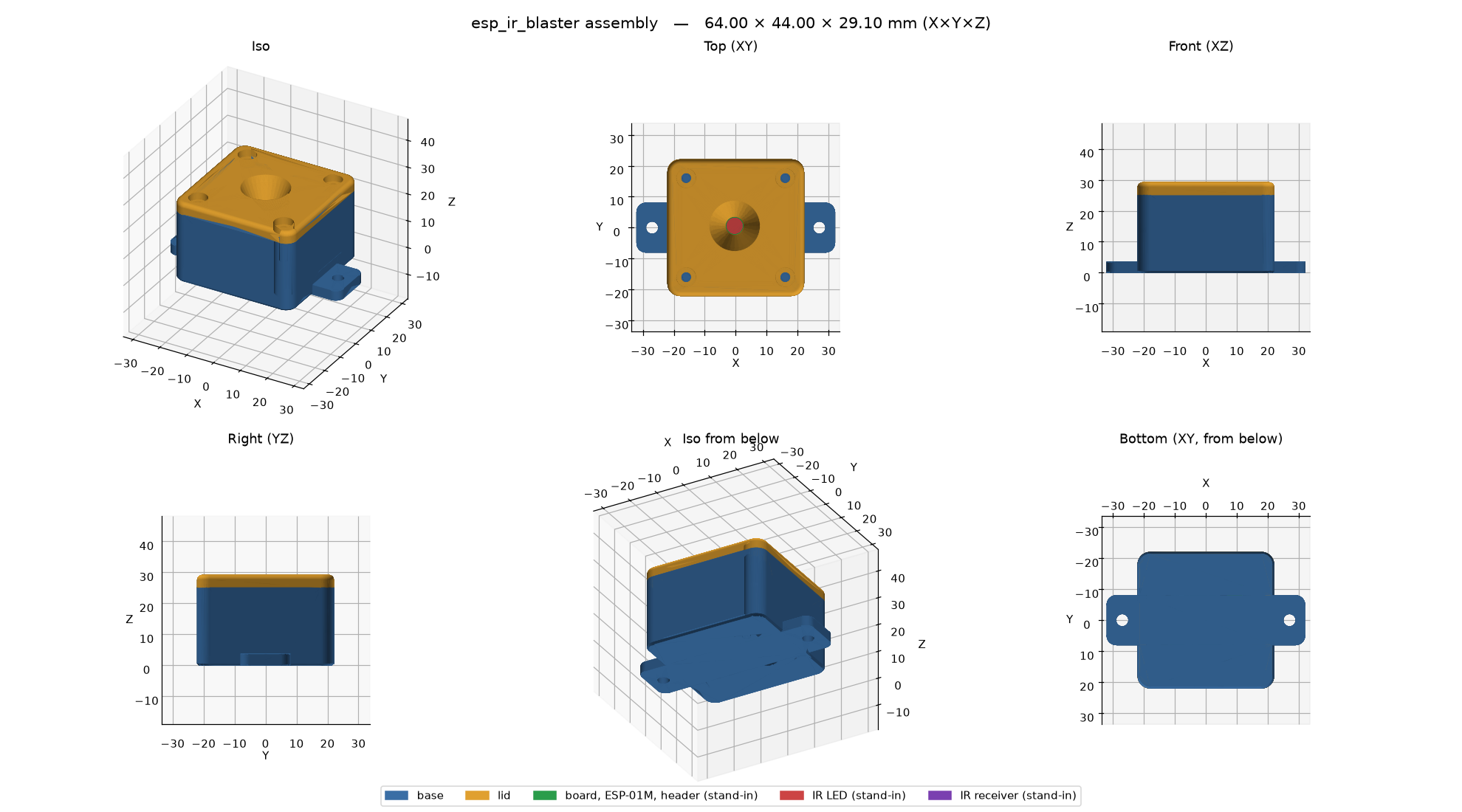 | 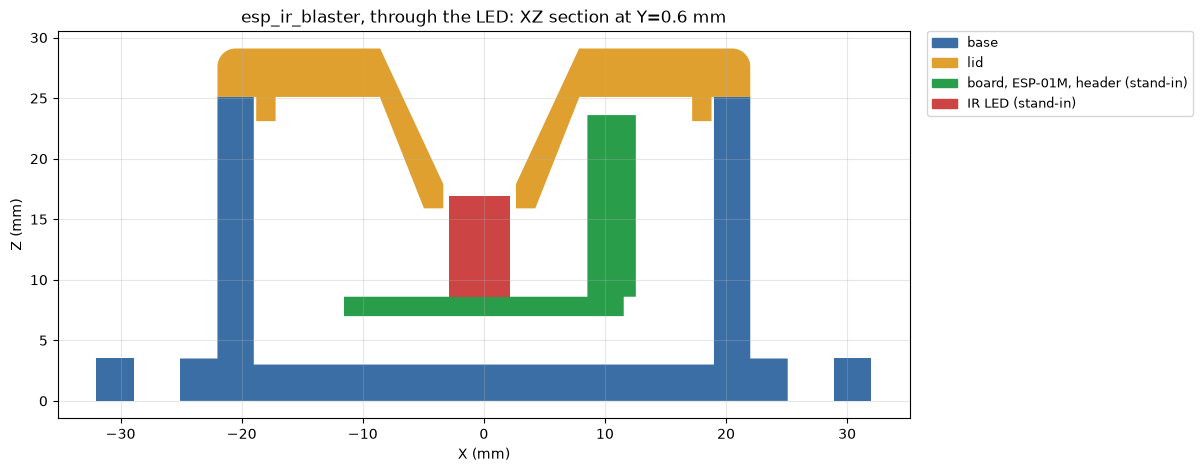 |
| Two-part box for an IR transceiver board, with the board stand-ins | Section through the LED: lid cone, board, clearances |
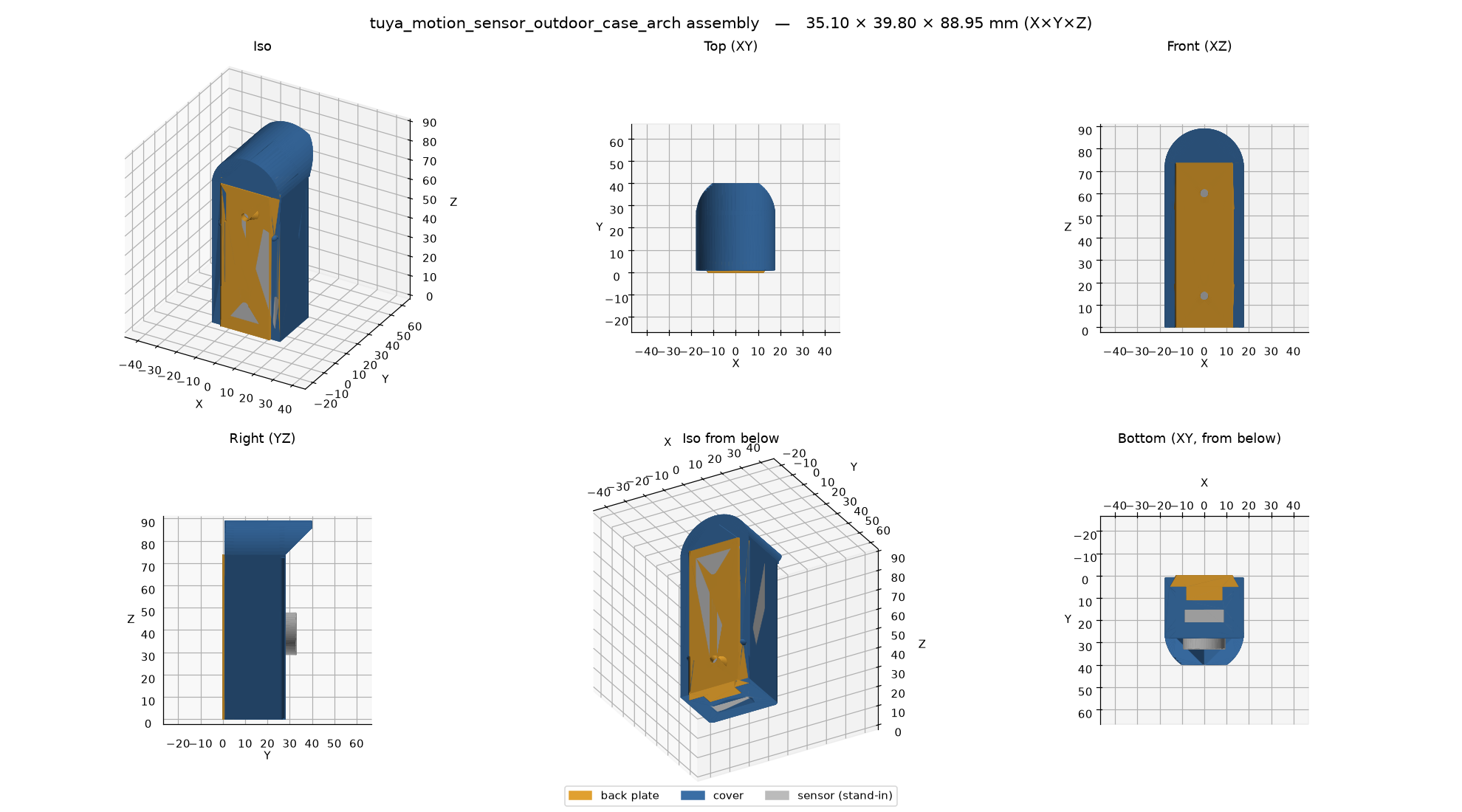 | 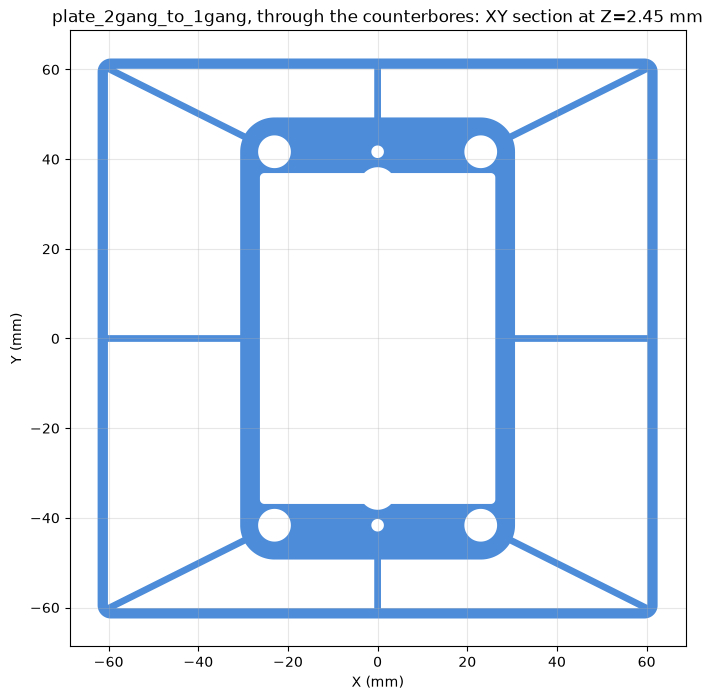 |
| Outdoor sensor case: dovetail back plate + support-free cover | Wall plate: section just past the face, where the wall check looks |
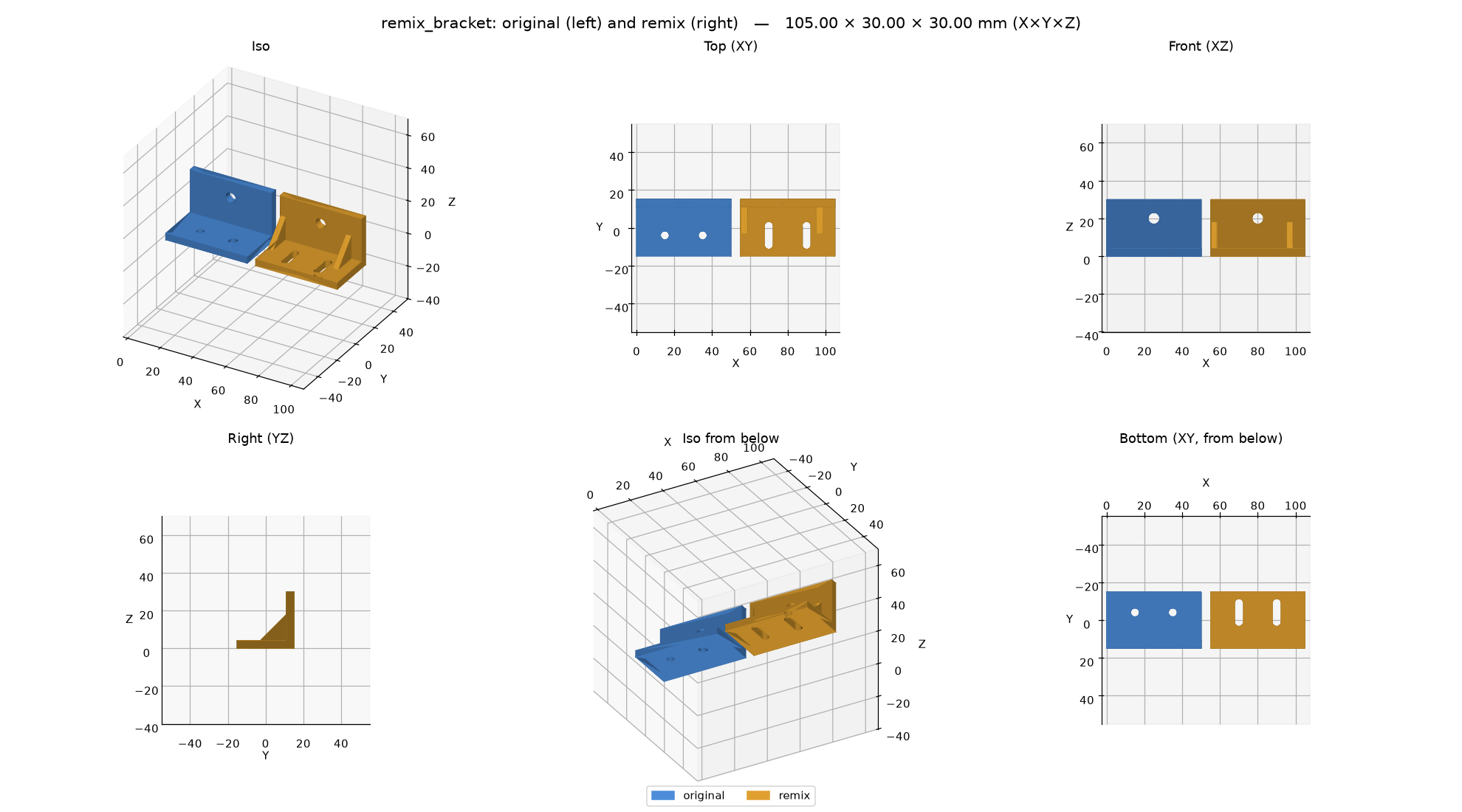 | 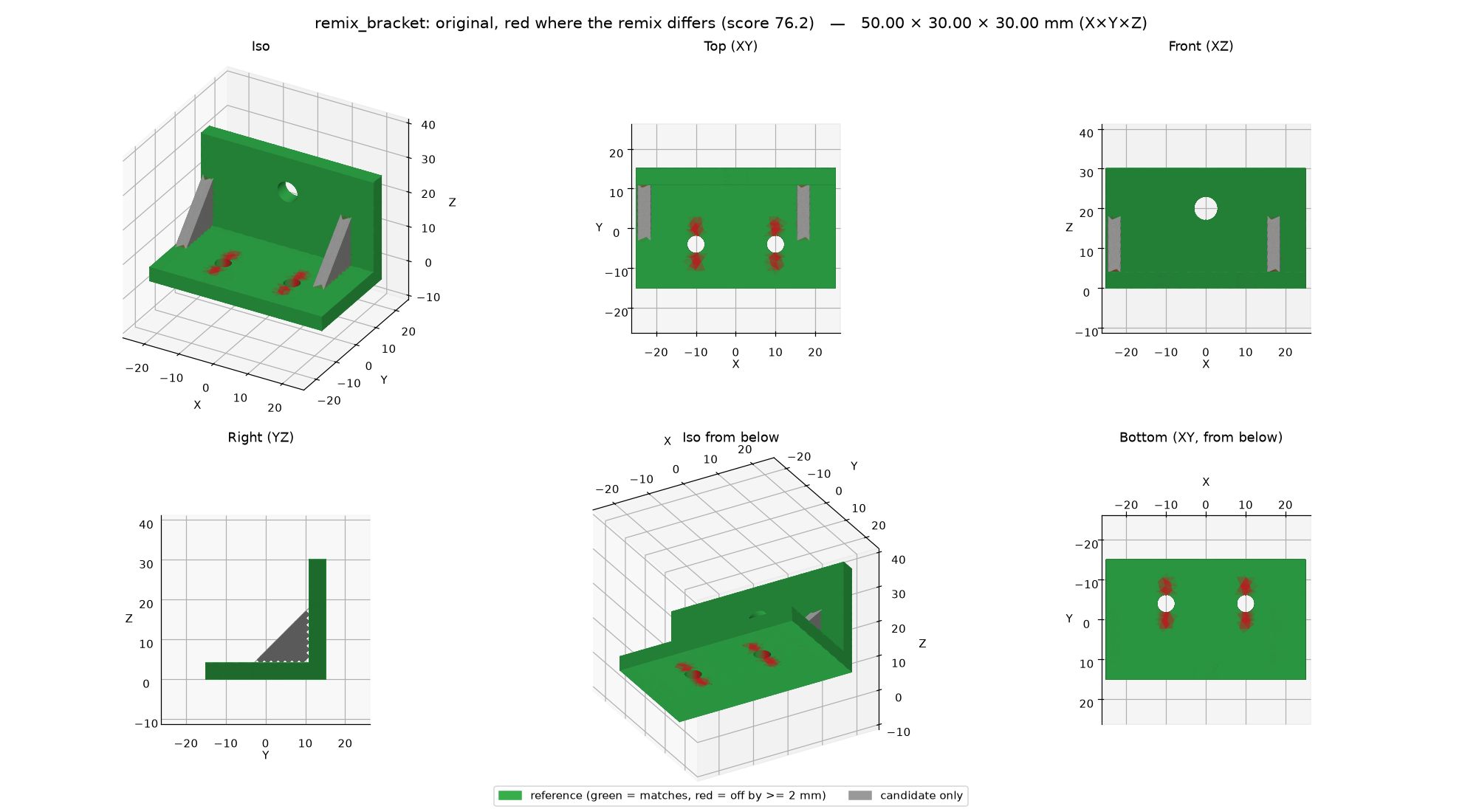 |
| Remix: a downloaded bracket, before and after | Where the remix differs: red cut, grey added |
Documentation: https://kd5ryn.github.io/b123d-print/
Get started in 2 minutes
b123d-print's MCP server is a plug-in that gives your AI assistant CAD tools. It runs on your own computer.
The easy way: paste this into your AI assistant (Claude Code, Claude Desktop, Cursor, Gemini CLI, Codex, …):
Install the b123d-print MCP server for me. It runs with
`uvx --from b123d-print b123d-print-mcp --workspace <folder>`
where <folder> is a folder for my parts, such as ~/parts.
Install uv first if it is missing (https://docs.astral.sh/uv/).
Add the server to your MCP settings, tell me when to restart you,
and after the restart check that its tools (list_parts, new_part,
build_part, ...) are available.
It will probably ask to run a few commands (to install uv and add the server): that is expected.
By hand:
-
Install uv, which fetches Python and everything else b123d-print needs.
-
Add the server. Claude Code:
claude mcp add b123d-print -- uvx --from b123d-print b123d-print-mcp --workspace ~/partsOr install the Claude Code plugin (server + skill) in one step:
/plugin install b123d-print --marketplace KD5RYN/b123d-printClaude Desktop (Settings → Developer → Edit Config):
{
  "mcpServers": {
    "b123d-print": {
      "command": "uvx",
      "args": ["--from", "b123d-print", "b123d-print-mcp", "--workspace", "/Users/you/parts"]
    }
  }
}
Cursor, VS Code, Gemini CLI, Codex and others: Connect your MCP client.
-
Restart the assistant.
Then ask: "Design a 40 mm round spacer, 10 mm tall, with an M3 hole." The files land in
your parts folder under parts/<name>/out/, ready for your slicer. The first start downloads a
few hundred MB and can take a few minutes (Troubleshooting).
The assistant checks its work by looking at its renders, so use a client that passes tool
images to the model (Claude Desktop and Claude Code do).
Scope: parts for FDM 3D printing, nothing else. Everything is built around a printed part: print orientation with the bed at Z=0, hole compensation, mating clearance, calibration coupons, and print checks built on sourced FDM design rules. It is not a general CAD framework.
What's in it
b123d-printpackage + CLI — export, 6-view renders, colored multi-part cross-sections, and print checks: overlap between mating parts, overhang and bridges in print orientation, thin features and wall thickness around cuts, holes (round tops that sag), bed-edge fillets, gaps between moving parts, probes ("is the roof closed?").b123d-print-mcp— an MCP server, so it works from Claude Desktop, Claude Code, Gemini CLI, Cursor, VS Code, Codex and other MCP clients. Part scripts are model-written code: they run in a sandbox with a timeout and no network.compare— measure a part against a reference STL, 3MF or STEP: size, volume and surface differences, a 0–100 score, pass/fail, and a deviation view (comparing parts).- Remix — start from someone else's STL, 3MF or STEP:
import_modelmakes a mesh a solid (coplanar triangles merged), the checks tell the original's problems from the ones the remix added, and a before/after view shows the change (remixing a part). - Fit-test templates — a quick thin print of a face, a slice or a region of the real part (same holes and clearances) to check the hole pattern and the fits before the full print (fit-test templates).
- Design review — after the print checks pass, the assistant reviews the part for a style you pick (functional, modern, least cost, rugged/outdoor, soft/handheld): rough filament and time estimates, supports, edge treatment, layer steps, water traps, and concrete suggestions from sourced design rules. It changes nothing without your OK (design review).
- The workflow, model-neutral — MCP prompts plus an
AGENTS.mdany agent can read. The rules come from real prints; one exists because a part broke through a 0.05 mm skin that no render showed. - Examples — four parts designed this way and printed, plus calibration coupons for holes,
fits, and overhangs and bridges, in
src/b123d_print/examples/.
Advanced: run it on another machine
Not needed for most people. To keep the parts on a home server and design from a laptop, use SSH; for many agents sharing one server (eval runs, a team), HTTP with a named token per tool; for the strongest isolation (also on Windows), Docker. Which mode? compares them.
Documentation
| Getting started | Quick start · MCP clients (Claude Desktop, Claude Code, Gemini CLI, Cursor, VS Code, Codex) · CLI and Python |
| Advanced | Which mode? · Remote over SSH · Over the network (HTTP) · Docker |
| Using it | How a session goes · MCP tools and prompts · Output formats · Settings · Hole compensation · Printer profiles · The checks · Sandbox · Comparing parts · Remixing a part · Fit-test templates |
| Part scripts | The part script · Checks API · Examples · Workflow rules · Design rules (sourced) |
| More | Reference · Updating · Troubleshooting · Contributing · Agent evals · Credits and licenses |
Status
0.x — early. The part-script convention may still change. CI tests macOS, Ubuntu and
Windows, the built package via uvx, and the Docker image on every push. On Windows the server
runs natively for local use, but without an OS sandbox (process isolation and an audit hook
only); use WSL2 or Docker for isolation. SSH mode's server side is macOS and Linux only; Windows
works as an SSH or HTTP client. Platforms and status.
Credits and license
b123d-print is a thin layer over build123d, Open CASCADE Technology (via OCP), lib3mf, OrcaSlicer's printer data, matplotlib, NumPy, the MCP Python SDK and uv. Details and redistribution notes: THIRD_PARTY.md.
MIT © KD5RYN and contributors.
Installation
Source-derived launch command. Check the maintainer’s required arguments and credentials before running:
uvx b123d-printSet up in your AI client
Merge this template into ~/Library/Application Support/Claude/claude_desktop_config.json. Keep existing servers. Add any arguments, credentials, and permissions required by the maintainer; this template has not been install-tested.
{
  "mcpServers": {
    "io-github-kd5ryn-b123d-print": {
      "command": "uvx",
      "args": [
        "b123d-print"
      ]
    }
  }
}
Restart Claude Desktop completely for changes to take effect. Confirm the server appears connected in the client’s tool list, then try a read-only example from its documentation.
Claude Desktop setup referencePackage
Compatible MCP Clients
b123d-print works with any MCP-compatible client. Copy the config snippet from the Configuration section above and add it to the file shown for your client, then restart the application.
- Claude Desktop
~/Library/Application Support/Claude/claude_desktop_config.jsonRestart Claude Desktop completely for changes to take effect. - Cursor
~/.cursor/mcp.jsonRestart Cursor for changes to take effect. - VS Code
.vscode/mcp.jsonReload VS Code window for changes to take effect. - Windsurf
~/.codeium/windsurf/mcp_config.jsonRestart Windsurf for changes to take effect. - Claude Code
.mcp.jsonSave at the project root, then start Claude Code in that project and review the MCP server approval prompt. Keep real credentials out of shared files.