io.github.kaitoy/nasa-images
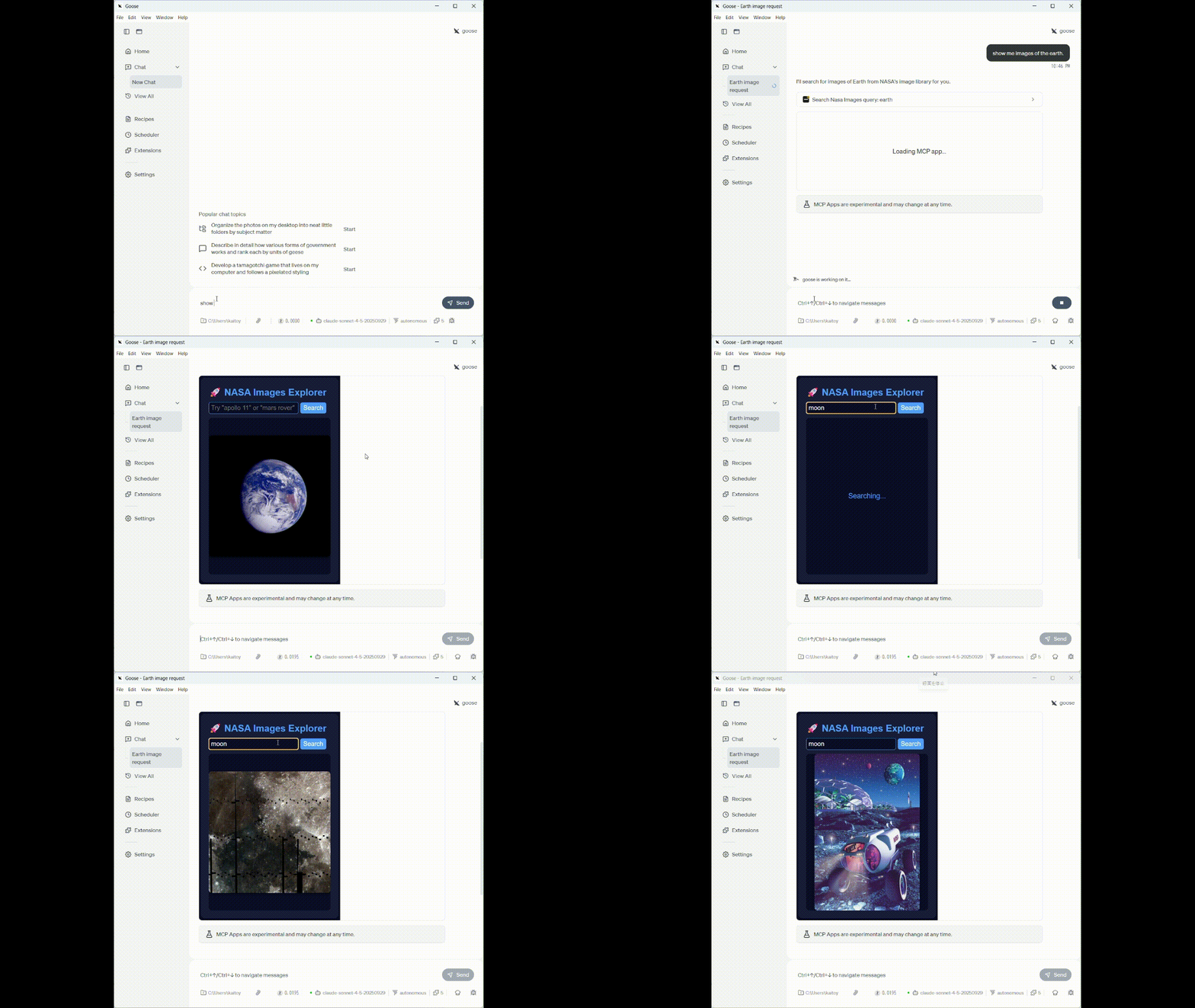
MCP server with UI for NASA images
NASA Images MCP Server
A project to search NASA's image library using an MCP server and display images in an interactive UI.
🌟 Features:
- Dual Transport Support: Supports both stdio and Streamable HTTP transport
- Image Search: Search by keywords using NASA's Images API
- Interactive UI: Beautiful image viewer using MCP Apps Pattern
- Image Navigation: Display search results sequentially
- Session Management: Stateful session management
Requirements
- Node.js 18 or higher
- npm or yarn
- NASA API Key (get free at nasa.gov/api)
Installation
- Clone the repository:
cd nasa-images-mcp-server
- Install dependencies:
npm install
- Set up environment variables:
cp .env.example .env
Edit the .env file to configure your NASA API key:
NASA_API_KEY=your_api_key_here
PORT=3000
- Build:
npm run build
Getting a NASA API Key
- Visit https://api.nasa.gov/
- Enter your name and email address in the form
- The API key will be sent to your email immediately
- Add it to your
.envfile
Rate Limits:
- DEMO_KEY: 30 requests/hour, 50 requests/day
- Registered key: 1000 requests/hour
Usage
stdio Mode (Recommended for MCP Clients like Claude Desktop)
In stdio mode, the server communicates via stdin/stdout — no HTTP server is started. Logs are written to stderr.
Run with npx (no installation required)
npx @kaitoy/nasa-images-mcp-server --stdio
Run from local build
Pass the --stdio flag to use stdio transport:
node build/index.js --stdio
Claude Desktop Configuration
Using npx (recommended):
{
  "mcpServers": {
    "nasa-images": {
      "command": "npx",
      "args": ["-y", "@kaitoy/nasa-images-mcp-server", "--stdio"],
      "env": {
        "NASA_API_KEY": "your_api_key_here"
      }
    }
  }
}
Using local build:
{
  "mcpServers": {
    "nasa-images": {
      "command": "node",
      "args": ["/path/to/nasa-images-mcp-server/build/index.js", "--stdio"],
      "env": {
        "NASA_API_KEY": "your_api_key_here"
      }
    }
  }
}
HTTP Server Mode
npm start
The server will start at http://localhost:3000.
Start on a Different Port
PORT=3001 npm start
About Transports
stdio Transport
Suitable for local MCP clients (e.g., Claude Desktop) that launch the server as a subprocess.
- Communicates via stdin/stdout
- Single session per process
- No network configuration required
Streamable HTTP Transport
The latest MCP HTTP transport protocol, suitable for remote or multi-client scenarios.
Key Features:
- ✅ Stateful Sessions: Issues a unique session ID for each client
- ✅ SSE Support: Supports push notifications from the server via Server-Sent Events
- ✅ JSON-RPC over HTTP: Communication via standard HTTP request/response
- ✅ Session Management: Automatic session lifecycle management
Integration with MCP Clients
Connecting with MCP Inspector (HTTP mode)
You can test the server using MCP Inspector:
npx @modelcontextprotocol/inspector http://localhost:3000/mcp
Connecting with MCP Inspector (stdio mode)
npx @modelcontextprotocol/inspector node /path/to/nasa-images-mcp-server/build/index.js --stdio
Using with Custom MCP Clients
Steps to connect from a custom client:
- Initialize Request (POST /mcp):
curl -X POST http://localhost:3000/mcp \
  -H "Content-Type: application/json" \
  -H "Accept: application/json, text/event-stream" \
  -d '{
    "jsonrpc": "2.0",
    "id": 1,
    "method": "initialize",
    "params": {
      "protocolVersion": "2024-11-05",
      "capabilities": {},
      "clientInfo": {
        "name": "my-client",
        "version": "1.0.0"
      }
    }
  }'
The response headers will include mcp-session-id.
- Subsequent Requests:
curl -X POST http://localhost:3000/mcp \
  -H "Content-Type: application/json" \
  -H "Accept: application/json, text/event-stream" \
  -H "mcp-session-id: <your-session-id>" \
  -d '{
    "jsonrpc": "2.0",
    "id": 2,
    "method": "tools/list"
  }'
- SSE Stream (GET /mcp):
curl -X GET "http://localhost:3000/mcp" \
  -H "mcp-session-id: <your-session-id>" \
  -H "Accept: text/event-stream"
Endpoints
| Endpoint | Method | Description |
|---|---|---|
/ | GET | Server information and endpoint list |
/health | GET | Health check (includes active session count) |
/mcp | POST | JSON-RPC requests (initialization, tool calls, etc.) |
/mcp | GET | SSE stream (for server notifications) |
/mcp | DELETE | Close session |
Available Tools
1. search_nasa_images
Search NASA's image library.
Parameters:
query(string, required): Search query (e.g., "apollo 11", "mars rover")
Usage Example (JSON-RPC):
{
  "jsonrpc": "2.0",
  "id": 3,
  "method": "tools/call",
  "params": {
    "name": "search_nasa_images",
    "arguments": {
      "query": "apollo 11 moon landing"
    }
  }
}
2. get_next_image
Display the next image from the current search results.
Parameters: None
Usage Example (JSON-RPC):
{
  "jsonrpc": "2.0",
  "id": 4,
  "method": "tools/call",
  "params": {
    "name": "get_next_image",
    "arguments": {}
  }
}
Available Resources
nasa-image://current
Get the URL of the currently displayed image.
MIME Type: text/uri-list
ui://nasa-images/viewer
HTML UI resource for the image viewer.
MIME Type: text/html;profile=mcp-app
Architecture
stdio Mode
┌─────────────────────────────────────────────┐
│     MCP Client (Claude Desktop, etc.)       │
│                   ↕ stdin/stdout            │
└───────────────────┼─────────────────────────┘
                    │
┌───────────────────┼─────────────────────────┐
│  NASA Images MCP Server                     │
│  ┌────────────────┴──────────────────────┐  │
│  │  StdioServerTransport                 │  │
│  └───────────────────────────────────────┘  │
│  ┌───────────────────────────────────────┐  │
│  │  McpServer (MCP Apps Pattern)         │  │
│  │  - registerAppTool(search_nasa...)    │  │
│  │  - registerAppTool(get_next_image)    │  │
│  │  - registerAppResource(viewer UI)     │  │
│  │  - registerResource(image URL)        │  │
│  └───────────────────────────────────────┘  │
│  ┌───────────────────────────────────────┐  │
│  │  Session Manager                      │  │
│  │  - Manage search state per user       │  │
│  └───────────────────────────────────────┘  │
│  ┌───────────────────────────────────────┐  │
│  │  NASA API Client                      │  │
│  │  - Image search                       │  │
│  │  - Image URL retrieval                │  │
│  └───────────────────────────────────────┘  │
└───────────────────┼─────────────────────────┘
                    │ HTTPS
┌───────────────────┼─────────────────────────┐
│         NASA Images API                     │
│  https://images-api.nasa.gov/search         │
└─────────────────────────────────────────────┘
HTTP Mode
┌─────────────────────────────────────────────┐
│     MCP Client (Inspector, Custom App)      │
│                                             │
│  ┌────────────────────────────────────────┐ │
│  │  HTTP Client                           │ │
│  │  - POST /mcp (JSON-RPC requests)       │ │
│  │  - GET /mcp (SSE stream)               │ │
│  └────────────────────────────────────────┘ │
│                   ↕                         │
└───────────────────┼─────────────────────────┘
                    │ HTTP/SSE
┌───────────────────┼─────────────────────────┐
│  NASA Images MCP Server (Express)           │
│  ┌────────────────┴──────────────────────┐  │
│  │  StreamableHTTPServerTransport        │  │
│  │  - Session management                 │  │
│  │  - JSON-RPC over HTTP                 │  │
│  │  - SSE for notifications              │  │
│  └───────────────────────────────────────┘  │
│  ┌───────────────────────────────────────┐  │
│  │  McpServer (MCP Apps Pattern)         │  │
│  │  - registerAppTool(search_nasa...)    │  │
│  │  - registerAppTool(get_next_image)    │  │
│  │  - registerAppResource(viewer UI)     │  │
│  │  - registerResource(image URL)        │  │
│  └───────────────────────────────────────┘  │
│  ┌───────────────────────────────────────┐  │
│  │  Session Manager                      │  │
│  │  - Manage search state per user       │  │
│  └───────────────────────────────────────┘  │
│  ┌───────────────────────────────────────┐  │
│  │  NASA API Client                      │  │
│  │  - Image search                       │  │
│  │  - Image URL retrieval                │  │
│  └───────────────────────────────────────┘  │
└───────────────────┼─────────────────────────┘
                    │ HTTPS
┌───────────────────┼─────────────────────────┐
│         NASA Images API                     │
│  https://images-api.nasa.gov/search         │
└─────────────────────────────────────────────┘
Main Components
- src/index.ts: Express server and transport management
- src/mcp-server.ts: MCP server logic (tool and resource registration)
- src/session-manager.ts: Session management (search state persistence)
- src/nasa-api.ts: NASA API client
- src/types.ts: TypeScript type definitions
Development
Watch Mode
npm run watch
Automatically rebuilds when files change.
Development Mode
npm run dev
Builds and immediately starts the server.
Troubleshooting
Port Already in Use
Error: listen EADDRINUSE: address already in use
Solution: Specify a different port:
PORT=3001 npm start
"Cannot find module" Error
Run:
npm run build
to compile TypeScript.
API Rate Limit Error
- If using
DEMO_KEY, obtain your own API key from api.nasa.gov - Limited to 30 requests per hour
"Not Acceptable" Error
The client must accept both MIME types:
application/jsontext/event-stream
curl -H "Accept: application/json, text/event-stream" ...
Session Not Found
Save the mcp-session-id header returned after the initialization request and send it as the mcp-session-id header in subsequent requests.
Security Notes
- This server has CORS enabled (for development)
- In production, implement proper CORS settings and rate limiting
- Manage NASA API keys via environment variables; do not hardcode them
License
MIT
References
- Model Context Protocol Specification
- MCP TypeScript SDK
- MCP Apps Extension
- Streamable HTTP Transport
- NASA Images API
- NASA Open APIs
Contributing
Pull requests are welcome! Bug reports and feature requests are accepted via Issues.
Support
If you encounter issues, please create an Issue or refer to the NASA API support page.
Installation
Source-derived launch command. Check the maintainer’s required arguments and credentials before running:
npx -y @kaitoy/nasa-images-mcp-serverSet up in your AI client
Merge this template into ~/Library/Application Support/Claude/claude_desktop_config.json. Keep existing servers. Add any arguments, credentials, and permissions required by the maintainer; this template has not been install-tested.
{
  "mcpServers": {
    "io-github-kaitoy-nasa-images": {
      "command": "npx",
      "args": [
        "-y",
        "@kaitoy/nasa-images-mcp-server"
      ]
    }
  }
}
Restart Claude Desktop completely for changes to take effect. Confirm the server appears connected in the client’s tool list, then try a read-only example from its documentation.
Claude Desktop setup referencePackage
@kaitoy/nasa-images-mcp-servernpmCompatible MCP Clients
io.github.kaitoy/nasa-images works with any MCP-compatible client. Copy the config snippet from the Configuration section above and add it to the file shown for your client, then restart the application.
- Claude Desktop
~/Library/Application Support/Claude/claude_desktop_config.jsonRestart Claude Desktop completely for changes to take effect. - Cursor
~/.cursor/mcp.jsonRestart Cursor for changes to take effect. - VS Code
.vscode/mcp.jsonReload VS Code window for changes to take effect. - Windsurf
~/.codeium/windsurf/mcp_config.jsonRestart Windsurf for changes to take effect. - Claude Code
.mcp.jsonSave at the project root, then start Claude Code in that project and review the MCP server approval prompt. Keep real credentials out of shared files.