TokenKnows
Distill AI coding sessions into weekly reports, ADRs and a knowledge graph - self-hosted
What is TokenKnows?
You spend hours pair-programming with Claude Code, Codex, and Cursor. The decisions, bug hunts, and design trade-offs from those sessions evaporate the moment the terminal closes. TokenKnows captures them automatically and distills them into structured, evidence-linked knowledge assets:
capture (6 collectors) → distill (5-stage LLM pipeline) → assets (7 document types) → review / redact / publish
- 📡 Captures everything — Claude Code, Codex, Cursor, VS Code, GitHub PRs/commits/issues, and local docs, all via local file watchers and API polling. No webhooks, no tunnels.
- 📝 Seven asset types — weekly reports, tech designs, ADRs, incident reviews, long-form books, reusable agent skills (SKILL.md), and an entity knowledge graph.
- 🔗 Evidence-linked — every paragraph traces back to the original PR / conversation / commit, ranked by
cosine × trust × recencyacross ≥2 sources. - 🔒 Local-first, zero egress by default — a three-layer LLM egress gate (instance ∧ project ∧ task) with full audit logging. Pair it with Ollama and run the whole pipeline with zero cloud keys.
Demo
| Workbench | Document page |
|---|---|
 |  |
| Evidence drawer | Publish receipt + version diff |
 |  |
▶ Full walkthrough: engineering_handoff/walkthrough.mp4 (5 min, Chinese narration + subtitles)
All 12 screens
| 1 Workbench | 2 Event drawer | 3 Document list | 4 Document page |
|---|---|---|---|
|  |  | |
| 5 Evidence drawer | 6 Regenerate dialog | 7 Review | 8 Redaction |
|  |  |  |
| 9 Publish dialog | 10 Publish receipt + diff | 11 LLM egress | 12 Admin |
 | |  |  |
Install the plugin
Prerequisite: the TokenKnows backend at http://localhost:8001 and the web UI at http://localhost:5173 (see Quick start), plus uv (the plugin pulls the MCP server from PyPI via uvx). All plugin env vars have working local defaults — export TOKENKNOWS_API_BASE / TOKENKNOWS_API_TOKEN / TOKENKNOWS_DEFAULT_PROJECT / TOKENKNOWS_WEB_BASE only for non-default setups. Register/login in the web UI and create an API token under Project Settings → MCP 接入 when your backend requires auth.
| Platform | How |
|---|---|
| Claude Code | /plugin marketplace add johnnywuj81/tokenknows → /plugin install tokenknows@tokenknows — full walkthrough in tokenknows-plugin/README.md (5-minute quickstart) |
| Codex | codex plugin marketplace add johnnywuj81/tokenknows → codex plugin add tokenknows@tokenknows (loads skills, commands and the MCP server; local-clone alternative in codex-plugin/README.md) |
| Cursor | Add the tokenknows MCP block to ~/.cursor/mcp.json (uvx config example in code/tokenknows-mcp/README.md) |
| VS Code | Download the .vsix from Releases → code --install-extension tokenknows-vscode-*.vsix |
The plugin gives your AI tool MCP tools (submit_session_events, distill_document, list_assets, get_asset, get_asset_chapters, search_entity) plus slash commands like /tokenknows:weekly and /tokenknows:adr.
Quick start
# 1. (Optional but recommended) Ollama — fully local inference, zero cloud keys
ollama serve &
ollama pull minimax-m2:cloud          # or gpt-oss:20b, qwen2.5, ...

# 2. Backend (FastAPI + SQLite persistence + 3-layer LLM egress gate)
cd code/tokenknows-api
python3 -m venv .venv && .venv/bin/pip install -e ".[dev]"
cp .env.local.example .env.local      # defaults to Ollama; edit to add cloud providers
.venv/bin/uvicorn app.main:app --host 127.0.0.1 --port 8001

# 3. Frontend (React 19 + Vite)
cd code/tokenknows-web
npm install
npm run dev
# open http://localhost:5173 — talks to the real backend (mocks are opt-in via ?msw=1)

# (Optional) seed demo data
./engineering_handoff/demo-seed.sh
Platform support: macOS — full experience (collectors auto-start via launchd). Linux — backend, frontend, and collectors all run manually (python3 plugins/<x>/sync.py --watch); the launchd scripts don't apply. Windows — untested; WSL2 recommended.
Data collectors
All local — no ngrok, no public webhooks. On macOS they restart on crash and on reboot (launchd).
| Collector | Source | Mode |
|---|---|---|
| claude-code | ~/.claude/projects/*.jsonl | 30s polling, incremental offsets |
| codex | ~/.codex/sessions/**/rollout-*.jsonl | 30s polling, incremental offsets |
| cursor | Cursor's state.vscdb (read-only SQLite) | 60s polling |
| github | GitHub REST API · PRs / issues / commits | 5min polling (gh auth token) |
| vscode | VS Code extension onDidSaveTextDocument | buffered, 10s flush |
| local-docs | ~/Documents .md .txt .pdf (watchdog) | realtime, 2s debounce |
./scripts/launchd/install.sh          # macOS: install all 5 Python collectors as LaunchAgents
launchctl list | grep com.tokenknows
tail -f ~/Library/Logs/tokenknows/*.log
Every event carries a trust score (0.6 × source_authority + 0.4 × extraction_confidence); the evidence stage ranks citations by 0.6 × cosine + 0.25 × trust + 0.15 × recency and enforces ≥2 distinct sources.
Architecture
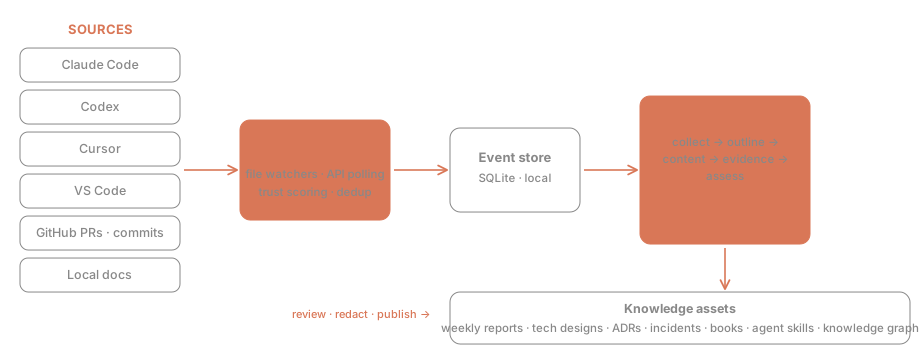
Collectors feed an event store (SQLite). A five-stage pipeline (collect → outline → content → evidence → assess) turns events into assets. The LLM Gateway unifies four providers (Anthropic / OpenAI / MiniMax / Ollama) with per-task routing and fallback chains — and refuses any cloud call unless all three egress switches are on.
CI
| Workflow | Runner | Trigger |
|---|---|---|
ci.yml | ubuntu-latest (GitHub-hosted) | push to main + every PR |
ci-macos.yml | self-hosted macOS ARM64 | maintainer pushes to main only — never runs external PR code |
Privacy & local-first
- Zero egress by default — cloud LLM calls require the instance and project and task switches all on
- Bring your own keys; the audit log never leaves your machine
- One-click kill switch drops the instance into fully-offline mode
Details: PRD §6.7 data residency & egress control (Chinese).
Documentation
| Topic | Doc |
|---|---|
| Product requirements, user journeys | PRD (zh) |
| Technical design, API, schema | TDD (zh) |
| Macro architecture & milestones | Architecture (zh) |
| Per-screen engineering decisions | TaskTechDesign (zh) |
| Pixel-level UI mockups | mockups/ — open in a browser |
Most in-depth docs are in Chinese (the project's working language). Code comments are predominantly Chinese too; issues and PRs in English or Chinese are both welcome.
Community
CONTRIBUTING · Roadmap · Code of Conduct · Security policy · Issues
License
MIT © 2026 johnnywuj81
Installation
Source-derived launch command. Check the maintainer’s required arguments and credentials before running:
uvx tokenknows-mcpSet up in your AI client
Merge this template into ~/Library/Application Support/Claude/claude_desktop_config.json. Keep existing servers. Add any arguments, credentials, and permissions required by the maintainer; this template has not been install-tested.
{
  "mcpServers": {
    "io-github-johnnywuj81-tokenknows": {
      "command": "uvx",
      "args": [
        "tokenknows-mcp"
      ]
    }
  }
}
Restart Claude Desktop completely for changes to take effect. Confirm the server appears connected in the client’s tool list, then try a read-only example from its documentation.
Claude Desktop setup referencePackage
tokenknows-mcppypiCompatible MCP Clients
TokenKnows works with any MCP-compatible client. Copy the config snippet from the Configuration section above and add it to the file shown for your client, then restart the application.
- Claude Desktop
~/Library/Application Support/Claude/claude_desktop_config.jsonRestart Claude Desktop completely for changes to take effect. - Cursor
~/.cursor/mcp.jsonRestart Cursor for changes to take effect. - VS Code
.vscode/mcp.jsonReload VS Code window for changes to take effect. - Windsurf
~/.codeium/windsurf/mcp_config.jsonRestart Windsurf for changes to take effect. - Claude Code
.mcp.jsonSave at the project root, then start Claude Code in that project and review the MCP server approval prompt. Keep real credentials out of shared files.