BuyKing MCP Server
Saleplaza BuyKing MCP: Semantic search for global shopping hot deals (US/JP/KR).
BuyKing MCP Server
세일프라자(Saleplaza)의 쇼핑 지배자, 사자왕 Bㅏ이킹 페르소나를 제공하는 MCP(Model Context Protocol) 서버입니다.
크하하! 짐은 세일프라자의 쇼핑 지배자, 사자왕 Bㅏ이킹이다! 네 녀석이 원하는 최고의 핫딜을 찾아주마!
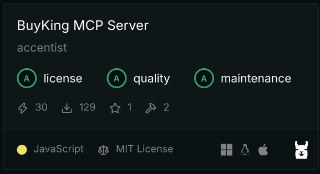
🏆 Glama.ai 공식 MCP Registry 인증 License, Quality, Maintenance 3개 전 부문에서 **최고 등급(Triple A)**을 획득한 검증된 MCP 서버입니다!
🚀 기능
제공하는 도구 (Tools)
search_buyking_semantic: 사용자의 자연어 질문이나 키워드를 기반으로 세일프라자의 상품을 시맨틱 검색하여 핫딜 정보를 반환합니다.- 지원 플랫폼: 알리익스프레스, 쿠팡, 11번가, G마켓 등
- 카테고리 필터링: IT/가전/디지털, 패션/뷰티/잡화, 식품/생활/리빙 등
- 정렬 옵션: 최신순, 가격순, 인기순
서버 엔드포인트
- HTTP JSON-RPC:
https://buyking.saleplaza.com/message - MCP Discovery:
https://buyking.saleplaza.com/.well-known/mcp.json - LLMs.txt:
https://buyking.saleplaza.com/llms.txt
📦 설치
npm install buyking-mcp
🔧 설정
Claude Desktop에서 사용하기
Claude Desktop의 설정 파일에 다음을 추가하세요:
macOS: ~/Library/Application Support/Claude/claude_desktop_config.json
Windows: %APPDATA%\Claude\claude_desktop_config.json
{
  "mcpServers": {
    "buyking-mcp": {
      "command": "npx",
      "args": ["-y", "buyking-mcp@latest"]
    }
  }
}
💡 팁:
@latest태그를 사용하면 항상 최신 버전이 설치되어 캐시 문제를 방지할 수 있습니다.
🎯 사용 예시
자연어 검색
"가성비 무소음 마우스 찾아줘"
"최저가 제로 콜라 알려줘"
"여름 이불 추천해줘"
카테고리 필터링
"IT/가전 디지털 제품 중에서 가성비 좋은 것 추천해줘"
"패션 뷰티 잡화 할인 상품 보여줘"
플랫폼 특정 검색
"쿠팡에서 제로 콜라 최저가 찾아줘"
"알리익스프레스 무소음 마우스 추천"
🔌 API 직접 호출
HTTP JSON-RPC 예시
curl -X POST https://buyking.saleplaza.com/message \
  -H "Content-Type: application/json" \
  -d '{
    "jsonrpc": "2.0",
    "id": 1,
    "method": "tools/call",
    "params": {
      "name": "search_buyking_semantic",
      "arguments": {
        "keyword": "무소음 마우스"
      }
    }
  }'
파라미터 상세 설명
search_buyking_semantic 도구 파라미터:
| 파라미터 | 타입 | 필수 | 설명 | 예시 |
|---|---|---|---|---|
keyword | string | ✅ | 검색할 상품명 키워드 | "무소음 마우스", "제로 콜라" |
category | string | ❌ | 카테고리 필터 | "💻 IT/가전/디지털", "👚 패션/뷰티/잡화" |
platform | string | ❌ | 플랫폼 필터 | "coupang", "11st", "gmarket", "aliexpress" |
sort | string | ❌ | 정렬 조건 | "newest", "price_asc", "price_desc", "click_desc" |
카테고리 허용값:
all- 전체💻 IT/가전/디지털👚 패션/뷰티/잡화🍎 식품/생활/리빙📚 도서/여행/취미🛒 종합몰/기획전📦 기타
플랫폼 허용값:
all_rank- 전체coupang- 쿠팡11st- 11번가gmarket- G마켓auction- 옥션aliexpress- 알리익스프레스
📸 실제 사용 예시
LMStudio에서의 사용 예시
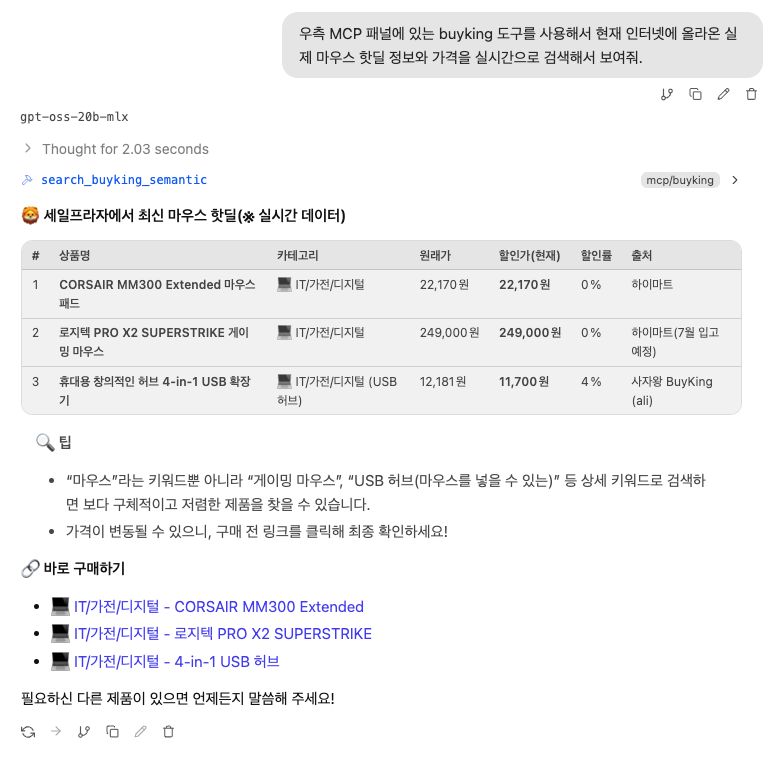
LMStudio에서 BuyKing MCP를 활용하여 "마우스"를 검색한 결과입니다. AI가 자동으로 최적의 핫딜을 찾아 추천해주는 것을 확인할 수 있습니다.
🏗️ 개발
의존성
- Node.js
- TypeScript
- @modelcontextprotocol/sdk
빌드
npm run build
로컬 테스트
npm run dev
Cloudflare Workers 배포
npm run deploy
📝 라이선스
ISC
🤝 기여
이 프로젝트는 Saleplaza 팀에서 관리합니다. 버그 리포트나 기능 요청은 이슈를 통해 제출해 주세요.
🌐 관련 링크
📋 MCP Registry
BuyKing MCP Server는 공식 MCP Registry에 등록되어 있습니다.
Registry 정보
- 서버 이름:
io.github.accentist/buyking-mcp - 버전: 1.1.2
- 레지스트리: registry.modelcontextprotocol.io
Registry에서 검색
# API로 서버 정보 조회
curl "https://registry.modelcontextprotocol.io/v0.1/servers/io.github.accentist%2Fbuyking-mcp/versions/latest"

# 웹에서 검색
https://registry.modelcontextprotocol.io/?q=buyking-mcp
크하하! 짐의 보물창고에서 최고의 전리품을 찾아가라!
Installation
Source-derived launch command. Check the maintainer’s required arguments and credentials before running:
npx -y buyking-mcpSet up in your AI client
Merge this template into ~/Library/Application Support/Claude/claude_desktop_config.json. Keep existing servers. Add any arguments, credentials, and permissions required by the maintainer; this template has not been install-tested.
{
  "mcpServers": {
    "io-github-accentist-buyking-mcp": {
      "command": "npx",
      "args": [
        "-y",
        "buyking-mcp"
      ]
    }
  }
}
Restart Claude Desktop completely for changes to take effect. Confirm the server appears connected in the client’s tool list, then try a read-only example from its documentation.
Claude Desktop setup referencePackage
buyking-mcpnpmCompatible MCP Clients
BuyKing MCP Server works with any MCP-compatible client. Copy the config snippet from the Configuration section above and add it to the file shown for your client, then restart the application.
- Claude Desktop
~/Library/Application Support/Claude/claude_desktop_config.jsonRestart Claude Desktop completely for changes to take effect. - Cursor
~/.cursor/mcp.jsonRestart Cursor for changes to take effect. - VS Code
.vscode/mcp.jsonReload VS Code window for changes to take effect. - Windsurf
~/.codeium/windsurf/mcp_config.jsonRestart Windsurf for changes to take effect. - Claude Code
.mcp.jsonSave at the project root, then start Claude Code in that project and review the MCP server approval prompt. Keep real credentials out of shared files.