SvGrid
Checks AI-written SvGrid code against the real API, plus version-pinned Svelte 5 grid docs.
SvGrid




The Svelte 5 native data grid. Headless-first. Render-ready.
SvGrid is a Svelte 5 data grid and data table built from the first line for runes, not a React grid
wrapped in a Svelte shim. It does virtual scrolling over 100k+ rows, Excel-style filtering, inline
editing, row grouping, tree data, pivot, and server-side data, and it ships both a headless engine you
compose yourself and a drop-in <SvGrid /> component. Open source under MIT, TypeScript-first, and
usable in SvelteKit with SSR.
Quick links: Website · Docs · 378 Demos · Pricing · Roadmap · Blog · Releases · npm
Writing SvGrid with an AI assistant? It ships an MCP server that carries the real API surface and checks your agent's code against it before you see it. Details below.
Install
Scaffold a working Vite + Svelte 5 app with SvGrid wired up in one command:
npm create @svgrid@latest
Or add it to an existing app:
npm install @svgrid/grid
In a project that already uses the Svelte CLI, the add-on wires it up and can drop in a working demo grid:
npx sv add @svgrid
The 30-second example
<script lang="ts">
  import { SvGrid, type GridColumns } from '@svgrid/grid'

  type Row = { firstName: string; age: number; status: string }

  const data = $state<Row[]>([
    { firstName: 'Ada',   age: 36, status: 'active' },
    { firstName: 'Linus', age: 54, status: 'active' },
    { firstName: 'Grace', age: 85, status: 'inactive' },
  ])

  const columns: GridColumns<Row> = [
    { field: 'firstName', header: 'First name' },
    { field: 'age',       header: 'Age' },
    { field: 'status',    header: 'Status' },
  ]
</script>

<SvGrid {data} {columns} sortable filterable editable />
That is a real, working, accessible table. Sorting, filtering, virtualization, cell selection, and inline editing all wire up the moment you turn on the matching prop.
See it running
Every demo below opens in the browser, and each one has an Edit in StackBlitz button that turns it into a live, editable Vite + Svelte 5 project. Nothing to install to try any of this.
 | 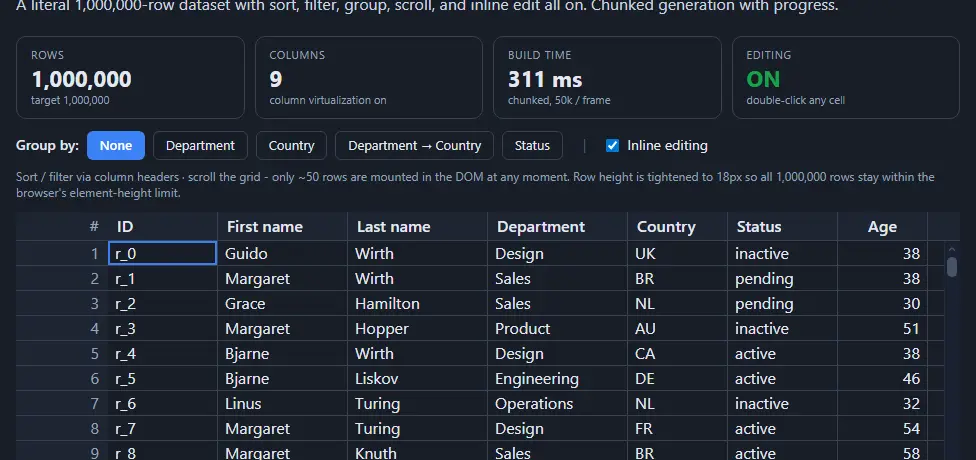 | 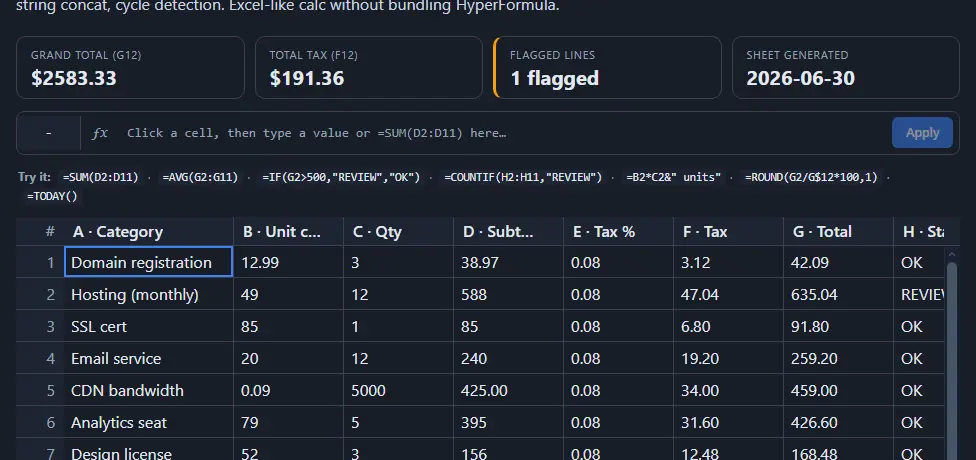 |
| Trading desk 10,000 securities on a 500 ms feed | 1 million rows sort, filter, group and edit, all on | Spreadsheet + formulas formula cells in a real grid |
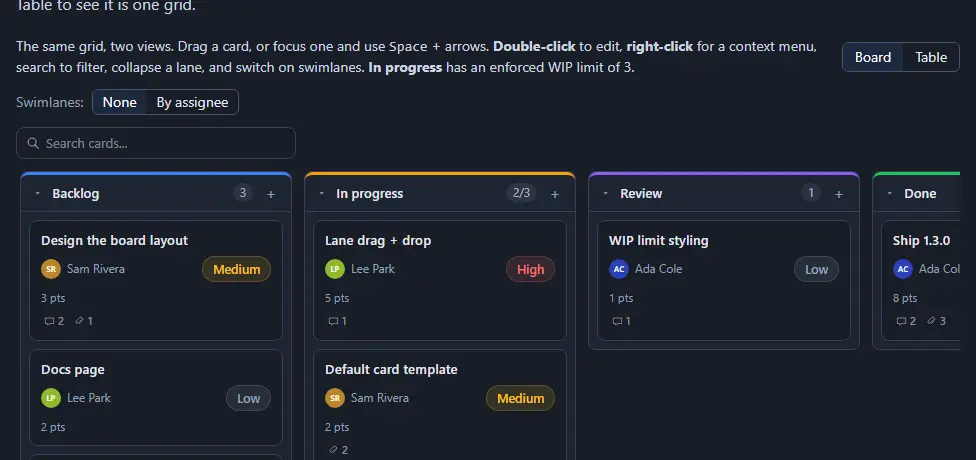 | 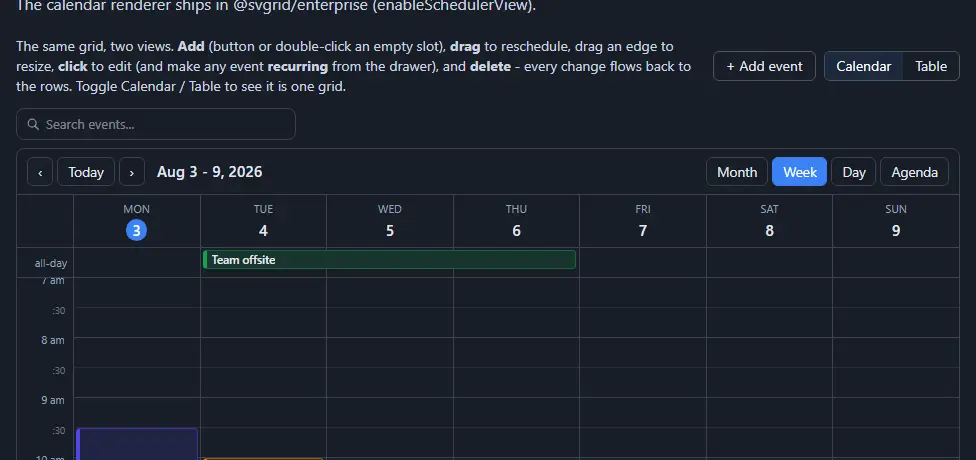 | 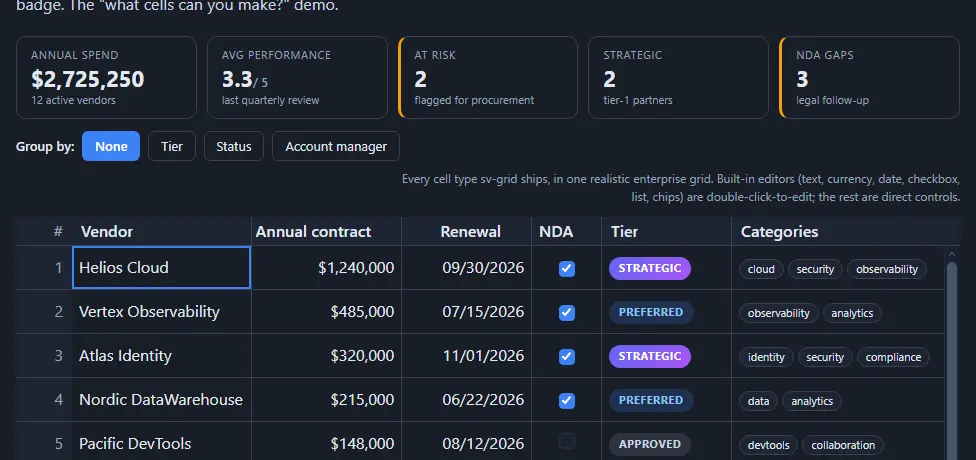 |
| Kanban board the same grid, board mode | Scheduler calendar views off the same data | Cell types every editor in one grid |
All 378 demos are browsable by category.
Shipped with it
"We were looking for an Excel-like library using SvelteKit. Then I explored your library a lot, mostly everything about SvGrid: cell selection, grabbing cells, updating values in cells. So we used it for an accounting application. It was so easy to integrate. We even built our custom theme, by updating the svgrid.css file which includes all the classes. We found no issues yet, everything just worked for us."
Sikandar Bhide - built an accounting app on SvelteKit
Quick facts
| Package | @svgrid/grid |
| License | MIT, free for commercial use |
| Requires | svelte@^5 (peer dependency), Node 16+ |
| Bundle (gzip) | ~2.5 KB headless core, ~83 KB full <SvGrid> + ~9.5 KB CSS |
| Types | Bundled, no @types/ package needed |
| SSR | Server-renders header + a viewport window of rows; verified in CI by pnpm ssr:check |
| Demos | 375 at svgrid.com/demos |
| AI grounding | MCP server, llms.txt, Agent Skill |
Re-derive the numbers yourself: pnpm size and pnpm demos:count.
What's in the box
- Virtual scrolling. Row + column windowing; 100k x 100 stays smooth, and there's a 1M-row demo.
- Filtering. Excel-style filter menu, inline filter row, locale-aware text matching, set / value-list filter, between operator on numbers and dates.
- Editing. 15 built-in
editorTypes (text, number, date, datetime, time, select, rich-select with typeahead, autocomplete, textarea, color, checkbox, list, chips, rating, password), plusdate-native/datetime-native/time-nativeto opt out of the rich pickers.registerBuiltinEditors()addsotp,durationandrichtext;<SvRichCell>paints sanitized HTML / Markdown in a cell; and acellEditorsnippet slot takes anything else. - Selection. Cell-range click+drag and Shift+arrows, copy/paste as TSV, Excel-style fill handle, drag a selected range by its border to move it (
moveCells), edge auto-scroll while dragging, row selection. - Views. Row grouping with aggregation, tree data, master/detail, full-width detail rows, spreadsheet mode with formulas, plus Kanban board and scheduler/calendar views.
- Layout. Row + column pinning, sticky header + first column, header drag-to-reorder, opt-in drag handles for row and column sizing (
rowResize/columnResize, each loaded only when enabled), keyboard-accessible column sizing, responsive mode for mobile. - Operations. Find in grid (Ctrl+F), undo / redo (Ctrl+Z), transaction API, optimistic updates, server-side row model with sort / filter / group pushdown.
- AI helpers, free. Natural-language filter, smart fill, summarize, classify, anomaly detection, and "chart this". Model-agnostic: you register one provider, nothing is bundled.
- UI components. A Svelte 5 component suite ships in the same package (inputs, selection, date/time, overlays, layout, feedback), usable standalone or as grid cell editors.
- Accessibility and i18n. WAI-ARIA grid roles, full keyboard navigation, RTL, high-contrast theme, and every string in the grid chrome overridable through
localeText. - Production concerns. TypeScript types, CSP / Trusted-Types safe rendering, SSR-friendly, themeable via
--sg-*CSS custom properties.
The MIT community core has zero feature gating: no license key, no watermark, no row-count cap.
Which package do I need?
| You want to | Install | License |
|---|---|---|
| A data grid in a Svelte 5 / SvelteKit app | @svgrid/grid | MIT |
| Excel / PDF export, import, pivot tables, print, advanced filter builder, no-code alert rules, selection action bar, record detail + bulk edit, Kanban + scheduler renderers | + @svgrid/enterprise | Commercial |
| The grid in React, Vue, Angular, or plain HTML | @svgrid/grid-wc | MIT |
| To copy one UI component into your app, shadcn-style | npx @svgrid/ui add <name> | MIT |
| Accurate SvGrid answers from Claude / Cursor / Zed | @svgrid/mcp | MIT |
| A generated CRUD app from your database schema | @svgrid/studio | Commercial |
To port an existing svelte-headless-table app | npx @svgrid/migrate | MIT |
| To add the grid via the Svelte CLI | npx sv add @svgrid | MIT |
OSS projects under an OSI-approved license get the Enterprise pack free. See Pricing.
Coming from another grid?
| SvGrid | AG Grid Community | TanStack Table | |
|---|---|---|---|
| Svelte 5 runes native | Yes | No, JS core + wrapper | Adapter only |
| Ships a renderer | Yes, plus headless | Yes | No, headless only |
| Bundle (gzip) | ~2.5 KB headless / ~83 KB full | ~340 KB | ~12-14 KB |
| Virtualization built in | Yes | Yes | Bring your own |
| Master/detail, tree, range selection | Free | Enterprise only | Build it yourself |
| License | MIT core, commercial pack | MIT core, commercial pack | MIT |
Multi-framework teams are better served by AG Grid or TanStack Table; SvGrid is deliberately Svelte-first. Full detail and migration guides: SvGrid vs AG Grid vs TanStack Table · Migrating from AG Grid · Migrating from Handsontable
Using SvelteKit? SvGrid with SvelteKit covers server loads, URL-driven sorting, form actions and what actually server-renders.
AI-native
SvGrid is built to be written by AI as well as used with it. Three grounding surfaces ship with the project so assistants cite real props, methods, and events instead of inventing them.
MCP server for Claude Desktop, Cursor, and Zed:
{
  "mcpServers": {
    "svgrid": {
      "command": "npx",
      "args": ["-y", "@svgrid/mcp"]
    }
  }
}
Claude Code users get both in one plugin - the house-style skill plus the
server whose svgrid_check_code tool verifies each file against the real API
surface before you see it:
/plugin marketplace add sv-grid/sv-grid
/plugin install svgrid@svgrid
Or wire them up separately, with no install at all on the server side:
claude mcp add --transport http svgrid https://mcp.svgrid.com/mcp
npx skills add sv-grid/sv-grid    # always-on house-style rules
Retrieval files for RAG and custom agents: llms.txt (index) and llms-full.txt (every doc page concatenated). See Use sv-grid docs as LLM context.
Frequently asked questions
Does SvGrid work with SvelteKit and SSR?
Yes. The server HTML contains the header and a viewport-sized window of rows with their real cell values, so crawlers and no-JS clients see the content; the rest of the rows arrive once the client measures the viewport. Verified in CI against a real server build (pnpm ssr:check). It works under SvelteKit SSR and
static builds. See going to production.
Is SvGrid free for commercial use?
Yes. @svgrid/grid is MIT, with no license key, no watermark, and no row-count cap. Only the optional
@svgrid/enterprise pack (export, import, pivot, print) is paid.
Does it support Svelte 4?
No. SvGrid is Svelte 5 only by design. It uses runes and snippets rather than Svelte 4 stores, which is what lets it skip the abstraction layer a cross-version grid would need.
How many rows can it handle?
100k rows x 100 columns scroll smoothly on the client thanks to row and column virtualization, and only the visible window is ever in the DOM. Past that, use the server-side row model, which pushes sorting, filtering, and grouping to your backend.
How big is the bundle?
About 2.5 KB gzipped for the headless core and about 83 KB for the full <SvGrid> render component, plus
9.5 KB of CSS, with Svelte excluded as a peer dependency. Charts, date/time editors, menus, and export add
another ~94 KB, and each of those chunks is fetched only once the feature that needs it is actually
used - rowResize and columnResize default to off and never request their module, and a grid that
never opens a menu never loads one. Run pnpm size to re-measure.
Do I need Tailwind?
No. The render component ships its own scoped styles and re-themes through --sg-* CSS custom
properties. Tailwind is supported if you use it; see the
Tailwind guide.
Can I use it from React, Vue, or Angular?
Yes, through @svgrid/grid-wc, which wraps the grid as
a <sv-grid> custom element with no build step required.
Is it accessible?
It implements the WAI-ARIA 1.2 grid pattern with full keyboard navigation, a screen-reader announcement layer, RTL support, and a high-contrast theme. See accessibility for exactly where the responsibility line sits.
How do I get AI assistants to write correct SvGrid code?
Point them at the MCP server, or feed them llms.txt. Both are covered in the
AI-native section above.
Who's behind it
SvGrid is built by jQWidgets, the team behind jqwidgets.com and htmlelements.com. We've been shipping UI components since 2011 to 5,000+ companies including Samsung, Boeing, NVIDIA, Microsoft, Nokia, and Intel. SvGrid is our Svelte 5 native effort.
Support
SvGrid is open core: the MIT @svgrid/grid is free for any use, and the project is funded by Enterprise
licenses, not donations.
- Found a bug or have a question? Open an issue.
- Want to contribute? See CONTRIBUTING.md.
- Security issue? See SECURITY.md.
- Need commercial or priority support? It is included with Enterprise.
What's not built yet
Honest list:
- Custom filter / floating-filter component slot. Filters are configurable but not yet pluggable as your own component. Medium effort.
- Custom tool panels. The tool panel is a fixed Columns + Filters pair. Medium effort.
- Integrated-chart depth is done. 15 chart types including candlestick / OHLC, the in-panel picker reaching every one of them that the current columns can feed, "chart selected range", click-to-cross-filter, the PNG / SVG export toolbar, zoom + brush, combo / dual-axis,
--sg-chart-*palette tokens, and server-side aggregation all ship. What is left is a chart BUILDER: the type gallery with live previews still lives in demo 152 rather than in the panel. Small effort. - Server-side pivot and a viewport row model. The server-side row model does sort / filter / group / infinite today. Large effort.
- A formula language of our own.
createHyperFormulaSheetships in the package so you can bring HyperFormula, and there are in-grid formula demos, but the engine itself is not ours and there is no formula bar. - Custom calendar systems (Hijri, Buddhist, fiscal year) for the date editor. Gregorian dates / times / datetimes are built in.
Full public roadmap with effort tags and a "recently shipped" track record on svgrid.com.
Repository layout
This is a pnpm workspace monorepo:
packages/grid/            @svgrid/grid          - MIT data grid + UI component suite
packages/enterprise/      @svgrid/enterprise    - paid feature pack + Studio codegen
packages/studio/          @svgrid/studio        - Studio CLI + visual designer
packages/mcp/             @svgrid/mcp           - MCP server
packages/grid-wc/         @svgrid/grid-wc       - <sv-grid> web component
packages/svgrid-ui/       @svgrid/ui            - UI component CLI
packages/create-sv-grid/  @svgrid/create        - grid scaffolder
packages/create-studio/   @svgrid/create-studio - Studio app scaffolder
packages/migrate/         @svgrid/migrate       - svelte-headless-table codemod
packages/svgrid-sv/       @svgrid/sv            - Svelte CLI add-on (sv add @svgrid)
examples/                                       - 378 live demos
website/                                        - svgrid.com source
docs/                                           - markdown docs
Requirements
- Node.js >= 18
- pnpm (the workspace pins
pnpm@10.33.2viapackageManager;corepack enablewill pick it up)
Develop
pnpm install            # install workspace deps
pnpm dev                # run the demo gallery at http://localhost:5174
pnpm build              # build packages/grid/dist
pnpm build:example      # build the demo gallery
pnpm --filter svgrid-website dev    # run the website at http://localhost:5180 (private submodule)
pnpm --filter svgrid-website build  # build the website (writes website/dist)
pnpm test               # run the grid test suite
pnpm test:types         # type-check every package
pnpm lint               # encoding + mobile-CSS + API-example checks, then eslint
pnpm size               # re-measure the gzipped bundle
pnpm demos:count        # re-count the live demos
pnpm ssr:check          # verify the SSR output against a real server build
pnpm dev proxies to pnpm --filter @svgrid/grid-example-gallery dev. Inside the example, the library
is linked via the workspace ("@svgrid/grid": "workspace:*"), so edits in packages/grid/src/** are
picked up by Vite HMR with no rebuild.
Library entry points
import {
  SvGrid,
  FlexRender,
  // headless core + row-model factories
  createSvGrid,
  createCoreRowModel,
  createFilteredRowModel,
  createSortedRowModel,
  createGroupedRowModel,
  createExpandedRowModel,
  createPaginatedRowModel,
  // features
  tableFeatures,
  rowSortingFeature,
  columnFilteringFeature,
  columnGroupingFeature,
  rowExpandingFeature,
  rowPaginationFeature,
  rowSelectionFeature,
  // cell renderers
  renderSnippet,
  renderComponent,
} from '@svgrid/grid'
Documentation
- Getting started - end-to-end walkthrough.
- Why headless? - what the headless core gives you and when to reach for it.
- Tailwind integration - re-theming via
--sg-*tokens, dark-mode wiring. - Bundle size - measured numbers and how to reproduce them.
- Help index - topic pages for columns, rows, cells, filtering, editing.
- Missing features - honest gap list.
Website
website/ contains the public marketing + docs site (Vite + Svelte 5). Published to GitHub Pages via
.github/workflows/deploy-website.yml on every push to main. See
website/README.md for routes, base-path config, and the one-time Pages setup.
License
This repository ships under mixed licensing. The grid, the web component, the UI CLI, the MCP server, the migration codemod, the Svelte CLI add-on, and the two scaffolders are open source; the Enterprise pack, Studio, and the website are commercial.
| Package | License | LICENSE file |
|---|---|---|
| packages/grid | MIT | LICENSE |
| packages/grid-wc | MIT | LICENSE |
| packages/svgrid-ui | MIT | LICENSE |
| packages/create-sv-grid | MIT | LICENSE |
| packages/create-studio | MIT | LICENSE |
| packages/migrate | MIT | LICENSE |
| packages/svgrid-sv | MIT | LICENSE |
| packages/enterprise | Commercial | LICENSE |
| packages/mcp | MIT | LICENSE |
| packages/studio | Commercial | LICENSE |
| website | Proprietary | LICENSE |
The MIT packages can be used freely, including for commercial work. The Enterprise feature pack, Studio, and the marketing + docs website are proprietary: source is visible for evaluation and for paying customers, but visibility does not grant a license. See the SvGrid pricing page for Enterprise purchases.
Trademark
SvGrid™ and sv-grid™ are trademarks of jQWidgets Ltd. The licenses above apply to the source code only; they grant no rights to the SvGrid / sv-grid names or logos. You may build on and redistribute the MIT-licensed code, but you may not reuse the project's name or branding in a way that implies endorsement by, or affiliation with, jQWidgets Ltd, nor redistribute it under a confusingly similar name.
If SvGrid saved you some work, a star helps other Svelte developers find it.
Installation
Source-derived launch command. Check the maintainer’s required arguments and credentials before running:
npx -y @svgrid/mcpSet up in your AI client
Merge this template into ~/Library/Application Support/Claude/claude_desktop_config.json. Keep existing servers. Add any arguments, credentials, and permissions required by the maintainer; this template has not been install-tested.
{
  "mcpServers": {
    "com-svgrid-svgrid": {
      "command": "npx",
      "args": [
        "-y",
        "@svgrid/mcp"
      ]
    }
  }
}
Restart Claude Desktop completely for changes to take effect. Confirm the server appears connected in the client’s tool list, then try a read-only example from its documentation.
Claude Desktop setup referencePackage
Compatible MCP Clients
SvGrid works with any MCP-compatible client. Copy the config snippet from the Configuration section above and add it to the file shown for your client, then restart the application.
- Claude Desktop
~/Library/Application Support/Claude/claude_desktop_config.jsonRestart Claude Desktop completely for changes to take effect. - Cursor
~/.cursor/mcp.jsonRestart Cursor for changes to take effect. - VS Code
.vscode/mcp.jsonReload VS Code window for changes to take effect. - Windsurf
~/.codeium/windsurf/mcp_config.jsonRestart Windsurf for changes to take effect. - Claude Code
.mcp.jsonSave at the project root, then start Claude Code in that project and review the MCP server approval prompt. Keep real credentials out of shared files.