IP for AI
Check if your exit IP works for ChatGPT, Claude, Gemini: ASN, proxy/IDC type, risk, AI availability
ipforai 网络检测
面向 AI 访问场景 的网络环境检测:当前出口画像、网络/接入/路由属性、风险信号、环境质量分,以及对 ChatGPT / Claude / Gemini 等服务的可用性参考(可用 / 受限 / 不可用 / 待确认)。
结果只描述网络环境,不代表账号登录、订阅资格或平台风控结论。
一行命令
终端检测
快捷执行(sh 和 bash 均可):
curl -fsSL https://ipforai.cc/sh | sh
curl -fsSL https://ipforai.cc/sh | bash
先审阅再执行(推荐):
curl -fsSL https://ipforai.cc/sh -o /tmp/ipforai-check.sh
less /tmp/ipforai-check.sh
sh /tmp/ipforai-check.sh -y
# 也可以用 bash 执行:bash /tmp/ipforai-check.sh -y
常用参数:
# 跳过确认
curl -fsSL https://ipforai.cc/sh | sh -s -- -y

# 指定 IP(仅画像与环境质量分,不含本机 AI 链路探测)
curl -fsSL https://ipforai.cc/sh | sh -s -- -y 8.8.8.8

# 详细输出
curl -fsSL https://ipforai.cc/sh | sh -s -- -y -d
以上命令中的 sh 均可替换为 bash;两者执行同一份 POSIX 兼容脚本。
权威脚本地址始终是官网
https://ipforai.cc/sh。本仓库中的check.sh为审阅镜像;请以官网版本为准。
完整参数、探测范围和结果解读见命令行检测指南。
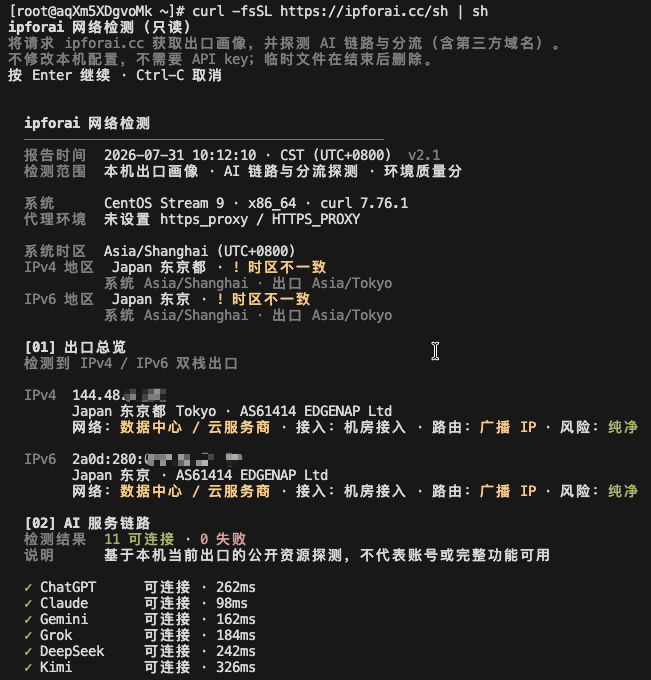
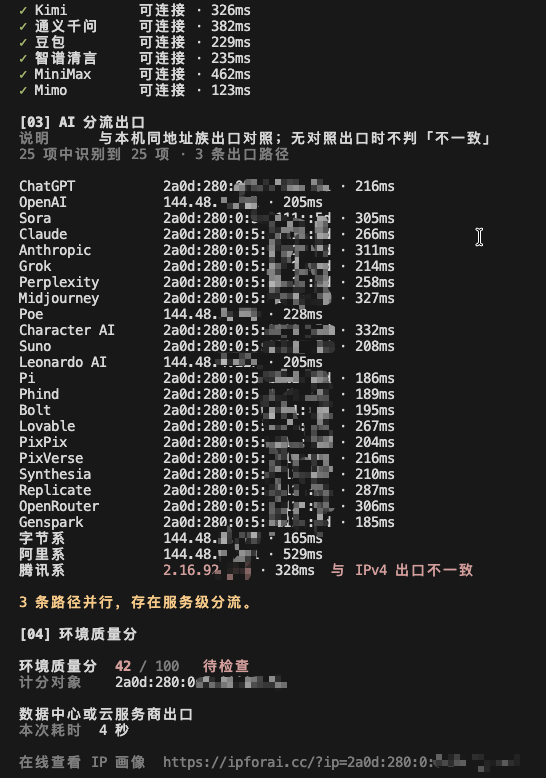
检测效果
以下为脱敏的双栈终端检测示例。IP、时区、耗时和服务结果会随实际网络环境变化。
开发者 JSON(GET)
# GET /json:查看服务端看到的本次请求源 IP
curl -fsSL 'https://ipforai.cc/json'

# GET /json?ip=:服务端查询指定 IPv4 或 IPv6
curl -fsSL 'https://ipforai.cc/json?ip=8.8.8.8'
curl -fsSL 'https://ipforai.cc/json?ip=2001:4860:4860::8888'

# 强制分别查看请求的 IPv4 / IPv6 出口
curl -4 -fsSL 'https://ipforai.cc/json'
curl -6 -fsSL 'https://ipforai.cc/json'

# 使用 GET 参数编码传入 ip
curl --get -fsSL --data-urlencode 'ip=8.8.8.8' 'https://ipforai.cc/json'
ip 是唯一可选查询参数:省略或留空时查询本次请求源 IP;填入地址时只做服务端画像查询,不会从该 IP 发起实时连接,也不会读取调用方本机系统或浏览器数据。非法 IP 返回 HTTP 400。合法 ?ip= 响应带 Cache-Control: public, max-age=600,允许 CDN 缓存;无参响应始终 private, no-store。
字段说明见 docs/api.zh.md(English),示例响应见 examples/sample.json。
README 徽章(GET)
给任意项目 README 挂一张「AI 网络评分」徽章,点击回到官网结果页:
[](https://ipforai.cc/?ip=8.8.8.8)
自托管 SVG(不依赖 Shields.io,任意网页 <img> 可直接嵌入):
[](https://ipforai.cc/?ip=8.8.8.8)
实际效果(8.8.8.8 查询时的快照):

README 徽章必须带 ?ip=:GitHub 的 README 图片由 camo 代理抓取并缓存,不带参数显示的是抓图方的分数,不是读者的。接口细节与颜色档位见 docs/badge.zh.md(English)。
MCP(AI 客户端)
在 Claude、Cursor 等支持 MCP 的客户端里直接问「我现在的 IP 能不能用 Claude」:
claude mcp add ipforai -- npx -y ipforai-mcp
提供 check_my_ip(本机出口)和 lookup_ip(指定 IP)两个工具,支持 HTTPS_PROXY。其他客户端的配置见 mcp/README.md。
能做什么
| 能力 | 说明 |
|---|---|
| 出口画像 | 地理位置、ASN、网络类型、接入形态、路由属性 |
| 风险信号 | 代理相关风险档位、Tor 出口等(有数据时) |
| 环境质量分 | 网络环境参考分,不是 AI 账号分 |
| AI 可用性参考 | 与官网底部一致:可用 / 受限 / 不可用 / 待确认 |
| 终端链路探测 | CLI 在本机出口下探测公开入口与分流(指定 IP 时不跑链路) |
明确不做什么
- 不判断账号是否会被封、能否登录、订阅是否有效
- 不提供「纯净度 / 防封 / 解锁」承诺
- 不把任意 IP 的字符串当成「从该 IP 真实访问 AI」的连通探测(指定 IP 只查画像)
依赖与边界
- CLI:POSIX
sh、curl和系统常用命令;只读检测,不写系统配置、不安装软件、不需要 API Key - 网络请求:CLI 会向 ipforai.cc、IPv4 探测域名及脚本列出的 AI/厂商公开域名发起探测;JSON 只请求官网后端画像接口
- 数据来源:离线库与规则由官网维护,仓库中的
check.sh只是审阅镜像 - 会创建临时目录并在退出时删除
- 一次 TCP 请求只能看到一个源地址族;双栈请
-4/-6各查一次
仓库结构
.
├── README.md / README_EN.md
├── LICENSE
├── check.sh                 # /sh 的审阅镜像,以官网为准
├── docs/api.zh.md / api.md  # /json 说明
├── docs/badge.zh.md / badge.md  # /badge.json、/badge.svg 说明
├── mcp/                     # MCP 服务(npm 包 ipforai-mcp)
└── examples/sample.json     # 示例响应(单次请求仅一侧有值)
更新
- 脚本版本以运行输出中的版本号及响应头
X-IP-for-AI-Check-Version为准(当前镜像:v2.1) - JSON 模式:
X-IP-for-AI-Schema: json-v1;单次/json只填一个地址族,dualStack多为false - 更新镜像:
curl -fsSL https://ipforai.cc/sh -o check.sh
谁在用(Used by)
如果你的项目把 ipforai 接进来了——README 徽章、/json?ip= 接口或 CLI 检测——欢迎开一个 issue 告知,我们会把你列在这里:
暂无。欢迎成为第一个。
集成前请阅读 JSON 接口说明 中的「稳定性承诺」与「跨域(CORS)」:?ip= 对任意来源开放,无参形式不对第三方站点开放跨域。
License
Installation
Source-derived launch command. Check the maintainer’s required arguments and credentials before running:
npx -y ipforai-mcpSet up in your AI client
Merge this template into ~/Library/Application Support/Claude/claude_desktop_config.json. Keep existing servers. Add any arguments, credentials, and permissions required by the maintainer; this template has not been install-tested.
{
  "mcpServers": {
    "cc-ipforai-ipforai": {
      "command": "npx",
      "args": [
        "-y",
        "ipforai-mcp"
      ]
    }
  }
}
Restart Claude Desktop completely for changes to take effect. Confirm the server appears connected in the client’s tool list, then try a read-only example from its documentation.
Claude Desktop setup referencePackage
ipforai-mcpnpmCompatible MCP Clients
IP for AI works with any MCP-compatible client. Copy the config snippet from the Configuration section above and add it to the file shown for your client, then restart the application.
- Claude Desktop
~/Library/Application Support/Claude/claude_desktop_config.jsonRestart Claude Desktop completely for changes to take effect. - Cursor
~/.cursor/mcp.jsonRestart Cursor for changes to take effect. - VS Code
.vscode/mcp.jsonReload VS Code window for changes to take effect. - Windsurf
~/.codeium/windsurf/mcp_config.jsonRestart Windsurf for changes to take effect. - Claude Code
.mcp.jsonSave at the project root, then start Claude Code in that project and review the MCP server approval prompt. Keep real credentials out of shared files.